开发工具
插件
dsh-doctor
asdf17128
Find what your DeepSeek Harness (dsh) patches silently broke — dead patches, config fields dropped by whole-config repla…
agentclicordisdeepseek
PROJECT TOPICS
PROJECT README
English | 中文
Standalone OAuth / subscription-plan LLM plugin for DeepSeek Harness. Install it into your own profile with dsh plugin add — it does not patch the Harness repo.
Official dsh-llm-pi-ai authenticates with API keys only and never runs an OAuth login or refresh. This plugin reuses the same catalog package, @earendil-works/pi-ai, but constructs Models with a durable CredentialStore so subscription tokens refresh on the request path.
Packaging follows the official plugin guides — your first plugin and publish / install:
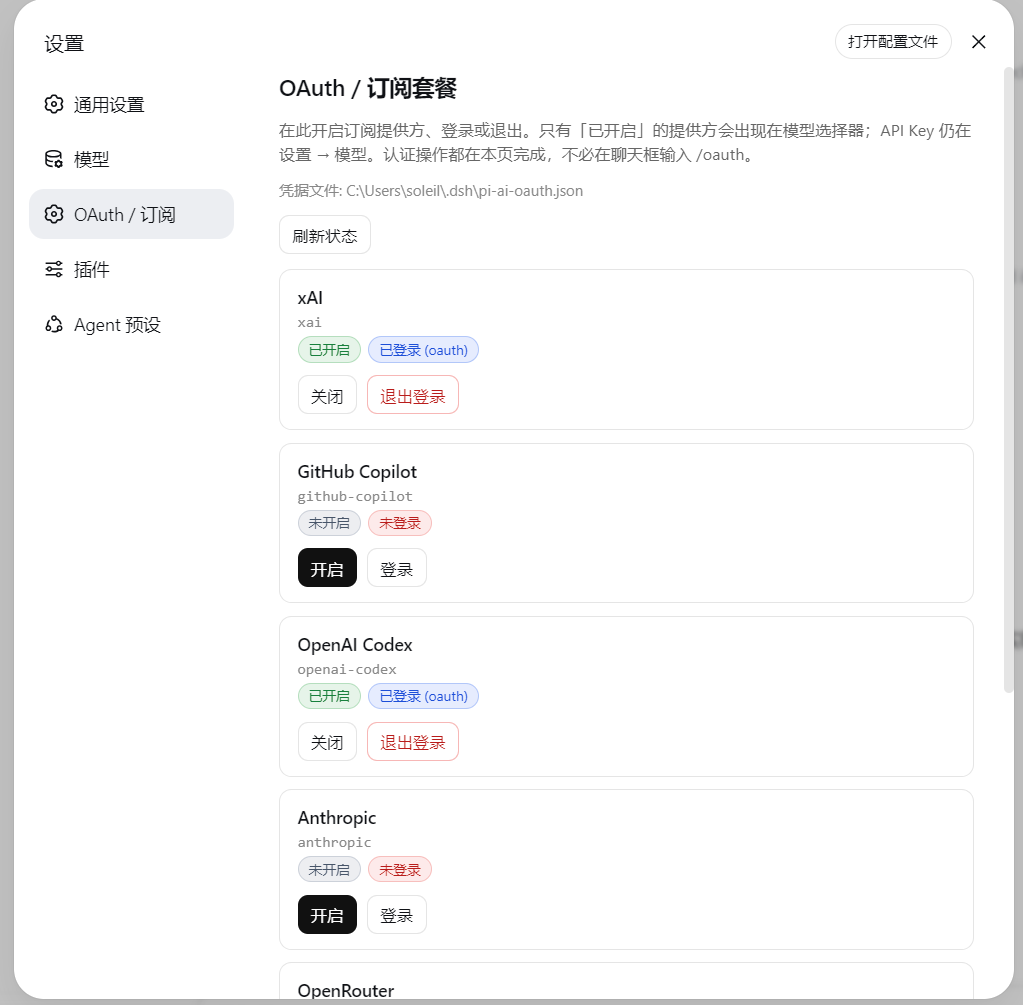
package.json → dsh.bundle.patch plus optional dsh.client (Web Settings face)cordis.patch.yml inserts one plugin rowprepare bundles src/ → lib/ (including lib/client.js) on git installname, inject, Config, apply — no export default| Subscription | Provider id | Notes |
|---|---|---|
| Grok (SuperGrok / X Premium) | xai |
Model ids come from the installed pi-ai catalog. |
| GitHub Copilot | github-copilot |
Optional Enterprise URL defaults to public github.com. |
| ChatGPT / Codex plan | openai-codex |
Not the openai API-key route. Needs device-code authorization enabled in ChatGPT — see below. Account-ban risk. |
| Anthropic subscription | anthropic |
|
| OpenRouter | openrouter |
Large catalog — enable only if you need it. |
| Kimi For Coding | kimi-coding |
Model ids come from the installed @earendil-works/pi-ai catalog, not from this plugin. Bump that dependency and rebuild when you want a newer catalog.
After install the plugin is dormant: the catalog lists the providers above, but providers: {}, so the model picker is not flooded with hundreds of models.
| Concept | Meaning | How |
|---|---|---|
| Enable | Register the LLM route; provider appears in the picker | Settings → OAuth / Subscriptions, /oauth enable xai, or auto on login |
| Sign in | Store tokens in pi-ai-oauth.json |
Settings panel, /oauth login xai, or bin/login.mjs |
| Disable | Remove from picker; keep stored tokens | Settings panel or /oauth disable xai |
Only enabled providers list models. They sit alongside API-key providers under Settings → Models once enabled.
dsh plugin --profile web add github:ziyou979/dsh-llm-oauthFrom a local checkout:
dsh plugin --profile web add ./dsh-llm-oauthConfirm the layer:
dsh --profile web --dump-configA git install may ask you to allow prepare in the profile's pnpm-workspace.yaml (pnpm ≥10 refuses lifecycle scripts otherwise):
allowBuilds:
dsh-llm-oauth: trueThe Web UI adds a settings section (between Models and Plugins) with:
/oauth in chat)Providers that ask “pick a login method” (e.g. openai-codex) auto-select device code on Web (browser login needs a local :1455 callback). If you still see an interactive-prompt error, use bin/login.mjs in a terminal.
After a provider is enabled (and signed in), it also appears under Settings → Models next to API-key routes:
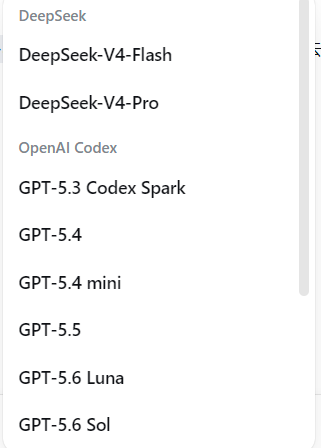
API-key providers stay curated under Settings → Models. OAuth enable + login live on this plugin’s page.
Host HTTP API (same-origin Web):
| Method | Path | Body |
|---|---|---|
GET |
/dsh-llm-oauth/status |
— |
POST |
/dsh-llm-oauth/enable |
{ "provider": "xai" } |
POST |
/dsh-llm-oauth/disable |
{ "provider": "xai" } |
POST |
/dsh-llm-oauth/login |
{ "provider": "xai" } |
POST |
/dsh-llm-oauth/logout |
{ "provider": "xai" } |
openai-codex on Web uses device code, not the localhost :1455 browser callback. ChatGPT hides that flow until you turn it on:
openai-codex, then open the authorization URL and enter the code shown on the Settings page.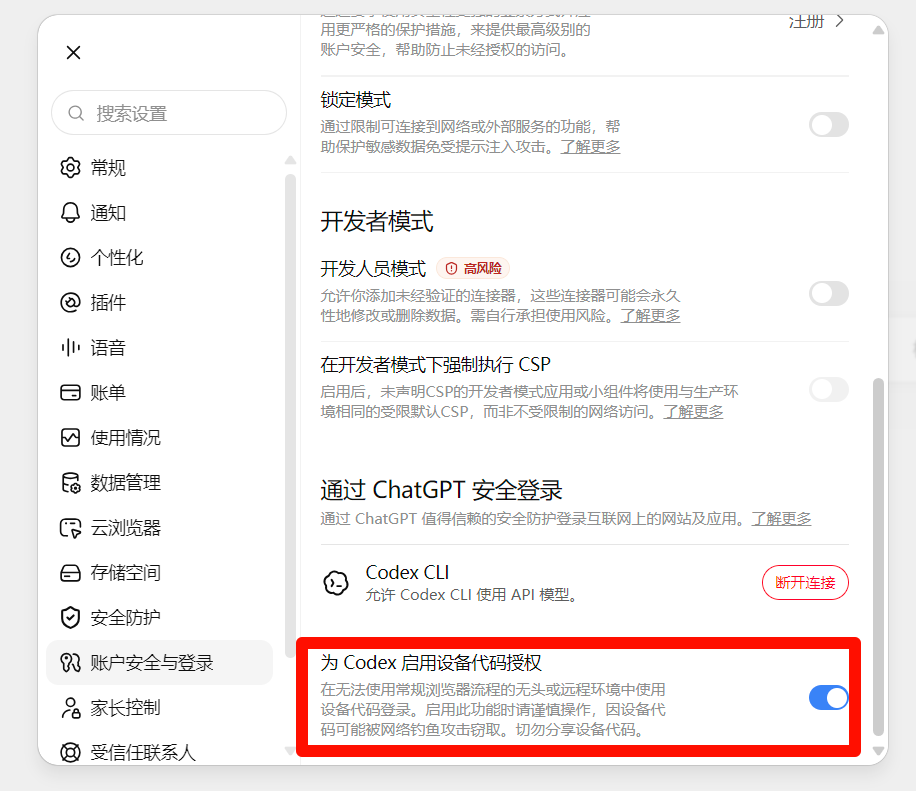
Without that toggle, the device page rejects the code even though this plugin already picked the device-code method.
Risk: signing in to Codex / ChatGPT this way (device code or any unofficial client OAuth) can get the ChatGPT account restricted or banned. OpenAI treats this as using the subscription outside official Codex / ChatGPT apps. Use a disposable account if you try it; do not put a main or paid account you cannot afford to lose on this route. This plugin cannot prevent or reverse a ban.
In the Web UI:
/oauth status
/oauth list
/oauth enable xai
/oauth login xai
/oauth disable xai
/oauth logout xai
/oauth login returns the authorization URL and user code immediately so the chat UI does not hang. Finish in the browser, then run /oauth status or refresh the Settings page. The poll continues in the background.
Credentials are stored at $DSH_HOME/pi-ai-oauth.json (default ~/.dsh/pi-ai-oauth.json).
If you need a terminal (or a provider still requires an interactive prompt):
node bin/login.mjs --list
node bin/login.mjs xai
After a profile install:
node %USERPROFILE%\.dsh\profiles\web\node_modules\dsh-llm-oauth\bin\login.mjs xaiOr enable in settings.yaml without the UI:
llm-oauth:
  providers:
xai: {}dsh-base mounts dormant dsh-llm-pi-ai. Declaring the same provider id under an llm-pi-ai: settings section throws DUPLICATE_ADAPTER.
llm-deepseek / llm-pi-aipnpm install
pnpm test
pnpm run build
node bin/login.mjs --list@deepseek-ai/* packages are peers supplied by the DSH profile. Unit tests (catalog / store / service) only need @earendil-works/pi-ai.
@earendil-works/pi-ai; this plugin does not maintain a private model tableMIT
CLASSIFICATION EVIDENCE
系统优先读取 GitHub Topics,再与站内分类词典和词根规则比对。
asdf17128
Find what your DeepSeek Harness (dsh) patches silently broke — dead patches, config fields dropped by whole-config repla…
asdf17128
Manage DeepSeek Harness profiles — list, create, clone, diff, and share a whole dsh setup as one portable file.
aust24lzy
DeepSeek Harness (DSH) 开源插件导航站 —— 实时同步 dsh-plugin 生态,按 Stars 动态排行