Agent 与会话
插件
dsh-thinking-language-zh
ayanJava111
deepseek harness思考过程中文插件
chinesedeepseek-harnessdsh-pluginprompt
PROJECT TOPICS
PROJECT README
Session manager for DeepSeek Harness.
dsh-session-manager gives the Harness Web UI a full session-management surface: browse all sessions and the archived ones, restore (unarchive) archived sessions back to their original workspace, archive any session, delete sessions with a two-step confirmation, and preview conversation content — all from the Settings panel, with zero modification to official packages.
Stock DSH archives sessions one-way: the sidebar's Archive action hides a session from every view (workspace groups, ungrouped, search, flat list), and there is no view or API to bring it back — archived sessions are effectively lost until you hand-edit ~/.dsh/storages/workspace.json. This plugin makes archiving a reversible, manageable state and adds an overview of every session on disk:
right-click a session -> Archive (stock DSH)
  -> the session vanishes from the sidebar (nowhere to see it again)
  -> this plugin: Settings -> Session manager -> archived tab
       preview its content, Restore it (back to its original workspace
       position), or Delete it from disk (two-step confirmation)
  -> the all-sessions tab lists every persisted session (grouped by
workspace, ungrouped ones included) so nothing is ever lost sight ofdsh.bundle patch layer); every operation goes through official services (workspaceRegistry, sessionPersistence, sessionQuery, fs, shell, …) — no official package is patched or overridden./dsh-sm/* routes reject non-loopback hosts and cross-origin requests (Host + Origin / Sec-Fetch-Site fence).# one line, from a git source
dsh plugin --profile web add github:omdsh-dev/dsh-session-manager
# restart the web server, then hard-refresh the pageLocal development:
dsh plugin --profile web add /path/to/dsh-session-managerThe repository ships plain-JS lib/ artifacts with no build step, so git-source installs work without any build tooling on the user's machine.
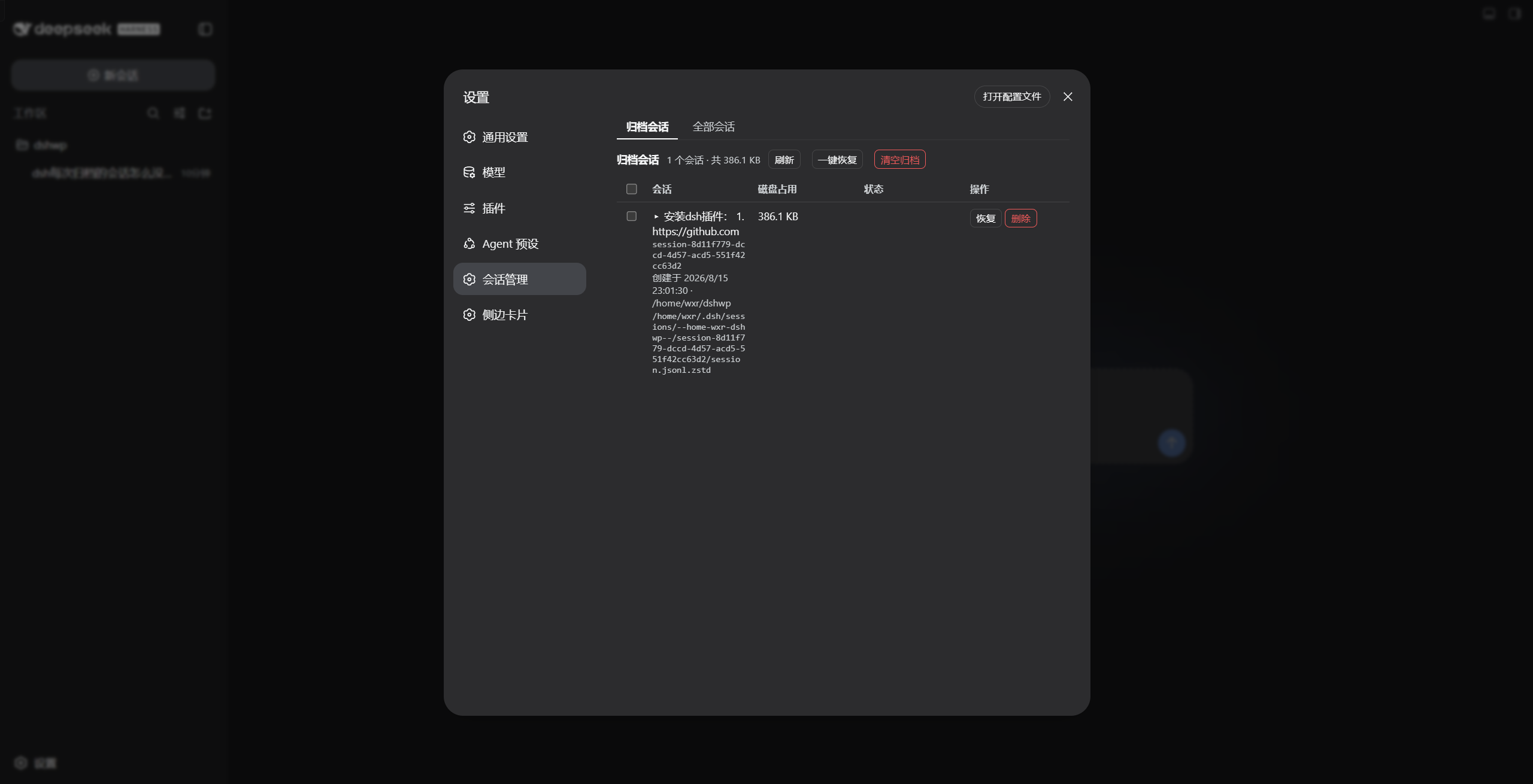
Open Settings → Session manager:
—), status badges for archived / live / running. Actions: Archive, Delete, and Delete all (two-step; skips running/open sessions).lib/
├── index.js Host half: cordis plugin (injects webServer) exposing POST /dsh-sm/* routes
└── client.js Browser half: __ModuleLoader__ bundle registering the Settings section
cordis.patch.yml dsh.bundle patch layer — one insert row drives both halvesbrowser (Settings page) --POST /dsh-sm/*--> host handlers
archived/list · archived/unarchive · sessions/list · sessions/archive
· sessions/delete · sessions/detail
workspaceRegistry (archive-set read/write) + sessionPersistence (headers/locate)
+ sessionQuery (titles/content) + fs/shell (size/delete) + agents (running guard)Host routes:
| Route | Payload | Returns |
|---|---|---|
POST /dsh-sm/archived/list |
{} |
{ items, totalBytes } |
POST /dsh-sm/archived/unarchive |
{ sessionId } |
{ ok, changed, archivedSessionIds } |
POST /dsh-sm/sessions/list |
{} |
{ items } |
POST /dsh-sm/sessions/archive |
{ sessionId } |
{ ok, archivedSessionIds } |
POST /dsh-sm/sessions/delete |
{ sessionId } |
{ ok, deleted, sessionId, path?, reason? } |
POST /dsh-sm/sessions/detail |
{ sessionId } |
{ id, createdAt, cwd, totalEvents, messageCount, truncated, messages } |
The unarchive path rewrites the durable archive set through workspaceRegistry.setState (with a workspace storage-domain fallback), so the registry's in-memory state and the on-disk global.archivedSessionIds stay consistent; the client refreshes the workspace/session stores afterwards so the sidebar updates immediately.
node test/smoke.mjs # 10 host-logic checks against stub servicesThe smoke test drives apply(ctx) with stub services and covers the route wiring, the loopback/origin fence, archive-set read/write, delete bookkeeping and detail extraction. End-to-end verification was performed against a real profile (a second instance on a separate port plus a browser walkthrough of restore / archive / delete-all).
CLASSIFICATION EVIDENCE
系统优先读取 GitHub Topics,再与站内分类词典和词根规则比对。
ayanJava111
deepseek harness思考过程中文插件
ben7am1n
Durable cross-session SQLite memory for DeepSeek Harness
chenkezhen480
为deepseek-harness添加向量化跨会话记忆插件