
Agent 与会话
插件
dsh-thinking-language-zh
ayanJava111
deepseek harness思考过程中文插件
chinesedeepseek-harnessdsh-pluginprompt
PROJECT TOPICS
PROJECT README


Persistent multi-model agent squads for DeepSeek Harness. Give every member its own model and tool policy, save reusable teams in Settings, then select a squad beside the composer and keep chatting normally.
dsh plugin --profile web add -w github:toolclub/dsh-agent-team-gui#v0.1.0
dsh --profile web
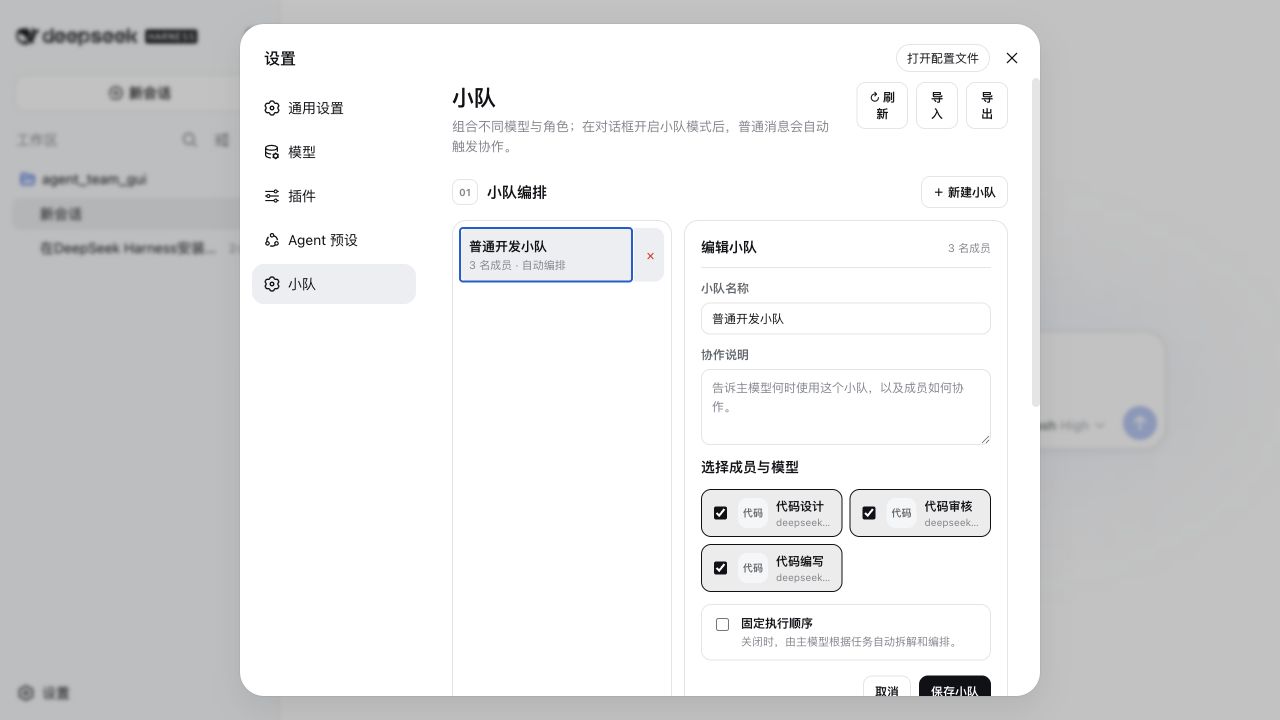
Then open Settings → Teams, create a squad, select it beside the conversation composer, and turn on Squad mode. The plugin uses your existing dsh model routes and credential store; it never stores API keys.
| What you get | Why it matters |
|---|---|
| One provider/model and tool policy per agent | Mix a strong planner, fast implementer, and strict reviewer in one squad |
| Global persistent agents and squads | Build a team once, then reuse it across projects and conversations |
| Fixed or model-planned execution order | Pin a repeatable workflow, or let the lead model plan roles for each task |
| Serial/parallel execution with spawn/fork/chain context | Match collaboration topology to the task instead of forcing one pattern |
| Parent tool trace plus child sessions | Inspect which member did what and diagnose failures |
If this workflow is useful, a GitHub Star helps other DeepSeek Harness users discover it. Bug reports and real squad recipes are equally welcome.
[!WARNING] Both dsh and this plugin are developer previews. The plugin targets dsh
>=0.1.0-rc.5 <0.2.0and requires Node.js 22.19 or later. dsh can make breaking changes before a stable release; pin both dsh and this plugin when reproducibility matters.
A squad does not have to share one model configuration. Every agent can independently select an
existing dsh provider/model route, maxTokens, and tool allow/deny policy. Save those agents as
global reusable definitions in Settings, combine them into persistent squads, and select a squad
per conversation. When squad collaboration is enabled, an ordinary Send enters the collaboration
flow: the squad follows its optional fixed member order, or lets the model plan assignments and
execution order when no order is pinned.
Settings --> global agent/squad definitions --+
Conversation --> per-session squad mode -------+--> dsh storage-domain --> JSON backend
                                              |
Conversation squad selector + collaboration toggle
                                              |
ordinary Send --> fixed member order, if set --+
              `-> model-planned roles/order otherwise
                                              |
                  Agent A / Agent B / Agent C
                                              |
             assistant response + traceable child sessions

Natural-language request --> dispatch_to_squad (model tool) --> same squad runtime
The package contains a Web client, loopback-only Connection RPC, host service, durable registry, and model-facing dispatch tool. Settings → Teams manages global definitions. Each conversation gets a squad selector and collaboration toggle; after selecting a squad and enabling collaboration, the user sends through the ordinary composer rather than a separate dispatch form. Provider and model choices are read from dsh's existing model configuration.
Current capabilities:
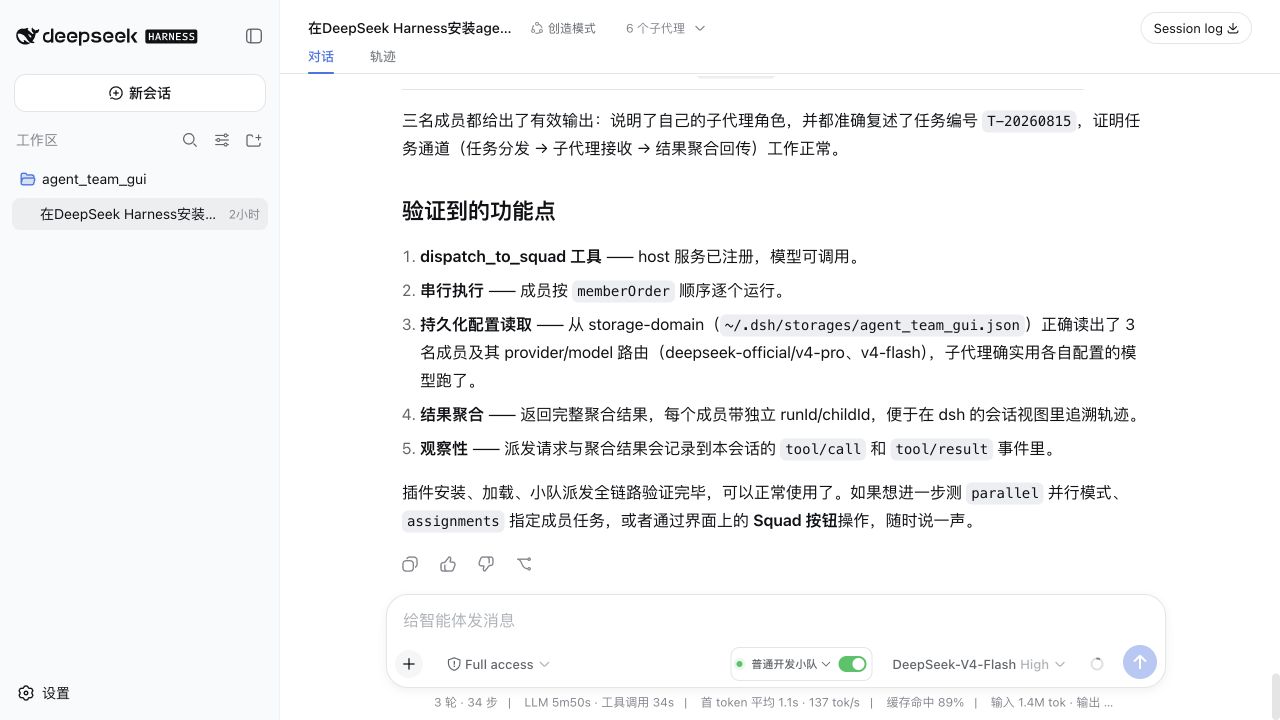
storage-domain.{ provider, model, maxTokens? } route and tool restrictions; no API-key storage.dispatch_to_squad with optional explicit per-agent assignments.spawn, fork, or serial-only chain context modes.tool/call and tool/result
records, with child session/run IDs in each member result.>=0.1.0-rc.5 <0.2.0. This bundle is not a headless
or bare-profile bundle.PATH. The Git-install notes below apply to pnpm 10 and later.The commands below assume an installed dsh executable. Cloning the DeepSeek Harness source does
not install that executable globally. From the Harness repository root, verify the source CLI
with:
pnpm dsh --versionWhen running from another directory, replace every dsh ... below with
pnpm --dir /absolute/path/to/deepseek-harness dsh ....
Run each command from the directory that contains dsh-agent-team-gui.
Install the plugin's development dependencies:
pnpm --dir ./dsh-agent-team-gui installExpected: pnpm finishes successfully and creates or updates dsh-agent-team-gui/node_modules.
Build the checkout before linking it into a profile:
pnpm --dir ./dsh-agent-team-gui run buildExpected: the command exits with status 0 and produces the runtime entry under
dsh-agent-team-gui/lib/.
Add the local bundle to the Web profile:
dsh plugin --profile web add -w ./dsh-agent-team-guiExpected: pnpm reports dsh-agent-team-gui as added. dsh must not print the warning that the
package "declares no dsh.bundle".
Inspect the composed configuration without booting it:
dsh --profile web --dump-configExpected: output contains a dsh-agent-team-gui bundle layer and an agent-team-gui row.
Start the profile:
dsh --profile webExpected: dsh starts normally, Settings → Teams is available, and conversations show
the squad selector and collaboration toggle. When info-level host logging is enabled, the log
also contains
[agent-team-gui] durable registry and dispatch_to_squad ready.
A built tarball contains compiled output and therefore needs no install-script allowance.
Install dependencies and build:
pnpm --dir ./dsh-agent-team-gui install
pnpm --dir ./dsh-agent-team-gui run build
Expected: both commands exit with status 0 and dsh-agent-team-gui/lib/ exists.
Create the tarball:
pnpm --dir ./dsh-agent-team-gui packExpected: pnpm prints the generated archive name, normally
dsh-agent-team-gui-0.1.0.tgz. Use the exact path printed by your pnpm version below.
Install that archive:
dsh plugin --profile web add -w ./dsh-agent-team-gui/dsh-agent-team-gui-0.1.0.tgzExpected: pnpm reports dsh-agent-team-gui as added without an allowBuilds prompt. If pack
printed the archive elsewhere, substitute that exact path.
Verify the layer:
dsh --profile web --dump-configExpected: the dump contains the dsh-agent-team-gui layer and agent-team-gui row.
Git dependencies contain source rather than prebuilt release artifacts. This repository therefore
ships a self-contained prepare path that builds its runtime entry without assuming a sibling dsh
monorepo checkout.
You can also send this single sentence to a DeepSeek Harness agent that has terminal access:
Follow the README at https://github.com/toolclub/dsh-agent-team-gui and install the plugin into the DeepSeek Harness web profile; resolve and pin the current main commit SHA, configure pnpm
allowBuildsas documented, and verify withdsh --profile web --dump-config.
Pin and install a reviewed commit:
dsh plugin --profile web add -w github:toolclub/dsh-agent-team-gui#<commit-sha>Expected with pnpm 10 or later on the first attempt: installation may fail because pnpm blocks
the Git dependency's prepare script. pnpm prints the exact package key, and dsh prints the
profile directory whose pnpm-workspace.yaml must be changed.
Add exactly the key pnpm printed to that profile's workspace file. With the default dsh home,
edit ~/.dsh/profiles/web/pnpm-workspace.yaml (or
$DSH_HOME/profiles/web/pnpm-workspace.yaml when DSH_HOME is set):
allowBuilds:
  dsh-agent-team-gui: true
Expected: the YAML now preserves any existing workspace settings and contains the printed key
under allowBuilds. Do not guess the key if pnpm printed a different one.
Re-run the same pinned install:
dsh plugin --profile web add -w github:toolclub/dsh-agent-team-gui#<commit-sha>Expected: pnpm is allowed to run prepare, builds the package, and reports it as added.
Verify the bundle layer:
dsh --profile web --dump-configExpected: the dump contains the dsh-agent-team-gui layer and agent-team-gui row.
Restart any running dsh Web process, then refresh the browser. Installing or updating replaces files on disk but cannot replace an already loaded host module. The UI performs an RPC revision handshake and shows an explicit restart message if client and host revisions do not match.
[!CAUTION]
allowBuildsauthorizes that package to execute code on your machine during installation. This code runs outside every dsh agent sandbox. Allow only packages whose source you trust, review the selected revision, and pingithub:owner/repo#<sha>so later pushes cannot silently change what executes. A built tarball avoids this build permission.
The bundle inserts this host row:
- id: agent-team-gui
  name: dsh-agent-team-gui
  config:
    defaultProvider: spawn
    defaultExecutionMode: serial
defaultContextMode: spawn| Field | Type | Default | Meaning |
|---|---|---|---|
defaultProvider |
string |
spawn |
Registered dsh subagent provider used unless dispatch/context selection chooses another one. |
defaultExecutionMode |
serial \| parallel |
serial |
Default member scheduling. |
defaultContextMode |
spawn \| fork \| chain |
spawn |
spawn starts fresh children; fork includes the parent's completed-turn prefix; chain passes each serial member's text to the next. |
To override it for one profile, edit $DSH_HOME/profiles/<name>/cordis.patch.yml:
- id: agent-team-gui
  config:
    defaultProvider: fork
    defaultExecutionMode: parallel
    defaultContextMode: fork
dsh patch rows replace the complete config object; they are not deep-merged. Restate every field
you need whenever overriding the row. chain is valid only with serial execution.
Agent records contain:
| Field | Required | Meaning |
|---|---|---|
name |
yes | Display name. |
systemPrompt |
yes | Role/persona passed to the child agent. |
provider |
yes | Existing dsh provider route name. |
model |
yes | Existing model id for that provider. |
maxTokens |
no | Per-agent token cap. |
toolScope.allow / toolScope.deny |
no | dsh tool-name restrictions applied to that child. |
Squad records contain:
| Field | Required | Meaning |
|---|---|---|
name |
yes | Global display name used by Settings and conversation selectors. |
members |
yes | Unique agent IDs available to the squad. |
collabNote |
no | Collaboration guidance included in member prompts. |
executionOrder |
no | Fixed complete ordering of every member. Omit it for lead-model planning. |
executionMode |
no | Squad default: serial or parallel; falls back to plugin config. |
contextMode |
no | Squad default: spawn, fork, or serial-only chain; falls back to plugin config. |
Squad records contain name, an optional collaboration note, a member list, optional
executionOrder, and optional executionMode/contextMode defaults. An agent may appear in
multiple squads. Settings → Teams edits these global records through a loopback-only host RPC.
A fixed executionOrder must contain every member exactly once. With no fixed order, the lead model
plans assignments and passes a complete memberOrder when dispatching. The plugin stores route
names only; it does not store or copy provider secrets.
Plugin authors can also use the same registry in-process:
const agentId = await ctx.agentTeamGui.createAgent({
  name: 'Reviewer',
  systemPrompt: 'Review for correctness and cite concrete evidence.',
  provider: 'your-configured-provider',
  model: 'your-configured-model',
  toolScope: { allow: ['bash', 'str_replace_editor'] },
})

const squad = await ctx.agentTeamGui.createSquad({
  name: 'Release review',
  collabNote: 'Run independent checks, then consolidate findings.',
  members: [agentId],
})
The service also exposes get/list/update/delete methods for both record types,
addMemberToSquad, removeMemberFromSquad, exportDefinitions/importDefinitions, and a
programmatic dispatch method. Exact TypeScript signatures are exported by the package
declarations.
User: Give the release-review squad this task: inspect the patch for regressions.
      Have the reviewer check correctness and the test agent run focused tests in parallel.

Assistant: [calls dispatch_to_squad with squadId, task,
            assignments=[...], executionMode="parallel", contextMode="spawn"]

Assistant: The squad completed with two member results. The reviewer found ..., and the focused
           tests .... Any failed member is listed explicitly instead of being omitted.
The model selects dispatch_to_squad; the plugin does not parse the user's text with regular
expressions. squadId accepts either the durable ID or an exact squad name (case-insensitive); if
names are duplicated, use the durable ID. Tool arguments are squadId, task, optional
assignments: [{ agentId, task }], optional executionMode, and optional contextMode.
memberOrder is also optional when the squad has no fixed executionOrder; when supplied, it must
be a complete, duplicate-free ordering of all squad members. A fixed squad order cannot be
overridden per call. The tool renders the complete canonical JSON result—including each member's
runId, childId, status, error, stop reason, and output—so the lead model can produce the final
summary.
dsh --profile web and open Settings → Teams.User types: Inspect this change and prepare a release recommendation.
Conversation control: Release review squad -> Collaboration on
User selects: Send
Assistant: [the selected squad collaborates using the current conversation as parent]
Assistant: The release-review squad recommends ... Reviewer: ... Test agent: ...The selected squad is conversation-scoped and its mode is durable; both session modes and global
agent/squad definitions survive restart. Deleting a selected squad automatically disables affected
session modes. Sending does not require a second task box or a separate Dispatch button.
Internally, a dynamic system prompt tells the lead model to call dispatch_to_squad once and
summarize its result for the normal assistant response. This is a best-effort model instruction,
not an API-level forced tool call; see Known limitations.
Settings → Teams can dump and restore the durable definitions as a JSON document.
agent-team-gui-<date>.json containing { "format": "agent-team-gui/definitions", "version": 1, "agents": [...], "squads": [...] } — every record with
its durable id, plus model routes (never API keys).The same operations are available in-process as exportDefinitions() and
importDefinitions(document, mode); mode is merge (default) or replace. replace makes the
document the entire store, and then a squad may only reference agents present in the document.
The parent session's ordinary tool/call and durable text tool/result events retain the request
and complete canonical JSON aggregate. Every member result includes the provider-owned child
session/run IDs when a
child started, so its trajectory can be inspected through dsh's existing subagent/session views.
The host log also records member start/finish/failure. Results distinguish complete, partial, and
failed members. A member failure is aggregated with its error and does not silently stop unrelated
members. The plugin contributes no long-lived subprocess; Cordis owns tool/listener cleanup, and
the storage domain is closed when the plugin unloads.
The general form is dsh plugin --profile <name> remove <pkg>. For this Web bundle:
dsh plugin --profile web remove dsh-agent-team-guiExpected: pnpm removes the dependency and dsh removes dsh-agent-team-gui from the profile's bundle
list. Durable records under the dsh storage backend are not automatically deleted.
squad/* session event types: the current out-of-tree API cannot register them in
dsh's known-event catalog. Observability relies on standard tool events, child sessions, and host
logs.dispatch_to_squad call, but the current Harness generation API exposes no toolChoice control
with which the plugin could hard-force that call.>=0.1.0-rc.5 <0.2.0.pnpm install and build with pnpm run build.pnpm test, pnpm run typecheck, and pnpm pack as applicable.Released under the MIT License.
CLASSIFICATION EVIDENCE
系统优先读取 GitHub Topics,再与站内分类词典和词根规则比对。
ayanJava111
deepseek harness思考过程中文插件
ben7am1n
Durable cross-session SQLite memory for DeepSeek Harness
chenkezhen480
为deepseek-harness添加向量化跨会话记忆插件