其他
技能
dsh-web-search-ddg
aooyoo
Zero-token DuckDuckGo search provider for the DeepSeek Harness (DSH) web seam — local headless browser, no API key, no m…
deepseek-harnessdeepseek-harness-plugindsh-bundledsh-ctest
PROJECT TOPICS
PROJECT README
Mermaid visual editor — a DeepSeek Harness (dsh) browser plugin. A closable right-side panel that keeps the canvas and the Mermaid code in sync, and works directly with the agent.
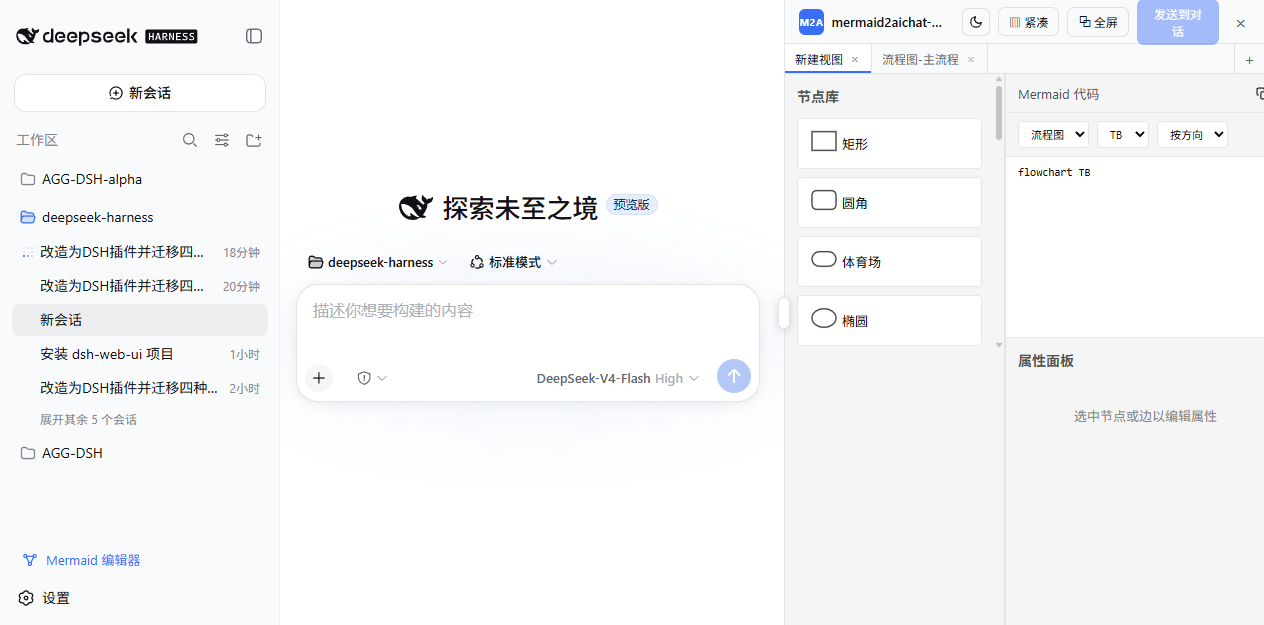
Supports four diagram types: flowchart, sequenceDiagram, classDiagram, erDiagram. The editor UI is the core — no MCP, no server, no VS Code extension; the plugin talks to dsh directly and touches zero dsh source code.
Panel & layout
Editor
Working with the agent (two-way Mermaid transfer)
mermaid_load (host-global layer, no preset change) — when the AI calls it, the diagram is auto-imported as a new tab and the panel opens to show it```mermaid blocks (AI messages, user messages, tool results); the sidebar badge shows unseen count, and "从对话导入" parses one into a new tab/ and the "mermaid" group lists the current session's tabs — pick one to insert its code block into the draftdsh plugin --profile web add mermaid2aichat-dshdsh plugin --profile web add github:supergameboy/mermaid2aichat-dshdsh plugin --profile web add <path-to-this-repo>
lib/build artifacts are committed, so git/npm installs work without a build step. If pnpm blocks the build, allow the package in$DSH_HOME/profiles/web/pnpm-workspace.yaml(allowBuilds) or use option 1.
After installing, restart dsh web (the mermaid_load tool registers at host startup), then refresh the page — the "Mermaid 编辑器" button appears at the bottom of the sidebar.
The value of mermaid2aichat-dsh is not "one more diagram tool" — it turns diagrams into an editable loop that feeds the agent:
AI analyzes / draws ──mermaid_load──▶ editor (editable) ──send to chat──▶ AI continues
user draws / edits ──editor──▶ Mermaid code ──send to chat──▶ AI analyzes / implements from the diagram
One-shot generators such as archify own the "analysis + polished HTML artifact" end; this plugin owns the "Mermaid workbench + two-way agent feed" end. The two complement each other without overlap.
# this plugin (npm)
dsh plugin --profile web add mermaid2aichat-dsh

# dsh-web-ui family (right-side file tree / preview / task board, coexists on the same grid)
dsh plugin --profile web add @linxin666/dsh-web-ui-all

# archify: an agent skill (Claude Code / npx skills — see its README)
npx skills add tt-a1i/archify -gmermaid_load into this editor, tweak it, then "发送到对话".Tell the agent:
Draw the flow of XXX as a flowchart and send it to the editor.
The agent calls mermaid_load, and the diagram appears in a new editor tab (the panel opens automatically). Adjust it in the editor and click "发送到对话" to send the updated code back; or type / in the input box to reference any tab's code block.
One npm package plays three roles:
dsh.bundle.patch → cordis.patch.yml registers the plugin as a dsh.client row;mermaid_load (global layer, visible to every session's agent);sidebar.footer.action), the panel entry (shell.overlay), the input trigger (inputTriggers) and the DOM layout controller (client/layout.ts).Data flow (no MCP, no server):
canvas ──onCanvasChange──▶ state.ts (localStorage, per-session)
state ──「发送到对话」──▶ SessionFace.prompt('queue')
mermaid_load tool ──result──▶ blocks source ──▶ auto-import
session ──blocks source──▶「从对话导入」──▶ new tab
input '/' ──trigger「mermaid」──▶ current-session tabs ──▶ insert code block
src/
index.ts host half (registers the mermaid_load tool)
client/ dsh plugin (state, panel, launcher, trigger, block scan, layout controller)
editor/ editor UI (canvas, node library, property panel, code editor)
serializer/ parser/serializer (jison parsers + serializers for the 4 types)
cordis.patch.yml bundle patch layer
lib/ build artifacts (committed; installs work out of the box)The editor and serializer are bundled into lib/client.js (@xyflow/react, dagre-cluster-fix, js-yaml inlined; react and friends come from the dsh shell's module table).
The editor column is a grid track the layout controller appends at the DOM level: it mirrors the shell's inline grid-template-columns (2/3-track tolerant) and appends its own track, fully decoupled from the sidebar, chat and details column — no ctx.layout dependency, no slot shadowing, no host-version requirement.
dsh-web-ui (aionui-panel) uses the same technique for its file-tree/preview panels. When their columns are detected, the controller switches to a cooperative protocol: it writes 6 tracks (shell 3 + editor + their preview + their file tree), keeps the editor column before theirs, re-appends on their 5-track writes in the same frame, nudges with a bare shell 3-track write to converge after their HMR/late attach, and carries a write-burst guard so observer cascades can never freeze the page. Both panels show side by side.
pnpm install      # install dependencies
pnpm run build    # builds lib/index.js (host) + lib/client.js (browser)
pnpm run typecheck
pnpm run watch    # tsdown watch rebuild
After changing source, re-run pnpm run build; host-side changes (tool registration) need a dsh web restart, browser-side changes only a page refresh.
/ input-trigger replaces the draft with the code block (setDraft semantics) and cannot append to existing draft textThe DOM layout controller (mirroring the shell's grid, appending its own column track, and drawing custom drag handles) is inspired by the aionui-panel package in dsh-web-ui. Thanks to its author for sharing the approach — this plugin's coexistence protocol is built around that behavior so both can run side by side in the same GUI.
CLASSIFICATION EVIDENCE
系统优先读取 GitHub Topics,再与站内分类词典和词根规则比对。
aooyoo
Zero-token DuckDuckGo search provider for the DeepSeek Harness (DSH) web seam — local headless browser, no API key, no m…
awa-123-cw
DSH 图片/音视频托管插件:自动拉起 8899 静态服务 + 3080 /files/ 路由(HTTP Range 流式)+ WebUI 内点击即播(视频静音/音频 20% 音量/互斥懒加载)
awa-123-cw
DSH 设置页「关于」栏位 + 一键检测更新插件(About page with update checking for DeepSeek Harness WebUI)