
部署运维
插件
dsh-webui-perf
awa-123-cw
DeepSeek Harness WebUI 性能优化开关插件:长代码流式渲染/历史加载/高亮缓存优化,设置面板一键开关(with official-package patches)
deepseek-harnessdshdsh-pluginperformance
PROJECT TOPICS
PROJECT README


English | 简体中文
A Codex-style token usage dashboard for DeepSeek Harness (dsh) Web UI: 5 stat cards + a GitHub-style activity heatmap (daily / weekly) + insights + per-model usage ranking. The UI follows the DSH language setting: Chinese interface → Chinese dashboard, anything else → English.
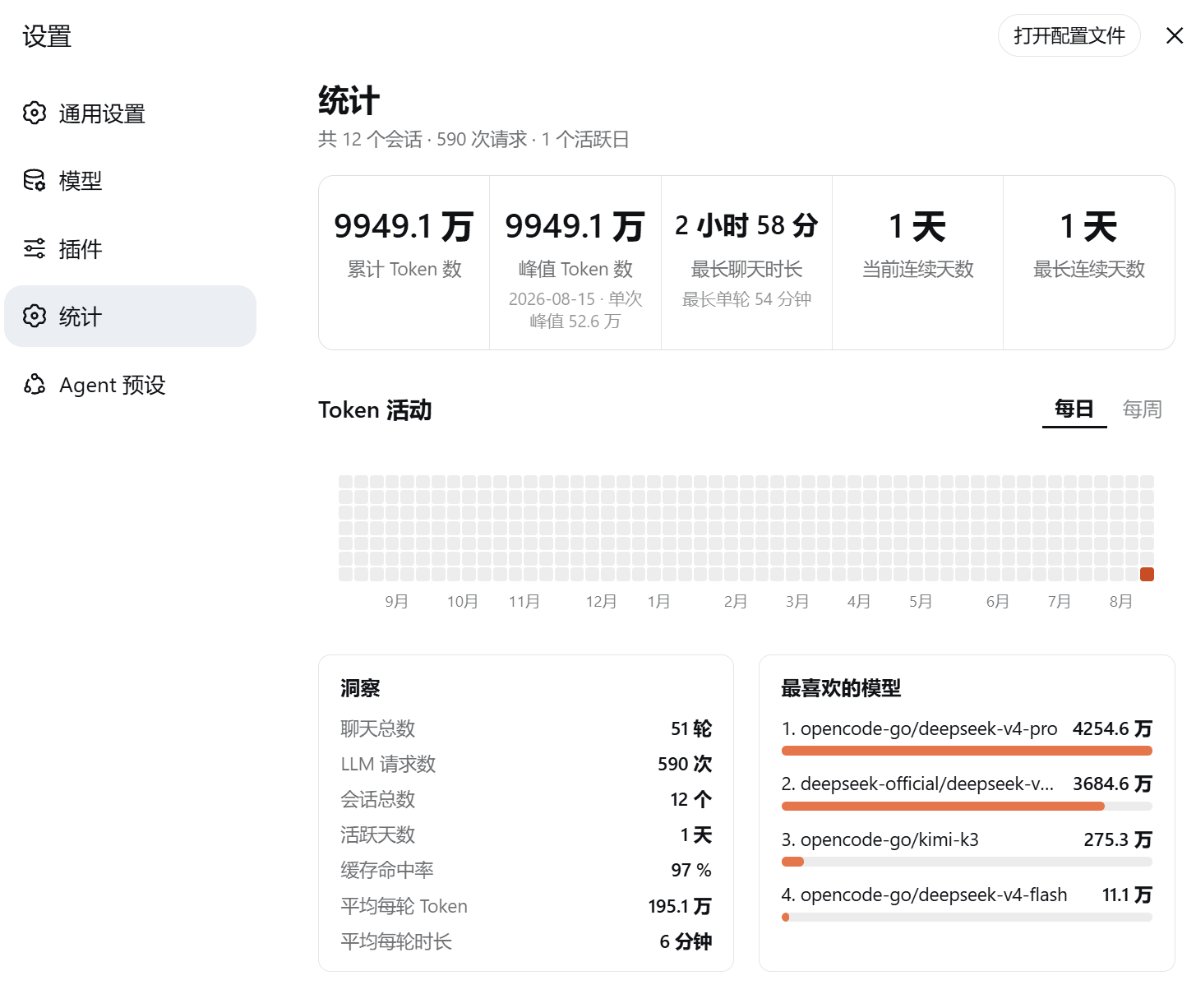
Aug 15, 2026: 273k tokens · 34 requests;
Daily / Weekly view toggle (weekly = bottom-up 7-cell bars, hover for the week total)assistant/message usage + request/header model attribution + turn/start/turn/end durations), live incremental updates, persisted snapshot + incremental sync for fast restartsThe plugin has two runnable forms that share the same aggregation logic:
dsh plugin add; the npm package contains lib/index.js (host half) and lib/client.js (client half). The host half registers GET /api/token-stats and POST /api/token-stats/rescan through the web server; the client half registers a "Settings → Stats" section and fetches the API.host.js and client.js are pasted into cordis_define for in-session deployment without restarting the profile.Data flow:
session/event / session/created and also performs an initial backfill over historical session logs.assistant/message.usage, request/header model attribution, and turn/start/turn/end durations into in-memory aggregates.~/.dsh/storages/token-stats/snapshot.json; on restart the snapshot is loaded first, then only new events are incrementally folded.GET /api/token-stats (2s while scanning, 30s after ready) and renders the dashboard.dsh plugin --profile web add github:solstice621/dsh-token-usage-dashboard
dsh --profile web # restart to applyThen open Settings → Stats for the full dashboard. Local install:
dsh plugin --profile web add file:/path/to/dsh-token-usage-dashboard.
On first open the plugin scans all historical sessions (seconds to a minute), then updates in real time via
session/event; the dashboard auto-refreshes every 30s — no manual action needed.
This repo also maintains a dynamic Cordis plugin (toksta-5, deployed in-session via cordis_define,
handy for iterating without restarting the profile):
cordis_inspect_list / cordis_inspect_query (sessionQuery, session/event,
session/created, harness, React/host/styles builtins, settings.section, timer, locale);cordis_define: plugin.kind: "new", idPrefix: "toksta", code.host = host.js, code.client = client.js;cordis_run (mode=run/update) to activate.⚠️ The bundle and the dynamic plugin register the same settings section id (
token-stats); don't run both at once — stop one before enabling the other.
| File | Description |
|---|---|
lib/index.js |
Bundle host half: folder + backfill + live listeners + GET /api/token-stats (POST /api/token-stats/rescan as fallback) |
lib/client.js |
Bundle client half: window.__ModuleLoader__.load factory, registers "Settings → Stats" |
cordis.patch.yml |
bundle patch: inserts the id: token-stats plugin row |
package.json |
npm package manifest (dsh.bundle / dsh.client) |
host.js / client.js |
Dynamic-plugin host/client function bodies (paste into cordis_define) |
plugin.json |
Plugin metadata & package history (pkg-9 … pkg-27) |
plan.md / progress.md |
Design docs & progress log (incl. every bug/fix) |
assets/dsh-token-usage-dashboard.png |
Dashboard screenshot |
| Symptom | Cause / fix |
|---|---|
pnpm not found on PATH |
dsh plugin needs pnpm: corepack enable pnpm (bundled with Node ≥16.10) |
| Two "Stats" sections in Settings | bundle + dynamic plugin (toksta-5) both active; stop one |
| Plain text, no styles at all | CSS not injected: dynamic styles is a Client Builtin (styles.insert(css)), not ctx.get('styles'); bundle injects via <style> |
Client render crash ctx is not defined |
ctx only exists in apply(ctx); components use the module-level timer bridge (intervalRef = (cb, ms) => ctx.interval(...)) |
service "timer" is not declared |
client has no timer Service; drop inject: ['timer'] |
| Horizontal scrollbar flashes under the heatmap | old month-label nowrap text inflated scrollable overflow; container & month row are overflow:hidden now |
console.warn throws |
Host builtins only expose console.log/error; use console.error |
usage are counted (skipped when assistant/message.usage is absent);assistant/message has no model field — usage is attributed to the session's latest
request/header provider/model;session/title-llm-request) are not counted.verified, one-click install pinned to github:solstice621/dsh-token-usage-dashboard#<commit>, auto-refreshed every 2h);docs: add dsh-token-usage-dashboard (UI & Experience, bilingual entry).MIT
CLASSIFICATION EVIDENCE
系统优先读取 GitHub Topics,再与站内分类词典和词根规则比对。
awa-123-cw
DeepSeek Harness WebUI 性能优化开关插件:长代码流式渲染/历史加载/高亮缓存优化,设置面板一键开关(with official-package patches)
caiyfa
deepseek-harness (dsh) 全局 Token 用量看板插件 —— 一行命令安装,后台常驻增量统计全部会话:按模型/按时间/按会话的用量趋势(分钟·小时·天 × 柱状/堆叠/累计)、红绿异常时点标记与按会话异常分组,子代理消…
gordonlu
Request Context Profiler for DeepSeek Harness — see what changed between model requests, and how cache reuse changed wit…