
其他
技能
dsh-web-search-ddg
aooyoo
Zero-token DuckDuckGo search provider for the DeepSeek Harness (DSH) web seam — local headless browser, no API key, no m…
deepseek-harnessdeepseek-harness-plugindsh-bundledsh-ctest
PROJECT TOPICS
PROJECT README
English | 中文
DeepSeek Harness 网页端「鲸鱼娘 Token 喂养桌宠」—— 每个聊天会话独立养一只鲸鱼娘,随着 token 消耗自动进食,肚子越来越大、阶段越来越高。支持本地/云端双存储、导出导入、图鉴、喂食趋势、键盘无障碍与明暗主题。


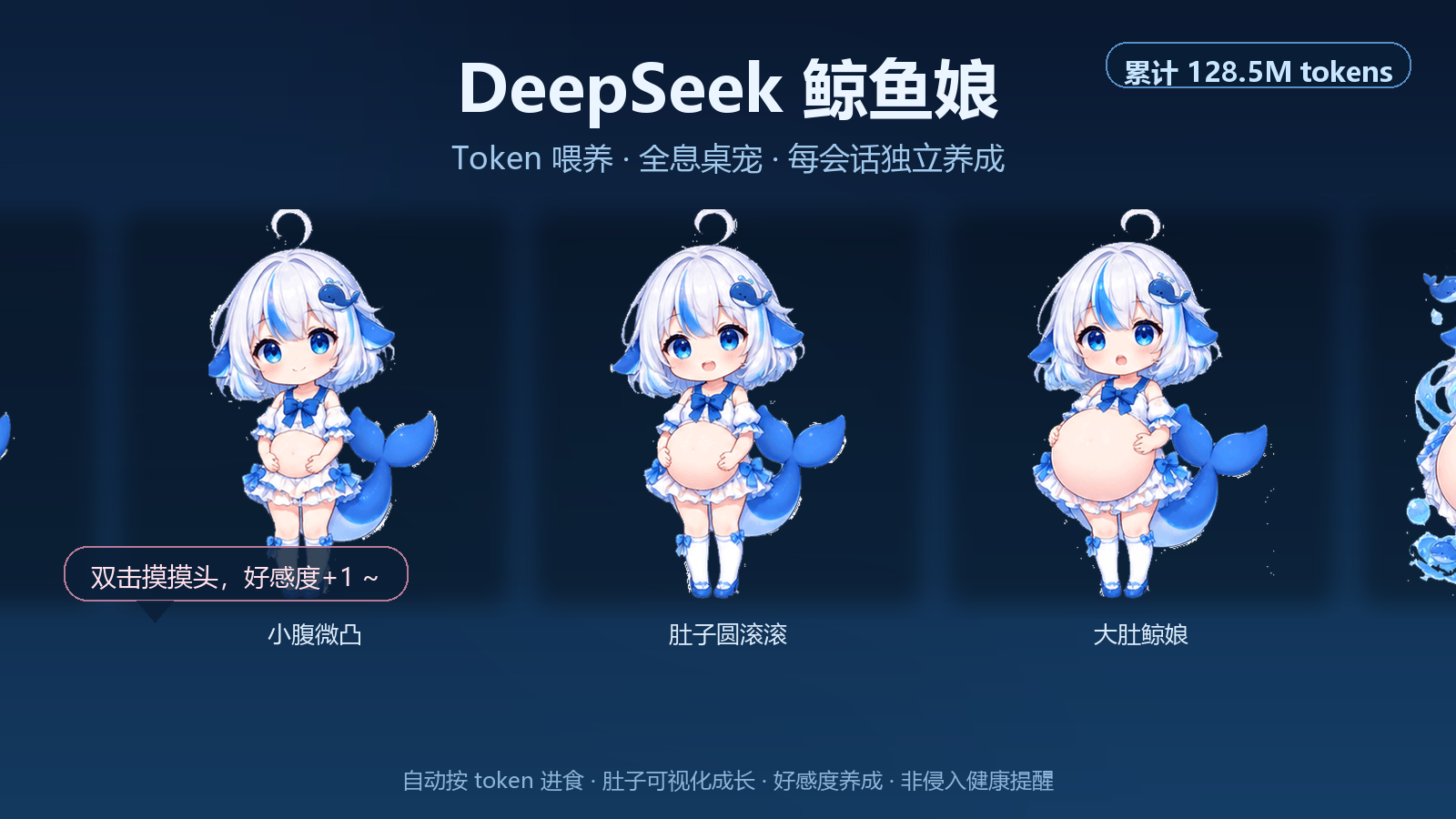
tokenUsage 投影(输入 + 缓存 + 输出),token 增长自动进食。assets/),支持 5 阶段肚子变化和进食/开心/犯困表情切换;图片加载失败时自动回退 SVG。prefers-reduced-motion 自动减少动画。localStorage 作为快速缓存;BroadcastChannel,兼容 storage 事件。:bak 再重建。position: fixed 让鲸鱼娘悬浮在整个页面上;头部槽位不可用时降级到消息操作区。dsh --profile web)cd ~/.dsh/profiles
npm install /path/to/dsh-plugin-whalefeed
# 或:npm install https://github.com/pythonshiyi/dsh-plugin-whalefeedcd ~/.dsh/profiles
npm install dsh-plugin-whalefeed注册到 cordis.patch.yml:
- insert:
    - id: plugin-whalefeed
      name: "dsh-plugin-whalefeed"
重启 dsh --profile web 并刷新页面。
- insert:
    - id: plugin-whalefeed
      name: "dsh-plugin-whalefeed"
      config:
        position: bottom-right # bottom-right | bottom-left | top-right | top-left | {x: 20, y: 20}
        size: 144 # 桌宠尺寸 px(32-320,默认 144)
        opacity: 0.92 # 不透明度(0.2-1,默认 0.92)
        showTokenBadge: true # 头顶显示当前会话累计 token
        showStageName: true # 显示当前阶段名
        catchUpOnFirstSeen: true # 首次接入时是否把会话已有消耗一次性补记
        feedRatio: 1 # 1 token = 1 鲸粮;可调成长速度
        resetOnNewSession: false # 新建/首次见到的会话是否强制从 0 开始
        draggable: true # 是否允许拖动桌宠
        hostPersistence: true # 是否启用 Host 文件持久化(不可用时自动回退 localStorage)
        historyLimit: 50 # 喂食历史条数上限
        visual: auto # auto 使用 assets/ 自定义 PNG,失败回退 SVG;svg 强制内置 SVG;custom 强制自定义图
        affectionEnabled: true # 是否启用摸头/好感度
        petCooldownMs: 3000 # 摸头冷却时间(毫秒)
        healthReminders: true # 是否启用 Token 健康提醒
        spikeThreshold: 10000000 # 单次增量超过该值触发“这一口有点大哦”
        sessionBudget: 500000000 # 会话累计超过该值触发“这个会话吃得有点多”
        dailyBudget: 1000000000 # 今日全局超过该值触发“今天已经吃了很多啦”
        warningCooldownMs: 60000 # 同类提醒最短间隔(毫秒)
stages: [] # 自定义阶段,见下方说明stages 为空时使用内置默认阶段:
[
  { threshold: 0, belly: 0.75 },
  { threshold: 10000000, belly: 1.0 },
  { threshold: 50000000, belly: 1.35 },
  { threshold: 250000000, belly: 1.75 },
  { threshold: 1000000000, belly: 2.2 },
];
可传 { threshold, belly, label? } 覆盖。插件会自动按 threshold 排序,并保证第一个阈值是 0。
| 环节 | 说明 |
|---|---|
| 主槽位 | conversation.session.header.utilities(会话作用域,提供 token 数据);CSS fixed 实现全局悬浮;降级 conversation.chat.assistant-actions |
| 数据源 | useProjection("tokenUsage"),与会话快照同源 |
| 累计口径 | uncachedInputTokens + cacheReadTokens + cacheWriteTokens + outputTokens |
| 喂养逻辑 | projection 变化时 delta = 当前累计 - 上次累计,delta > 0 则喂食 |
| 本地存储 | localStorage key:dsh-plugin-whalefeed:v1:{sessionId} |
| Host 存储 | Node 半段提供 /dsh-whalefeed-state 与 /dsh-whalefeed-states,写入 dsh-plugin-whalefeed-store.json |
| 多标签页 | BroadcastChannel + storage 事件双通道 |
| 损坏保护 | 解析失败自动写 :bak 备份 |
| 无障碍 | 键盘操作、ARIA、prefers-reduced-motion |
换电脑/浏览器后鲸鱼娘还在吗? 启用 Host 持久化后,同一 Harness profile 下的本地文件会保留;纯 localStorage 模式则只在本机浏览器保留。
Host 持久化安全吗? 数据只写入 Harness 本地数据目录,不经过第三方网络,不上传任何远端。
为什么某些环境不显示鲸鱼娘?
插件需要会话作用域槽位来读取 token 数据。如果当前 Harness 版本没有 conversation.session.header.utilities,会自动尝试 conversation.chat.assistant-actions;若都不可用则不会显示。
如何导出/导入? 点击鲸鱼娘打开游戏属性面板 → 底部“⚙ 设置” → 导出会下载 JSON 文件;导入会在设置内展开文本框,粘贴 JSON 后确认。
如何查看所有鲸鱼娘? 游戏属性面板 → “⚙ 设置” → 图鉴,可看到所有会话的鲸鱼娘列表和全局已喂总量。
重置后会不会重复喂入旧 token?
不会。重置时会把 lastTotalTokens 锚定到当前累计值。
0.1.0-rc.6(web profile)tokenUsage projection、conversation.session.header.utilities 槽位、Host webServer 服务(可选)npm test # 单元测试
npm run check # 语法检查
npm run pack # npm 打包预览
npm run lint # ESLint(需要先 npm install)
npm run format # Prettier(需要先 npm install)公众号:十一AIGC —— AI 工具评测与教程,第一时间获取本插件更新与更多 DeepSeek Harness 玩法。
如果本项目对你有帮助,欢迎 ⭐ Star,并关注公众号「十一AIGC」。
MIT
CLASSIFICATION EVIDENCE
系统优先读取 GitHub Topics,再与站内分类词典和词根规则比对。
aooyoo
Zero-token DuckDuckGo search provider for the DeepSeek Harness (DSH) web seam — local headless browser, no API key, no m…
awa-123-cw
DSH 图片/音视频托管插件:自动拉起 8899 静态服务 + 3080 /files/ 路由(HTTP Range 流式)+ WebUI 内点击即播(视频静音/音频 20% 音量/互斥懒加载)
awa-123-cw
DSH 设置页「关于」栏位 + 一键检测更新插件(About page with update checking for DeepSeek Harness WebUI)