部署运维
插件
dsh-webui-perf
awa-123-cw
DeepSeek Harness WebUI 性能优化开关插件:长代码流式渲染/历史加载/高亮缓存优化,设置面板一键开关(with official-package patches)
deepseek-harnessdshdsh-pluginperformance
PROJECT TOPICS
PROJECT README
English | 简体中文
dsh-balance-stats is a balance and usage statistics plugin for DeepSeek Harness Web. It displays three key figures in the conversation.composer.dock bar below the conversation composer:
Balance ¥40.22 | This session ¥0.15 | Total spent 42.5%Click the bar to open an interactive, scrollable details card with balance composition, Harness local usage estimates, model-level spend, token usage, and historical billing summaries.
Make sure Node.js >=22.19.0 is installed and pnpm --version works, then run:
npx @deepseek-ai/dsh plugin --profile web add https://github.com/pangzi499/dsh-balance-stats.gitStart or restart Harness Web, then hard-refresh the browser:
npx @deepseek-ai/dsh web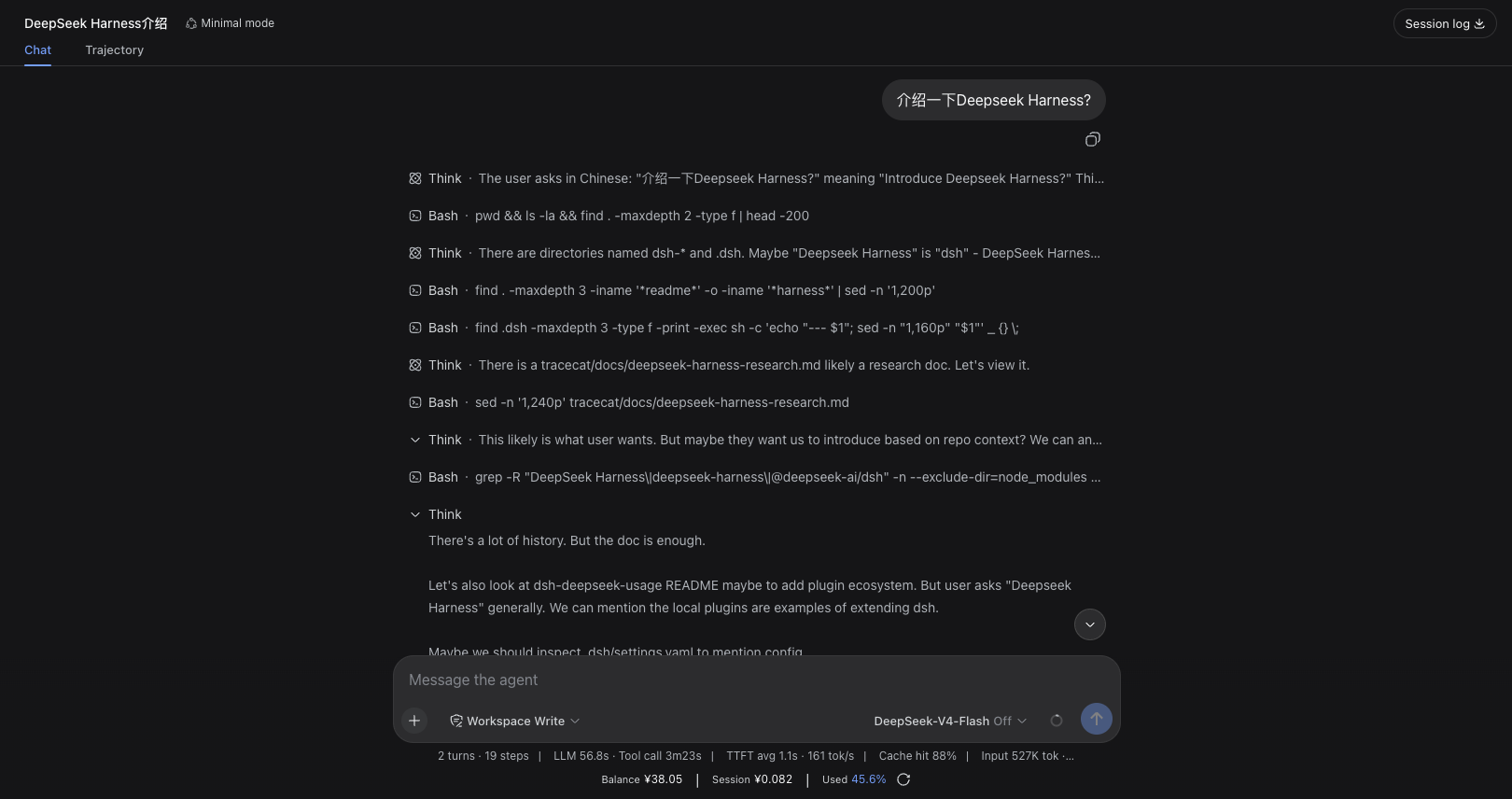
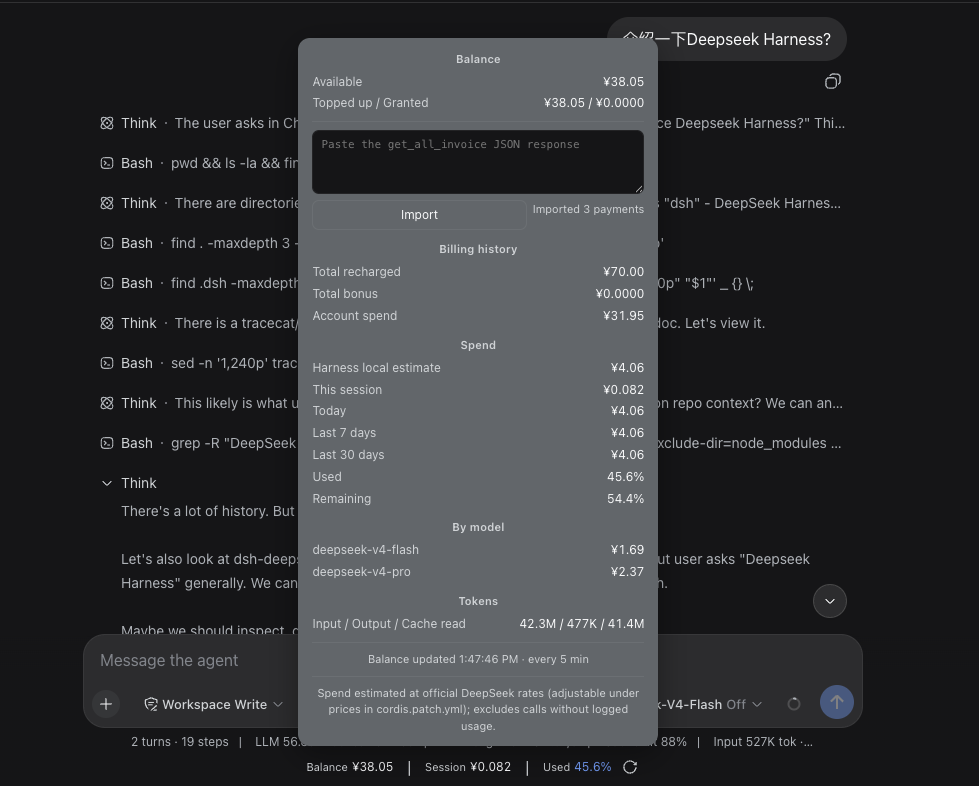
DeepSeek Harness is still in developer preview. The client APIs and mounting slot used by this plugin may change in upstream releases.
0.1.0-rc.6>=22.19.0PATH because Harness uses it to manage profile plugins24.19.0This is a community plugin for DeepSeek Harness. It is not an official @deepseek-ai plugin.
Check pnpm before installing:
pnpm --version
command -v pnpm
If pnpm is missing, install it with Corepack:
corepack enable
corepack prepare pnpm@10 --activate
pnpm --version
If Corepack is unavailable in your Node.js installation, use npm:
npm install --global pnpm@10
pnpm --versionbalanceStatsSessionCost projection.get_all_invoice JSON response to calculate historical top-ups and accounting-based total spend.The server requests:
GET https://api.deepseek.com/user/balanceBy default, the API key is read from the Harness credential DEEPSEEK_API_KEY. It is never sent to the browser.
The plugin scans usage events in Harness conversation logs and calculates spend from model prices using:
This is a local estimate. It may exclude calls made outside Harness, deleted historical logs, or calls without standard usage events.
The public DeepSeek balance API does not return historical top-ups. To enable accounting-based figures:
https://platform.deepseek.com/.https://platform.deepseek.com/auth-api/v0/users/get_all_invoice.Only top-up orders where payment_order_status === "SUCCESS" are counted. Valid grant orders are accumulated separately.
Accounting total = historical top-ups + historical grants
Accounting spend = max(0, accounting total - current total balance)
Total spent = accounting spend / accounting total × 100%
Without imported invoices:
Total spent = Harness local estimated spend
              / (remaining topped-up balance + Harness local estimated spend)
× 100%get_all_invoice or stores DeepSeek Platform cookies.localStorage.get_all_invoice is a private, authenticated DeepSeek Platform endpoint and its response format may change. Never share cookies, authorization headers, or raw JSON containing order details.
Install the latest version from the default branch:
npx @deepseek-ai/dsh plugin --profile web add https://github.com/pangzi499/dsh-balance-stats.git
npx @deepseek-ai/dsh web
Repository: https://github.com/pangzi499/dsh-balance-stats
You can also download dsh-balance-stats-0.1.1.tgz from the GitHub Release and install it as a tarball.
npx @deepseek-ai/dsh plugin --profile web add /absolute/path/to/dsh-balance-stats
npx @deepseek-ai/dsh webBuild:
cd /path/to/dsh-balance-stats
npm pack
Install:
npx @deepseek-ai/dsh plugin --profile web add /absolute/path/to/dsh-balance-stats-0.1.1.tgz
npx @deepseek-ai/dsh web
Then hard-refresh the browser:
Command + Shift + RUpdate to the latest version from the GitHub default branch:
npx @deepseek-ai/dsh plugin --profile web update dsh-balance-statsFor local-directory or tarball installations, run add again with the new path, then restart dsh web.
Override plugin configuration in $DSH_HOME/profiles/web/cordis.patch.yml. Configuration is replaced as a whole, so repeat every key you want to retain:
- id: dsh-balance-stats
  config:
    apiKey: ''
    apiKeyRef: DEEPSEEK_API_KEY
    baseUrl: https://api.deepseek.com
    refreshIntervalMs: 300000
    clientPollIntervalMs: 30000
    timeoutMs: 8000
    currency: CNY
    prices:
      deepseek-chat: { cacheHit: 0.1, cacheMiss: 1, output: 2 }
      deepseek-reasoner: { cacheHit: 1, cacheMiss: 4, output: 16 }
    defaultPrices: { cacheHit: 0.1, cacheMiss: 1, output: 2 }
Prefer apiKeyRef so the plugin reuses Harness credentials. Never put a real API key in a cordis.patch.yml file that you plan to share.
After starting the Web profile:
curl http://127.0.0.1:3080/balance-stats
curl http://127.0.0.1:3080/plugins/dsh-balance-stats/client.js
Example statistics response (amounts are illustrative):
{
  "ok": true,
  "currency": "CNY",
  "balances": [
    { "currency": "CNY", "total": 40.22, "granted": 0, "toppedUp": 40.22 }
  ],
  "stats": {
    "state": "ok",
    "totalCost": 2.103612,
    "percent": 5,
    "today": 2.103612,
    "day7": 2.103612,
    "day30": 2.103612,
    "sessions": 10
  }
}get_all_invoice response format.npx @deepseek-ai/dsh plugin --profile web remove dsh-balance-statsMIT
CLASSIFICATION EVIDENCE
系统优先读取 GitHub Topics,再与站内分类词典和词根规则比对。
awa-123-cw
DeepSeek Harness WebUI 性能优化开关插件:长代码流式渲染/历史加载/高亮缓存优化,设置面板一键开关(with official-package patches)
caiyfa
deepseek-harness (dsh) 全局 Token 用量看板插件 —— 一行命令安装,后台常驻增量统计全部会话:按模型/按时间/按会话的用量趋势(分钟·小时·天 × 柱状/堆叠/累计)、红绿异常时点标记与按会话异常分组,子代理消…
gordonlu
Request Context Profiler for DeepSeek Harness — see what changed between model requests, and how cache reuse changed wit…