Agent 与会话
插件
dsh-thinking-language-zh
ayanJava111
deepseek harness思考过程中文插件
chinesedeepseek-harnessdsh-pluginprompt
omdsh-dev/dsh-mnemon
Cross-agent, local-first persistent memory plugin for DeepSeek Harness (DSH), powered by Mnemon. It shares long-term memory across Mnemon-enabled agents and adds runtime memory, searchable project documents, semantic recall, knowledge graph, and a Sidebar UI.
PROJECT TOPICS
PROJECT README
English · 简体中文
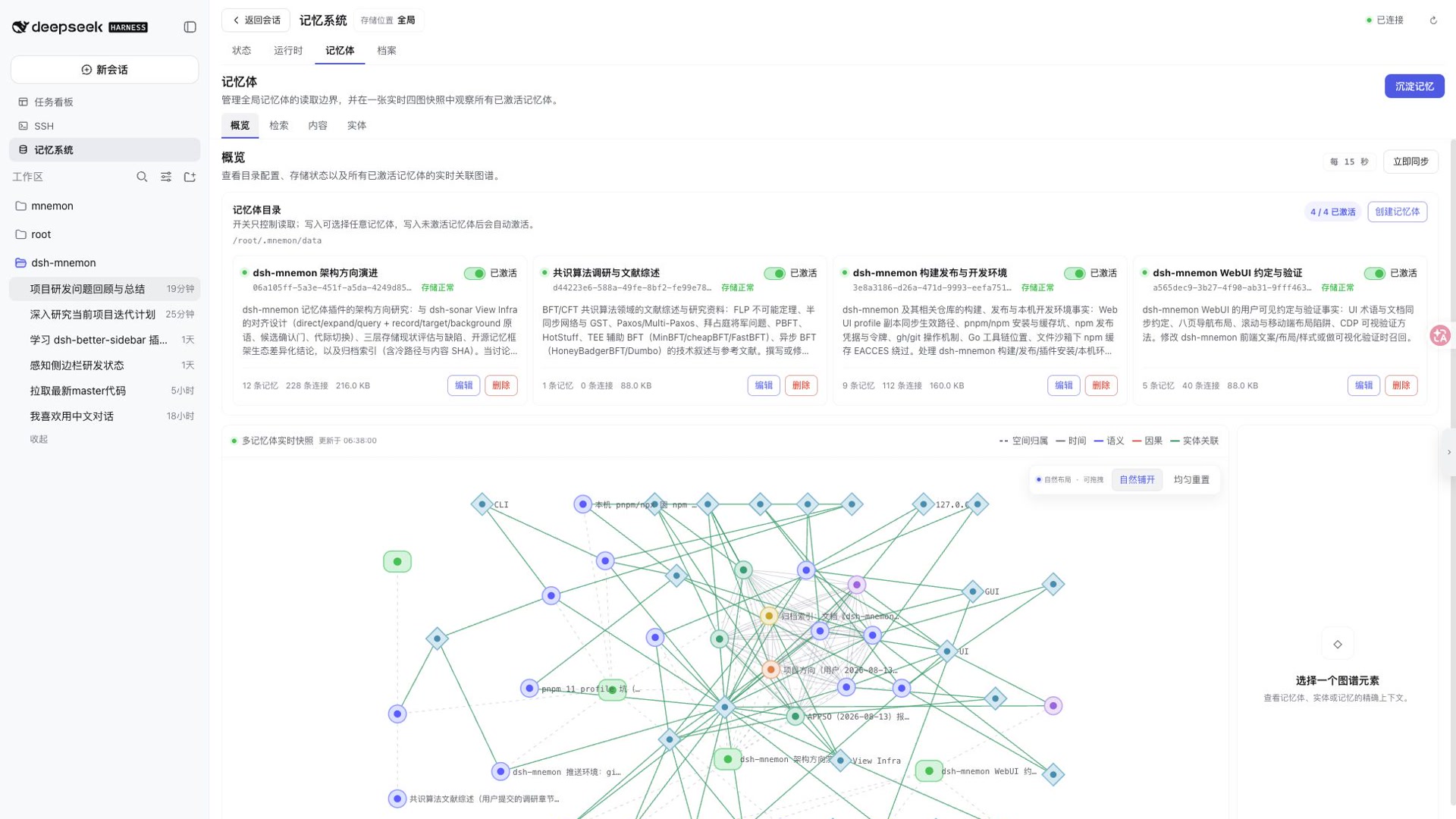
Local, layered, supervised memory for DeepSeek Harness—with cross-agent sharing through Mnemon.
dsh-mnemon integrates Mnemon with DeepSeek Harness (DSH). It brings hot memory needed every turn, full project Documents, and on-demand long-term Memory Spaces into one workbench. Other agents can share DSH's long-term memory when they also integrate Mnemon and use the same accessible local Mnemon storage.
Current user instructions, repository files, and live tool results always take precedence over historical memory.
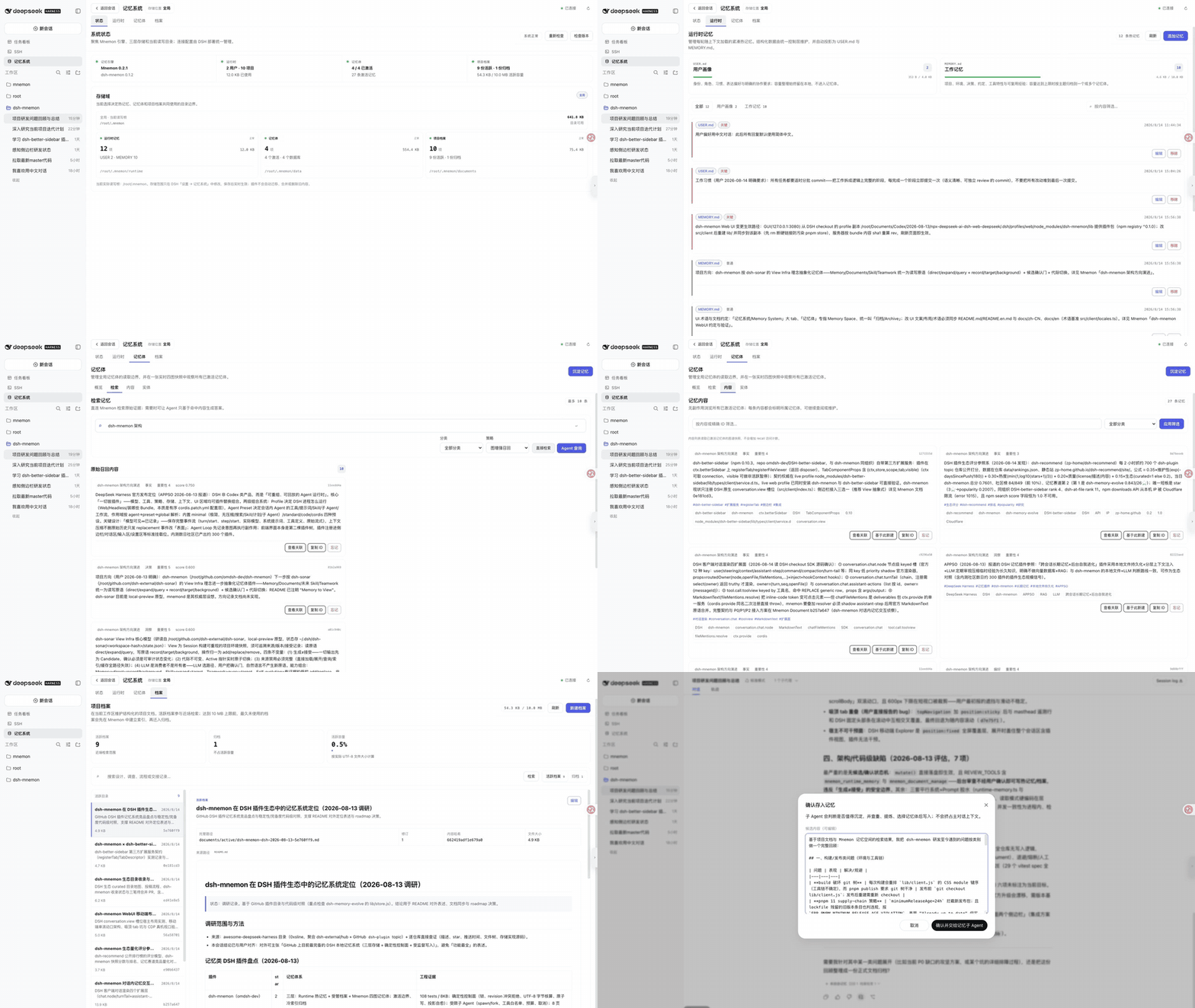
See the Sidebar and conversation UI guide for the complete visual walkthrough.
# macOS
brew install --cask mnemon-dev/tap/mnemon

# macOS / Linux via Go
go install github.com/mnemon-dev/mnemon@latest

mnemon --version
On Windows, install the official v0.2.3-or-newer release ZIP. This path is auto-discovered without changing PATH; see Getting Started for checksum verification:
$version = '0.2.3'
$arch = if ([System.Runtime.InteropServices.RuntimeInformation]::OSArchitecture -eq 'Arm64') { 'arm64' } else { 'amd64' }
$archiveName = "mnemon_${version}_windows_${arch}.zip"
$archive = Join-Path $env:TEMP $archiveName
Invoke-WebRequest "https://github.com/mnemon-dev/mnemon/releases/download/v${version}/${archiveName}" -OutFile $archive
$installDir = Join-Path $env:LOCALAPPDATA 'Programs\mnemon'
New-Item -ItemType Directory -Force -Path $installDir | Out-Null
Expand-Archive -Path $archive -DestinationPath $installDir -Force
& (Join-Path $installDir 'mnemon.exe') --versionFor the complete Web workbench:
dsh plugin --profile web add dsh-mnemon
dsh --profile web
DSH profiles have independent plugin rosters. Install it separately for one-shot Headless tasks:
dsh plugin --profile headless add dsh-mnemon
dsh --profile headless "Check durable project context before answering this task."
Use an absolute path for a local development checkout:
dsh plugin --profile web add "link:/absolute/path/to/dsh-mnemon"
dsh plugin --profile headless add "link:/absolute/path/to/dsh-mnemon"New installations use sidebar by default. Click Memory System in the DSH sidebar, then follow this first-run path:
See Getting Started for provider requirements and complete verification.
Headless has no workbench or conversation buttons. It still mounts Runtime context, Documents, Memory Space tools, lifecycle guidance, and supervised writes. With storageScope=workspace, its memory root follows the invocation directory. Because the process exits as soon as the one-shot Agent becomes idle, delayed background review is cancelled at shutdown; explicit or model-guided writes completed during the task remain durable.
| Tier | Best for | How it reaches context |
|---|---|---|
| Runtime | User preferences, collaboration rules, project conventions, environment facts | Compact USER.md / MEMORY.md projections on every turn |
| Documents | Designs, investigations, procedures, postmortems, and handoffs | Deterministic search of active Documents, then full text on demand |
| Memory Spaces | Cross-session facts, decisions, entities, and relations | Bounded evidence recalled on demand from active spaces only |
The tiers are not simple copies of the same content. Knowledge is routed by frequency, narrative length, and retrieval needs. See Storage and the three-tier model.
Cross-agent sharing applies to the Memory Spaces backed by Mnemon. Another Mnemon-enabled agent can recall from or contribute to the same durable facts, entities, and relations when it targets the same storageRoot and Store. DSH-managed Runtime Memory and Project Documents are not automatically exposed to other agents.
The default global scope uses ~/.mnemon, making it the simplest shared memory root for local agents. custom and workspace roots can also be shared, but every participant must align its directory explicitly. A shared root is shared data: establish a trust boundary first, and avoid incompatible offline migration or directory operations while another process is using it.
| Page | Main purpose |
|---|---|
| Status | Inspect connection, storage root, tier summaries, and Mnemon / dsh-mnemon versions |
| Runtime | Inspect USER / MEMORY capacity; filter, add, edit, or remove hot memory |
| Memory Spaces | Manage activation; switch among Overview, Recall, Content, and Entities; open Remember |
| Documents | Search, read, create, edit, and archive managed Markdown documents |
Add and edit use consistent dialogs, destructive actions require confirmation, long collections expose filters and progressive loading, and Documents use a dedicated reader.
| Turn memory | Save to memory |
|---|---|
 |
 |
Both are on by default. Disable them independently under Settings → Memory System → Conversation interface; saved changes apply live.
Configuration lives in $DSH_HOME/settings.yaml (commonly ~/.dsh/settings.yaml):
mnemon:
  displayMode: sidebar # sidebar | buildin; sidebar by default
storageScope: global # global | workspace | custom| Choice | Behavior |
|---|---|
sidebar |
Default dedicated workbench aligned with official DSH panel styling |
buildin |
Preserves the original conversation-area presentation and visuals |
global |
Shares ~/.mnemon (or MNEMON_DATA_DIR) across workspaces |
workspace |
Uses <workspace>/.mnemon; the workbench may inspect another workspace while the Agent still follows the current session |
custom |
Uses an absolute or ~/... path supplied through dataDir |
Saved settings apply live without a manual refresh. Changing scope never migrates, merges, or deletes old data. If the inspected workspace differs from the session's effective workspace, the header explains the mismatch and offers one-click alignment.
/mnemon status
/mnemon recall <query>
/mnemon related <full memory ID>
/mnemon remember <stable, self-contained durable insight>
/mnemon forget <full memory ID>
Recommended lookup order: Runtime Memory → active Documents → active Memory Spaces → archived original referenced by a hit.
mnemon CLI. The WebUI neither reads SQLite directly nor starts processes.~/.mnemon, workspace .mnemon roots, or custom directories.See Operations, security, and troubleshooting for complete boundaries, backup, recovery, and diagnostics.
| I want to… | Start here |
|---|---|
| Install and complete first-run verification | Getting Started |
| Learn every page and conversation entry | Sidebar and conversation UI guide |
| Understand the three tiers and complete flow | Project overview · Lifecycle and workflows |
| Choose storage scope or advanced switches | Configuration reference |
| Back up, update, or troubleshoot | Operations, security, and troubleshooting |
| Integrate tools, commands, or RPC | Interface reference |
| Develop, test, or publish | Development and verification |
See the documentation hub for the full map.
pnpm install
pnpm run verify
verify runs TypeScript checks, Vitest, a reproducible double build, an isolated real Headless-profile activation check, and published-package validation. lib/ is generated and intentionally not tracked.
MIT. Report security issues privately through SECURITY.md, not a public issue.
CLASSIFICATION EVIDENCE
系统优先读取 GitHub Topics,再与站内分类词典和词根规则比对。
ayanJava111
deepseek harness思考过程中文插件
ben7am1n
Durable cross-session SQLite memory for DeepSeek Harness
chenkezhen480
为deepseek-harness添加向量化跨会话记忆插件