其他
技能
dsh-web-search-ddg
aooyoo
Zero-token DuckDuckGo search provider for the DeepSeek Harness (DSH) web seam — local headless browser, no API key, no m…
deepseek-harnessdeepseek-harness-plugindsh-bundledsh-ctest
PROJECT TOPICS
PROJECT README
Custom tools for the DeepSeek Harness: users author their own JavaScript tools in the settings UI with a Monaco (VS Code) editor and TypeScript intellisense, and the model grows and prunes the same toolset itself through custom_tool_create / custom_tool_remove / custom_tools_list. Every tool is durable, hot-registered, and written into the model prompt on the next step.
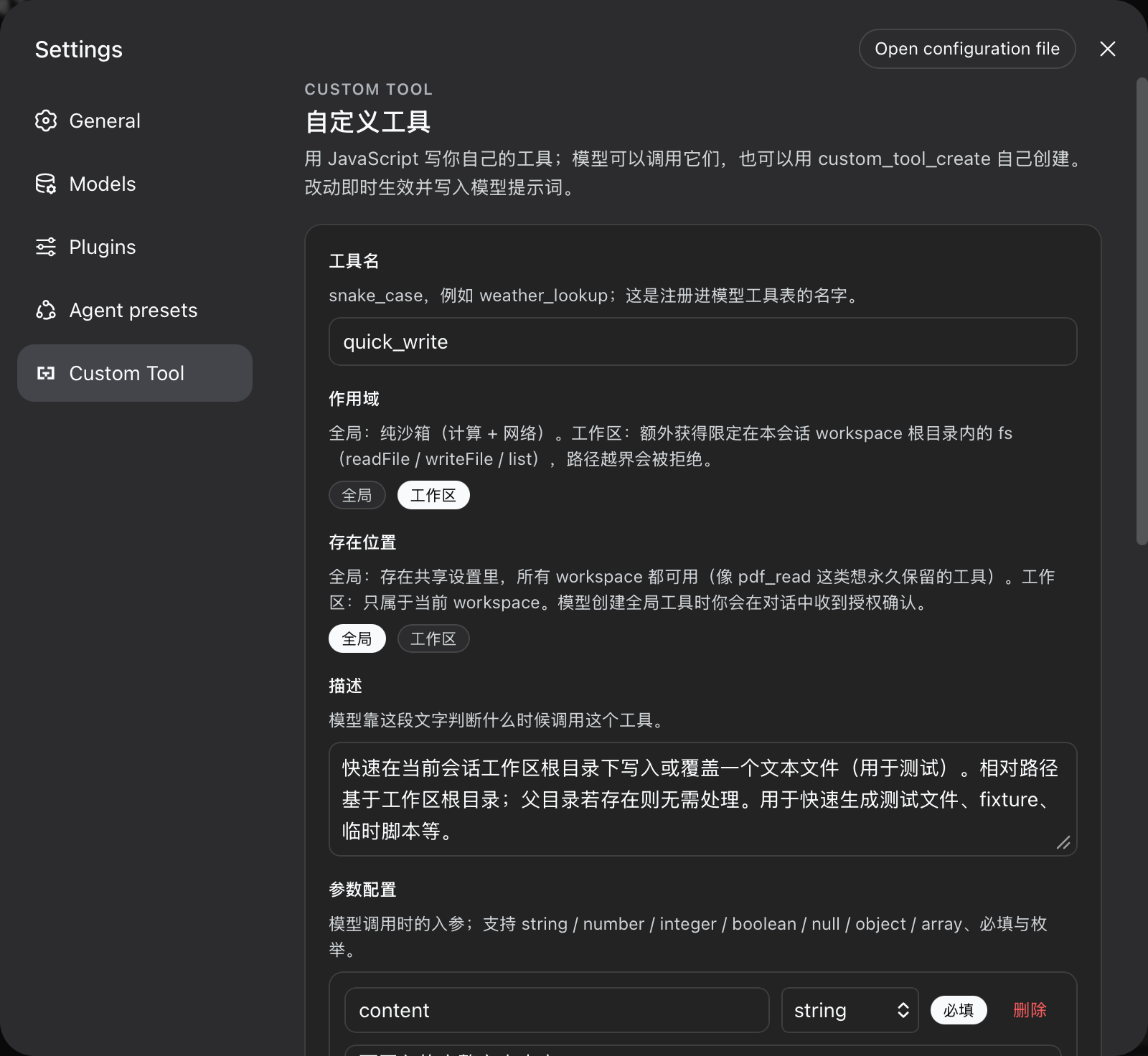
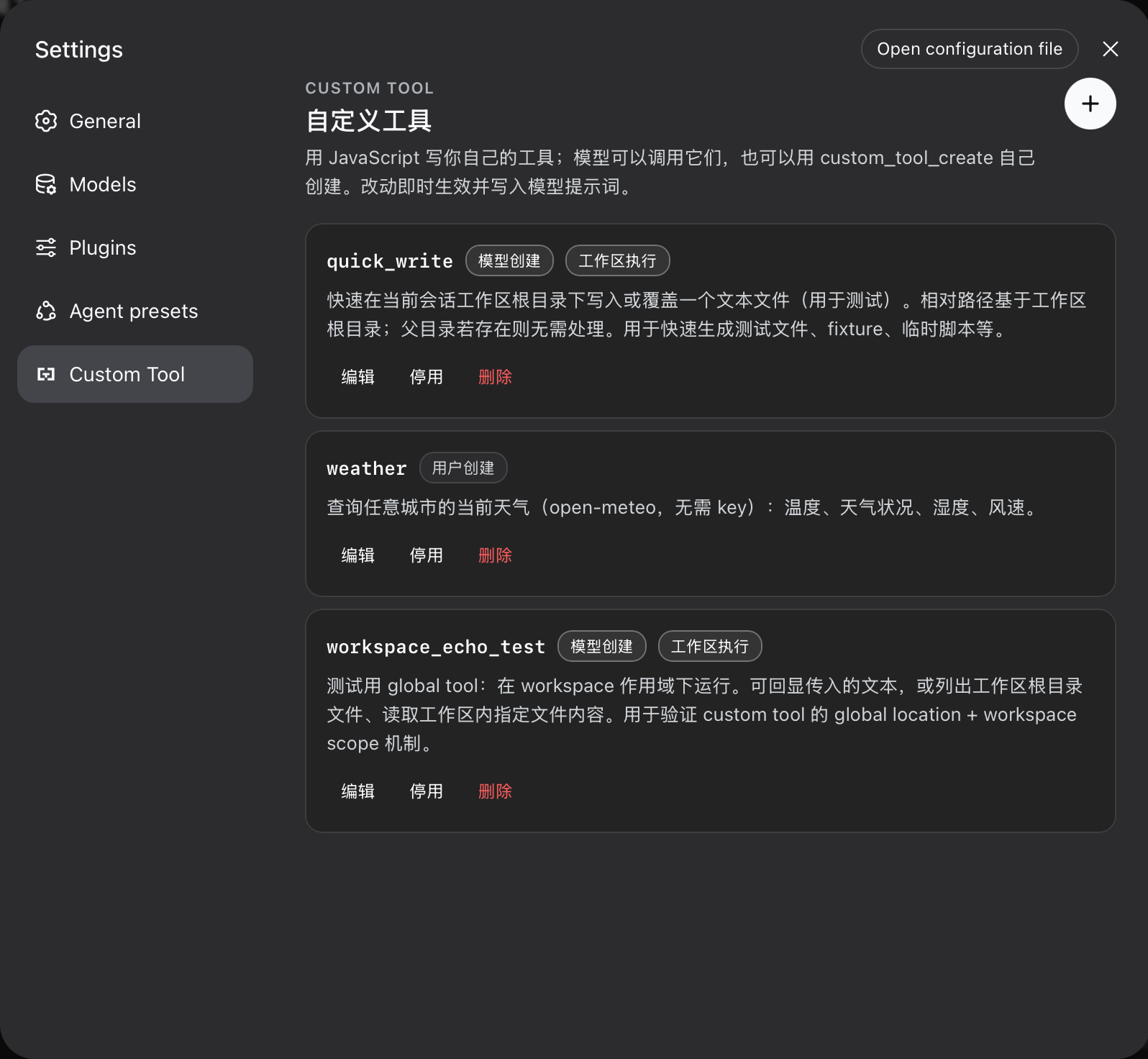
custom_tool_create lets the model persist tools mid-session (hot-registered, visible on its next step), with the same validation gate the UI uses — the model cannot persist anything the settings UI would refuse.node:vm realm with an explicit allowlist, Node Permission Model, and hard budgets. The worker receives no inherited environment variables, filesystem access outside its configured scope, or child-process capability.Custom Tool section, own nav glyph): list, create, edit, enable/disable, delete. Model-created and workspace-scoped tools are badged. Every string follows the harness locale (Chinese / English) and switches with the language preference.args typed from the parameter schema, env/sandbox globals declared, completions and diagnostics live. Editor and TS workers are bundled inline — the client bundle is a single file.custom-tools settings namespace (schema defaults, composition base, user document — the ordinary settings layering). Edits apply live; restart restores them.ctx.tools the moment the settings write commits; disabled/removed tools unregister immediately. The harness assembles tool schemas into the system prompt automatically.custom_tool_create (upsert by name), custom_tools_list, and custom_tool_remove share the UI's validation gate and the ownership rules below.Every tool declares one of two execution scopes. The boundary is the core security contract of this plugin:
global (default) |
workspace |
|
|---|---|---|
| Purpose | pure computation, external data, workflows | recurring file tasks inside the session workspace |
fetch (network) |
per allowNetwork config |
per allowNetwork config |
console, timers, TextEncoder, URL, … |
yes | yes |
fs capability |
no | readFile / writeFile / list, confined to the session workspace root |
require / import / process |
never | never |
Confinement rules for the workspace scope
cwd), resolved at call time.no workspace root rather than running without a boundary.resolve + prefix check). A symlink inside the workspace can still point out of it — workspace scope is trusted code, not a sandbox against a malicious host. The liveness budgets below apply to both scopes.Storage locations
Every tool also declares where it EXISTS:
location: 'global' — stored in the shared settings namespace; available in every workspace until removed.location: 'workspace' — stored in a per-workspace file under <dsh home>/workspace-tools/, keyed by the canonical workspace root; visible only to sessions of that workspace (registered into each matching agent's own tool scope).The two dimensions combine freely: a global-location tool with workspace scope (a durable file task the user keeps everywhere, like a PDF reader) runs its fs on whichever workspace calls it.
Ownership and authorization rules for the model
source: model).custom_tool_create raises a harness approval request (GUI prompt); a declined or unavailable answer fails the creation closed. Workspace-location tools are autonomous.source: user); custom_tool_remove refuses them and the system-prompt guidance says to ask the user to delete them in the settings UI.Execution budgets (both scopes)
timeoutMs), heap cap (memoryLimitMb), result text bound (maxResultChars), code size bound (maxCodeBytes), stored-tool cap (maxTools).dsh plugin --profile web add https://github.com/omdsh-dev/dsh-custom-tool/archive/refs/tags/v0.1.2.tar.gz
dsh web # restart the server to pick the plugin upThe package declares dsh.bundle.patch (mounts the host plugin) and dsh.client (serves the browser half at /plugins/dsh-custom-tool/client.js). lib/ is committed, so the GitHub tarball installs without a build step.
Harness requirement: the settings namespace is exposed to web configuration clients through the WEB_SETTINGS_NAMESPACES allowlist in packages/host/apiproxy/src/api-proxy.ts; the string 'custom-tools' must be present there (the upstream harness commit d6ea05b5 adds it). Without it the UI renders but saves are silently refused (settings-not-exposed).
The code field is the body of an async function async (args, env) => value:
// args is typed from the parameter JSON Schema you declared.
const url = `https://api.example.com/weather?city=${encodeURIComponent(args.city)}`
const response = await fetch(url)
if (!response.ok) throw new Error(`upstream returned ${response.status}`)
return await response.json()undefined or a non-JSON value fails the call.type, properties, required, items, enum, const, oneOf, additionalProperties, description, title, default, examples.fetch (blocked when allowNetwork: false), console, TextEncoder/TextDecoder, URL/URLSearchParams, atob/btoa, structuredClone, AbortController, setTimeout/setInterval + clears. env is { tool, scope }. Workspace scope adds fs.All tunables are cordis.yml config fields of the dsh-custom-tool entry:
| Field | Default | Meaning |
|---|---|---|
timeoutMs |
30000 | wall-clock budget per call |
memoryLimitMb |
128 | worker old-generation heap cap per call |
maxResultChars |
16000 | rendered result text budget |
maxCodeBytes |
65536 | UTF-8 byte budget per tool body |
maxTools |
100 | stored-tool cap |
allowNetwork |
true | whether tool bodies may call fetch or use network APIs |
pnpm install        # links the sibling dsh checkout for types and tests
pnpm run build      # worker bundles -> inline sources -> declarations -> bundles
pnpm run test       # builds workers first (pretest), then vitest
pnpm run typecheck
pnpm run lint
pnpm run check      # typecheck + lint + test + build
Node-env tests alias @deepseek-ai/dsh-client-runtime/client to source and monaco-editor to a mock (see vitest.config.ts).
custom_tools_list.CLASSIFICATION EVIDENCE
系统优先读取 GitHub Topics,再与站内分类词典和词根规则比对。
aooyoo
Zero-token DuckDuckGo search provider for the DeepSeek Harness (DSH) web seam — local headless browser, no API key, no m…
awa-123-cw
DSH 图片/音视频托管插件:自动拉起 8899 静态服务 + 3080 /files/ 路由(HTTP Range 流式)+ WebUI 内点击即播(视频静音/音频 20% 音量/互斥懒加载)
awa-123-cw
DSH 设置页「关于」栏位 + 一键检测更新插件(About page with update checking for DeepSeek Harness WebUI)