
文件与数据
插件
dsh-plugin-verified-search
f0909172434
Verified current-source search workflow for DeepSeek Harness
deepseekdeepseek-harnessdshdsh-plugin
PROJECT TOPICS
PROJECT README


Right-side file workspace for DeepSeek Harness. Click a path in a DSH Web session to read or diff it beside the conversation.
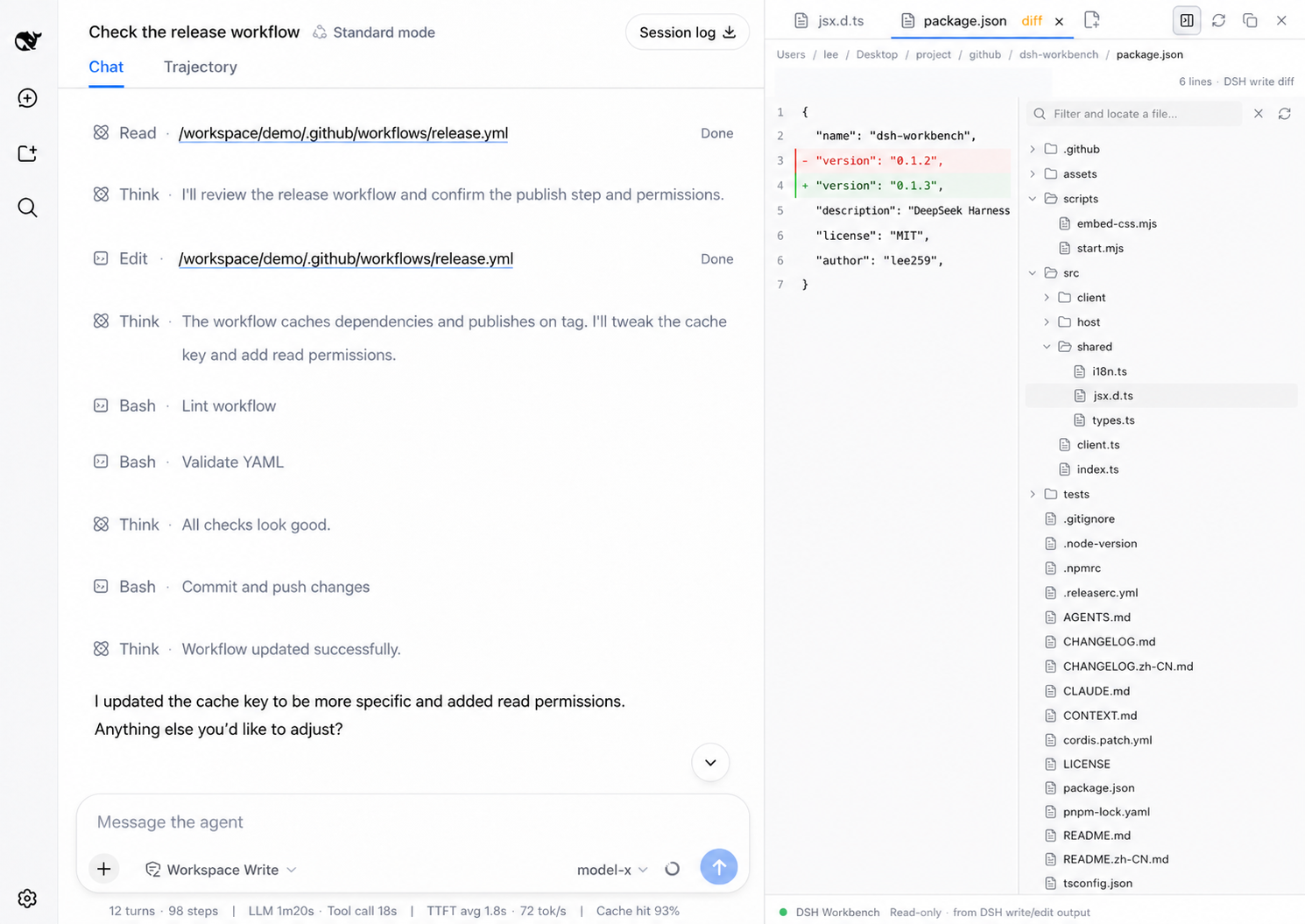
read       → source
write/edit → captured DSH diffHEAD.⌥⌘B toggle, ⌘⇧E hide or show the file pane, ⌘P open file, tree search to locate without opening, ⌘F / ⌘L find or jump, ⌘W close, ⌘1–⌘9 switch tabs. Drag or right-click to insert a path.+/−.dsh plugin --profile web add dsh-workbench
dsh webIf dsh is not on your PATH:
pnpm dlx @deepseek-ai/dsh plugin --profile web add dsh-workbench
pnpm dlx @deepseek-ai/dsh web
Local checkout:
git clone https://github.com/lee259/dsh-workbench.git
cd dsh-workbench
pnpm install
pnpm run build
dsh plugin --profile web add "$(pwd)"
dsh web
Rebuild and restart dsh web after plugin changes.
pnpm start -- /absolute/path/to/your/projectBuilds the plugin, registers it on the target project, and starts DSH Web. Without a path, uses the current directory.
| DSH operation | View |
|---|---|
read |
Source; images and Markdown render |
write / edit |
Captured DSH diff |
| File mention | Source; images and Markdown render |
Host listens to tool/call, tool/result, and tool/code-dispatch. Prefers dsh-tool-fs meta.diffs.
pnpm install
pnpm test
pnpm start -- /absolute/path/to/your/projectname, inject, apply(ctx) from src/index.tsdsh.client, exports["./client"], window.__ModuleLoader__.loadsrc/client/styles.cssreact-dom, need unbridged React APIs, or inject global CSS need an adapter; see src/client/react-bridge.ts and tsdown.config.ts.src/shared/i18n.tsInspect, navigate, and review what the agent touched. Diffs stay on captured DSH writes.
read and file mentionswrite / edit:line / #Lline targets⌘/Ctrl+P) and tree search that locates without opening+/− counts⌘/Ctrl+⇧+F)HEAD diffCLASSIFICATION EVIDENCE
系统优先读取 GitHub Topics,再与站内分类词典和词根规则比对。
f0909172434
Verified current-source search workflow for DeepSeek Harness
fryghost
Community plugin for DeepSeek Harness: give text-only models eyes - paste images natively, described via an OpenAI-compa…
gloryxpnv
Local-first vision for DeepSeek Harness: structured JSON evidence (OCR/layout/semantics) from local VLMs (LM Studio/Olla…