部署运维
插件
dsh-webui-perf
awa-123-cw
DeepSeek Harness WebUI 性能优化开关插件:长代码流式渲染/历史加载/高亮缓存优化,设置面板一键开关(with official-package patches)
deepseek-harnessdshdsh-pluginperformance
PROJECT TOPICS
PROJECT README
DSH web 客户端插件:在对话输入框下方的 dock 区显示 API 用量 —— token 用量分桶(缓存未命中输入 / 缓存命中输入 / 输出)、缓存命中率、上下文占用百分比,以及按 DeepSeek 官方定价估算的费用(支持峰谷时段自动计价)。
输入框下方一行用量显示:
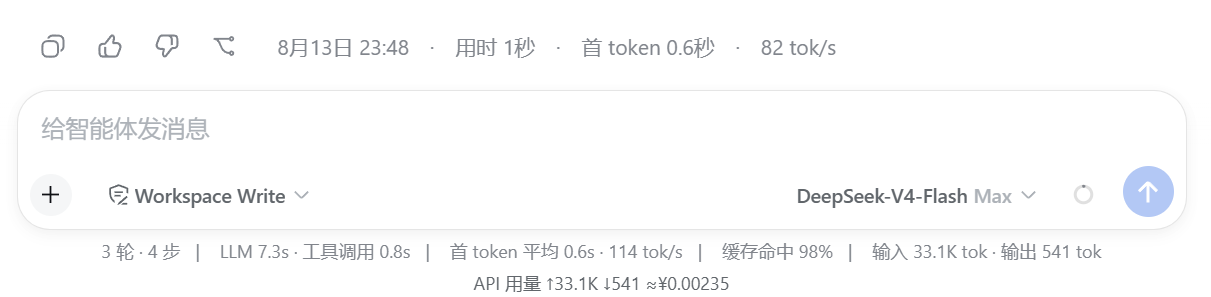
点击展开明细面板:
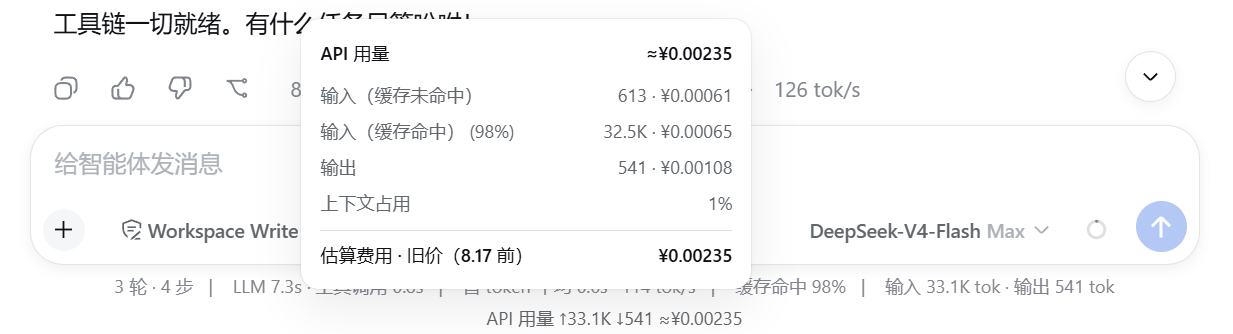
API 用量 ↑1.23M ↓345K ≈¥0.42tokenUsage / contextPressure 会话投影,由内置 @deepseek-ai/dsh-token-meter 提供(provider 报告的用量,非估算)。usage-panel: 设置节(见下)。插件按日期自动切换价格档位:
编辑 ~/.dsh/settings.yaml 可覆盖任意档位:
usage-panel:
  priceMode: auto            # auto | peak | offpeak
  # 旧价(2026-08-17 前,平峰统一)
  legacyCacheHitYuan: 0.02   # 缓存命中输入
  legacyCacheMissYuan: 1     # 缓存未命中输入
  legacyOutputYuan: 2        # 输出
  # 新价 · 高峰(2026-08-17 起)
  cacheHitPeakYuan: 0.10     # 缓存命中输入
  cacheMissPeakYuan: 3.0     # 缓存未命中输入
  outputPeakYuan: 9.0        # 输出
  # 新价 · 空闲
  cacheHitOffpeakYuan: 0.05  # 缓存命中输入
  cacheMissOffpeakYuan: 1.5  # 缓存未命中输入
  outputOffpeakYuan: 4.5     # 输出
高峰时段 = 北京时间 09:00–12:00、14:00–18:00。auto 按当前北京时段自动切换;其他模型可在同一节中覆盖为对应价格。
前置:已安装 Node.js ≥ 18,并全局安装 dsh:
npm i -g @deepseek-ai/dsh --registry=https://registry.npmmirror.com兼容性:本插件基于
dsh 0.1.0-rc.6开发。安装前可用dsh --version确认版本。若你的 dsh 版本不同,插件 API 可能有不兼容,届时以实际表现为准。
首次安装:如果你之前从未运行过
dsh web,~/.dsh/profiles/web/目录还不存在。请先运行一次dsh web(会自动生成 profile 结构),然后停止它,再继续下面的步骤。或直接执行下方命令中的New-Item手动创建目录。
# 1. 克隆本仓库
git clone https://github.com/jLeon-account/dsh-client-usage.git "$env:USERPROFILE\dsh-client-usage"

# 2. 复制到 dsh profile 的插件目录
$dst = "$env:USERPROFILE\.dsh\profiles\node_modules\dsh-client-usage"
New-Item -ItemType Directory -Path $dst -Force | Out-Null
Copy-Item "$env:USERPROFILE\dsh-client-usage\*" $dst -Recurse -Force把本仓库整个文件夹复制为 %USERPROFILE%\.dsh\profiles\node_modules\dsh-client-usage 即可(Windows 可用 robocopy <仓库路径> %USERPROFILE%\.dsh\profiles\node_modules\dsh-client-usage /E)。
在 %USERPROFILE%\.dsh\profiles\web\cordis.patch.yml 中启用插件。如果该文件或目录还不存在,先创建(或用 CMD):
New-Item -ItemType Directory -Path "$env:USERPROFILE\.dsh\profiles\web" -Force | Out-Null该文件默认内容是空数组 [](首次安装则为新创建的空文件),请把它改为:
- insert:
    - id: client-usage
      name: dsh-client-usage
注意:如果该文件已经有其他插件配置,请在顶层数组末尾追加上面这个
- insert:条目,不要覆盖已有内容。
重启 dsh web(或关闭并重新打开桌面应用)。插件在启动时扫描并加载。
cordis.patch.yml 中删除 - insert: 里的 client-usage 条目(或整个 insert 块)。%USERPROFILE%\.dsh\profiles\node_modules\dsh-client-usage 文件夹。dsh web。CLASSIFICATION EVIDENCE
系统优先读取 GitHub Topics,再与站内分类词典和词根规则比对。
awa-123-cw
DeepSeek Harness WebUI 性能优化开关插件:长代码流式渲染/历史加载/高亮缓存优化,设置面板一键开关(with official-package patches)
caiyfa
deepseek-harness (dsh) 全局 Token 用量看板插件 —— 一行命令安装,后台常驻增量统计全部会话:按模型/按时间/按会话的用量趋势(分钟·小时·天 × 柱状/堆叠/累计)、红绿异常时点标记与按会话异常分组,子代理消…
gordonlu
Request Context Profiler for DeepSeek Harness — see what changed between model requests, and how cache reuse changed wit…