生活娱乐
插件
dsh-web-speech-input
leozou320-ai
Voice-to-text for the DeepSeek Harness Web UI — live, editable, never auto-sends. | DeepSeek Harness 网页语音输入
accessibilitydeepseekdeepseek-harnessdsh-plugin
PROJECT TOPICS
PROJECT README
把 OpenAI Codex Pets 的宠物陪伴体验带进 DeepSeek Harness(DSH)Web GUI 的 Cordis 插件。
用宠物的行为状态代替进度条 —— 你的皮卡丘/小火龙会用动画告诉你 agent 正在思考、等你确认、还是完成了待你审查。
AI coding agent 跑长任务时(几分钟到十几分钟),你无法直观知道它现在在干什么:
| Agent 状态 | 宠物表现 | 你该做什么 |
|---|---|---|
| 思考中 / 写代码 | 原地跑动动画 | 去喝杯咖啡 ☕ |
| 等待你确认 / 审批 | 停下来盯着你看 | 回 DSH 响应 |
| 完成待审查 | 端坐/专注姿态 | 去看 diff |
| 出错 | 灰蓝色沮丧抖动 | 检查错误 |
| 空闲 | 呼吸/眨眼,偶尔挥手跳跃 | 陪它玩 😄 |
这正是 Codex Pets 的核心设计哲学:"agent 正在做什么"比"agent 是什么动物"更重要。
shell.overlay,右下角常驻,可拖拽、点击弹菜单、一键隐藏;状态气泡与配置菜单跟随宠物pet.json + 8×9 spritesheet(每帧 192×208)——社区标准,未来可直接导入 petdex.dev 上 4500+ 个社区宠物npm install -g @deepseek-ai/dshpnpm(dsh plugin 内部会调用 pnpm;可执行 corepack enable)dsh plugin --profile web add @hellosz/dsh-pets
dsh web如果使用 npx 启动 dsh,则对应命令为:
npx @deepseek-ai/dsh plugin --profile web add @hellosz/dsh-pets
npx @deepseek-ai/dsh web
安装后验证:
dsh --profile web --dump-config | grep -A2 'dsh-pets'浏览器打开 http://localhost:3080,皮卡丘会出现在右下角。
卸载:
dsh plugin --profile web remove @hellosz/dsh-petsdsh-pets.mjs # Host 入口(bundle 主入口):状态引擎 + pet/state、pet/asset 路由 + pet_say 工具
cordis.patch.yml # dsh bundle patch:向 profile 插件树插入本插件行
lib/client.js # Client 预构建产物:window.__ModuleLoader__.load 工厂
plugin/
├── pet-companion.host.js # 动态插件 Host(会话内 cordis_define 用,与 dsh-pets.mjs 功能一致)
└── pet-companion.client.js # 动态插件 Client(会话内 cordis_define 用)
packs/<id>/
├── pet.json # petdex 元数据(10 只)
└── spritesheet.png # 8×9 spritesheet
scripts/generate-packs.js # 从 sprites/ 源素材生成宠物包(ImageMagick)
sprites/ # 源素材(PokeAPI / Showdown 精灵)
docs/ # 预览图状态优先级:waiting(审批) > failed(错误) > review(回合结束) > running(思考/工具/子代理) > idle
数据流:Host 监听 agent/status、agent/turn-stopping、agent/error、approval/request、tools/execute|result、subagent/start|end、workflow/start|end → 推导状态 → 通过 webServer 暴露 GET /pet/state 与 GET /pet/asset → Client 每 600ms 轮询 pet/state → 播放对应动画行。
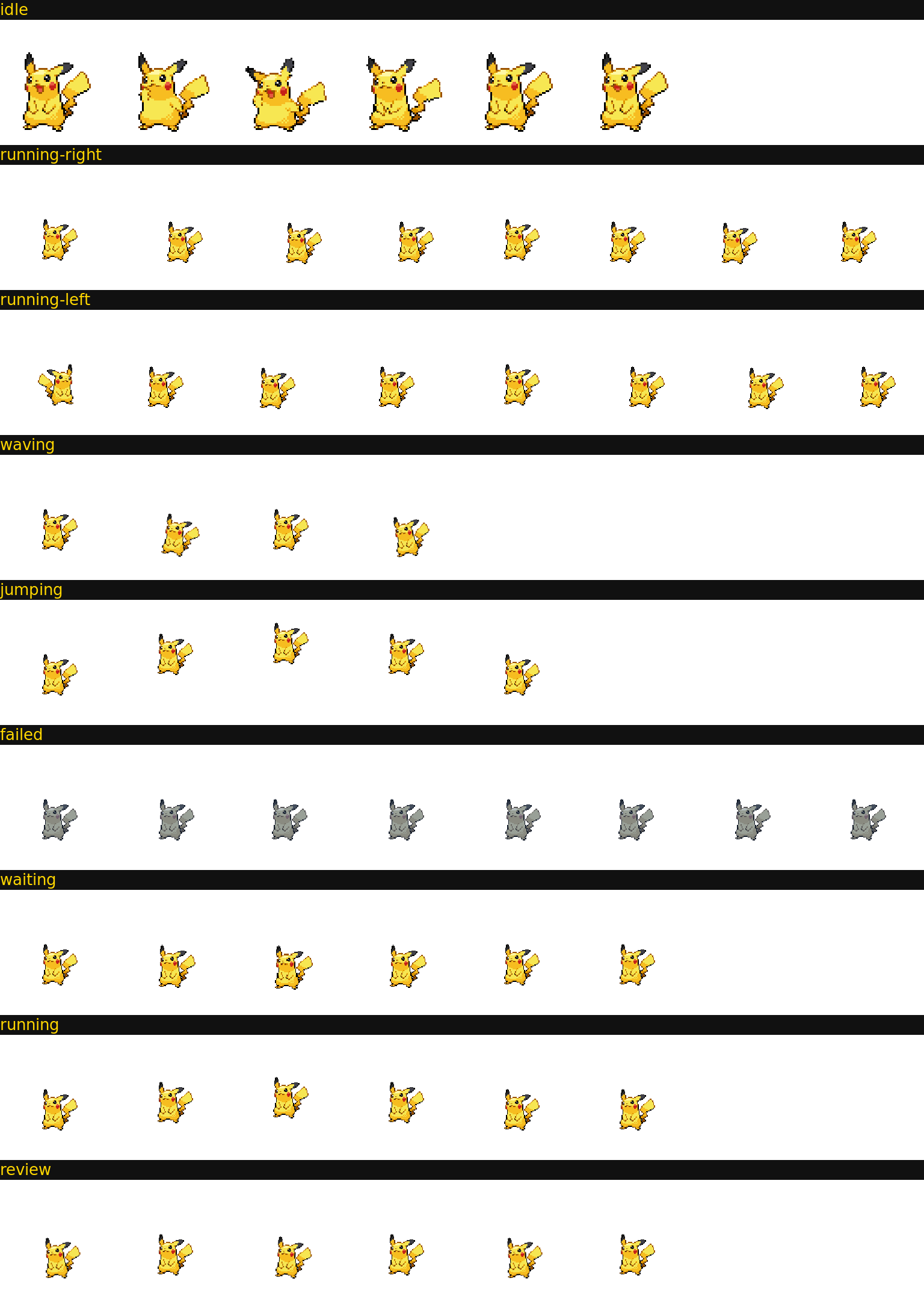
pet.json:{ id, displayName, description, spritesheetPath }spritesheet.png:8 列 × 9 行,每帧 192×208,行序固定:| 行 | 状态 | 帧数 | 用途 |
|---|---|---|---|
| 0 | idle | 6 | 呼吸/眨眼 |
| 1 | running-right | 8 | 向右跑 |
| 2 | running-left | 8 | 向左跑 |
| 3 | waving | 4 | 打招呼 |
| 4 | jumping | 5 | 跳跃 |
| 5 | failed | 8 | 出错 |
| 6 | waiting | 6 | 等待 |
| 7 | running | 6 | 原地跑 |
| 8 | review | 6 | 审查 |
# 依赖 ImageMagick 6+
node scripts/generate-packs.jssprites/ 目录已备)CLASSIFICATION EVIDENCE
系统优先读取 GitHub Topics,再与站内分类词典和词根规则比对。
leozou320-ai
Voice-to-text for the DeepSeek Harness Web UI — live, editable, never auto-sends. | DeepSeek Harness 网页语音输入
lhenlihai-hub
该仓库暂未提供项目说明。
misterbig5222-oss
DeepSeek Harness highlight annotation plugin: 8-color text highlighting, notes, tags, copy/delete, and context-positione…