其他
技能
dsh-web-search-ddg
aooyoo
Zero-token DuckDuckGo search provider for the DeepSeek Harness (DSH) web seam — local headless browser, no API key, no m…
deepseek-harnessdeepseek-harness-plugindsh-bundledsh-ctest
PROJECT TOPICS
PROJECT README
This repository is a feature fork: dsh-report-card adds a
card: 'report'render intent to DeepSeek Harness so tools can render interactive HTML reports directly inside the conversation.
packages/client/ui-report-panel - a standalone client plugin
(dsh-client-ui-report-panel) that contributes the report
artifact surface through public ui-conversation slots: the turn-tail card
and the right-hand panel (tabs, search, scroll memory, minimize,
multi-document tabs, ask-in-chat). The fork's ui-conversation stays at the
upstream baseline; the panel is an opt-in composition entry.
packages/core/tools/src/presentation.ts — new ReportCallView /
ReportResultView (card: 'report', carrying a self-contained HTML
document), wired into the ToolCallView / ToolResultView unions. The wire
types flow to clients automatically, so any tool can emit the card.
packages/client/ui-primitives/src/ReportBlock.tsx — sandboxed inline
renderer: the report HTML is displayed in an <iframe sandbox="allow-scripts">
(no same-origin), so report scripts can run but cannot touch the host page.
The frame auto-resizes via a postMessage height contract
(dsh-report-height), can open the report in a new tab, copy the HTML, or
download it as a title-named file. The details panel renders the report as a
full-height reading surface (up to 4096px).
packages/client/ui-tool — reportCardModel derivation plus render wiring
in the chat tool row and the details panel; malformed wire payloads (bad
title, empty or >5MB html) fall back to the generic card instead of
crashing. Report cards show up in the conversation immediately as standalone
ChatGPT-style cards: a compact preview with an Expand action to view the
full HTML and Collapse to shrink it back. The standalone card renders in the
core conversation renderer at the turn tail (the bottom of the message),
fully outside the tool-call tree. Clicking the card opens a right-side
application panel showing the full report; the panel shares the same layout
plane (the conversation is pushed left), includes a Refresh action, and
auto-replaces its content when a newer report arrives. Controls follow the
UI language (zh/en). The panel is fixed to the right side of the viewport
(full height, independent scroll) and the conversation reserves its width,
so the two are independent parallel spaces. The report fills the panel
height, so the whole pane is used. Multiple reports open as tabs in the
panel, and the panel width is draggable (320-800px). Reports load through
blob URLs with an injected in-frame navigation shim, so in-report anchor
links (table of contents) smooth-scroll to their target without blanking
the frame, and the collapsed preview stays scrollable. The panel searches
inside the report (the sandboxed frame is opaque to host Ctrl+F), remembers
each tab's scroll offset across switches, and minimizes to a narrow bar
without losing the tab set. Batch deliveries open as multi-document tabs
with an index page whose links switch reports, and the panel can compose an
ask-about-report question into the main conversation.
demo/report-card-demo — a demo tool that emits the card.
demo/report-html-integration — mounts the
dsh-report-html plugin so
its report tools emit the card; verified end to end with a real headless run.
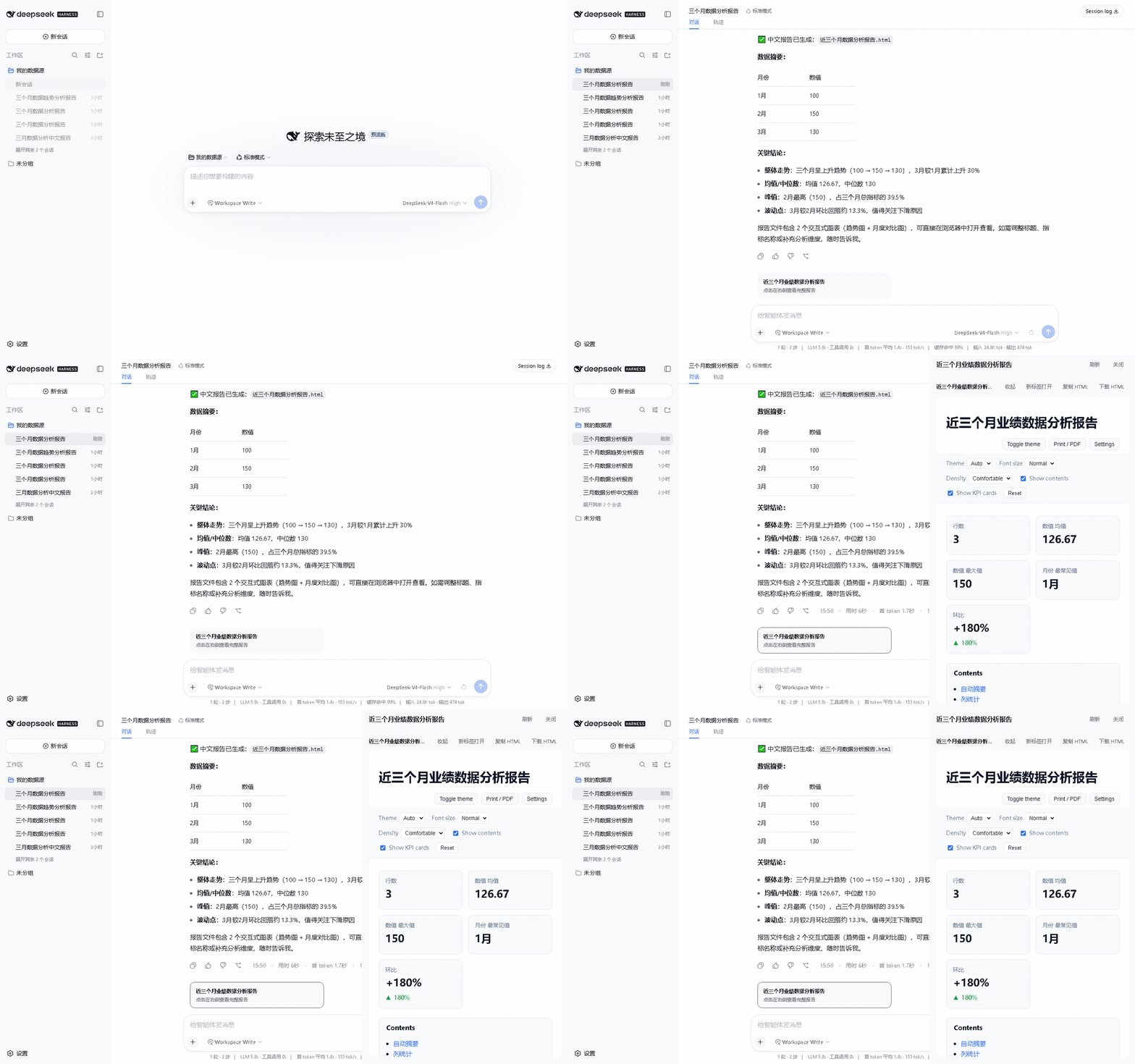
Real server, real model round: ask for a report, click the card, and the full report opens in an independent right-hand panel.
The report panel ships as an npm plugin and can be added to any dsh host:
dsh plugin --profile web add dsh-client-ui-report-panelPair it with a report generator such as
dsh-report-html
(dsh plugin --profile web add dsh-report-html). The fork's demo overlay
demo/report-html-integration/cordis.yml mounts both for local development.
pnpm install
pnpm dsh --profile web --patch ./demo/report-card-demo/cordis.yml
Open http://127.0.0.1:3080 and ask: Use the demo_report tool. The returned
HTML report renders inline in the conversation.
Any tool can use the intent by declaring a presentResult that returns
{ card: 'report', title, html }; dsh-report-html is the full report
generator companion that produces the HTML payload.
English | 中文
DeepSeek Harness (dsh) is an open-source agent harness developed by DeepSeek AI.
It uses an architecture where everything is a plugin, and is powered by Cordis, whose design is described in A Programming Paradigm for Spatiotemporal Composability.
DeepSeek Harness is currently in developer preview and is iterating rapidly. THERE WILL BE COMPATIBILITY-BREAKING CHANGES.
npmInstall Node.js, then run:
npx @deepseek-ai/dsh webThe command starts the Web UI, served at http://127.0.0.1:3080 by default. See Web UI guide.
To run from a repository checkout:
git clone https://github.com/deepseek-ai/deepseek-harness.git
cd deepseek-harness
pnpm install
pnpm run build
pnpm dsh webdsh-plugin topic to your plugin repository for discoverability.See CONTRIBUTING.md.
Start with the development guide and architecture documentation.
For agents, follow AGENTS.md.
Third-party dependencies and their licenses are disclosed in THIRD_PARTY_NOTICES.md.
CLASSIFICATION EVIDENCE
系统优先读取 GitHub Topics,再与站内分类词典和词根规则比对。
aooyoo
Zero-token DuckDuckGo search provider for the DeepSeek Harness (DSH) web seam — local headless browser, no API key, no m…
awa-123-cw
DSH 图片/音视频托管插件:自动拉起 8899 静态服务 + 3080 /files/ 路由(HTTP Range 流式)+ WebUI 内点击即播(视频静音/音频 20% 音量/互斥懒加载)
awa-123-cw
DSH 设置页「关于」栏位 + 一键检测更新插件(About page with update checking for DeepSeek Harness WebUI)