文件与数据
插件
dsh-plugin-verified-search
f0909172434
Verified current-source search workflow for DeepSeek Harness
deepseekdeepseek-harnessdshdsh-plugin
PROJECT TOPICS
PROJECT README
Give a text-only model in DeepSeek Harness sight — then just paste the image.
Pasted images are normally refused the moment the selected model is text-only, before any tool or plugin can react. deepseek-eyes adds a DeepSeek(视觉桥) entry to the model picker: select it, keep your usual text model underneath, and paste or drag images exactly like a native vision model. Set it up once in the Settings UI — no YAML, no new provider, no extra model download — and it just works from then on.
Community plugin — not affiliated with DeepSeek. This is a community-maintained, third-party plugin. It is not developed, sponsored, or endorsed by DeepSeek (深度求索), and it is not part of the official
@deepseek-ainpm scope.
中文说明见 README.zh.md。
Three steps, mostly point-and-click:
1. Install
git clone https://github.com/<you>/deepseek-eyes.git
dsh plugin --profile web add "file:$PWD/deepseek-eyes"
Restart the running Web profile and refresh the page. On Windows PowerShell, pass the absolute checkout path directly to dsh plugin — keep the file: prefix, it matters (see Install).
2. Configure once, in the UI. Open Settings → DeepSeek Eyes and fill in just two things:
Press Test connection to verify — settings save and apply live, no restart needed.
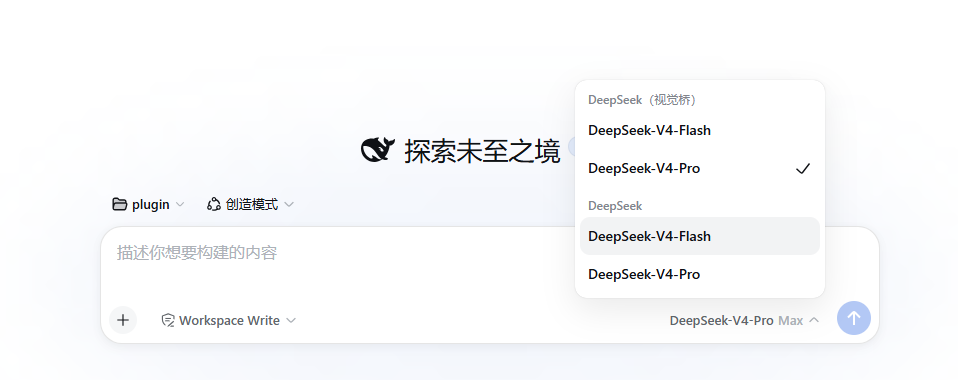
3. Select the bridge and paste. In the model picker choose DeepSeek(视觉桥) with your usual text model id (e.g. deepseek-v4-pro), paste or drag an image into the composer, ask a question in the same message, and send.
That's it. Text-only requests pass through untouched; only messages containing images are rewritten. Stuck? See Troubleshooting.
The only two things you bring: a vision endpoint and its key. Everything else — provider wiring, the Settings page, credential storage, image admission — is taken care of by the plugin.
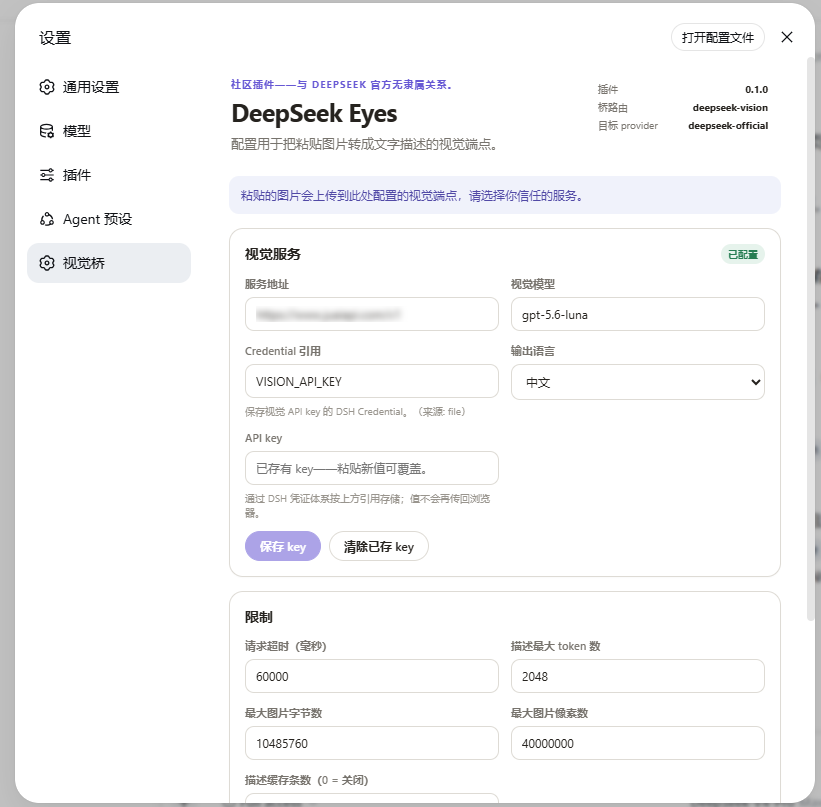
Configure the vision endpoint once on the Settings page — fill it in, test the connection, save the key:
Then pick DeepSeek(视觉桥) in the model selector and paste an image as usual:
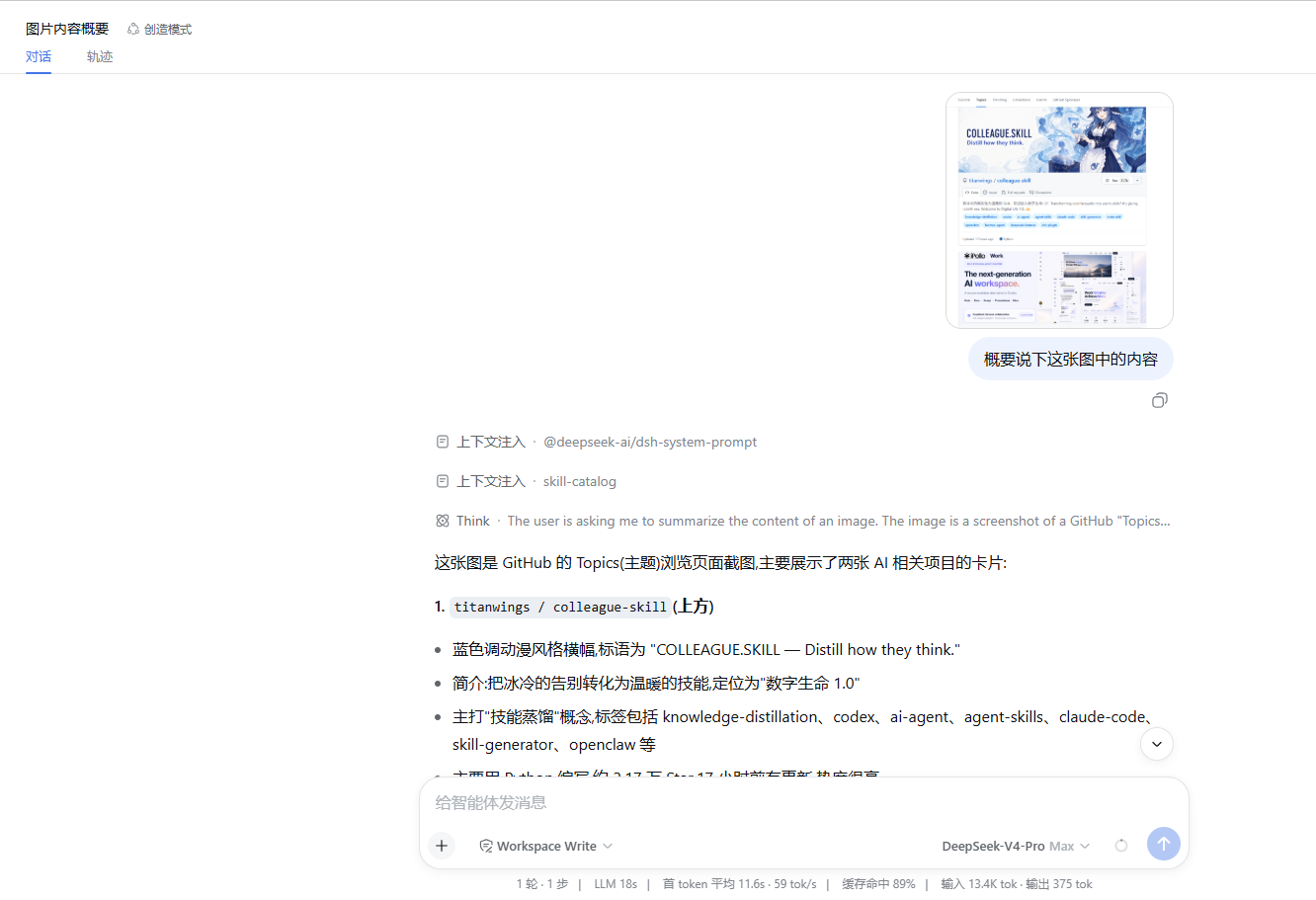
And here is the bridge in action: paste an image straight into the chat — DeepSeek-eyes describes it and hands the description to the text-only model, which then reads and analyzes it:
flowchart LR
    A[Paste / drag an image<br/>bridge provider selected] --> B[DSH prompt admission<br/>inputModalities: text + image]
    B --> C[Bridge adapter stream]
    C -->|has images| D[Focus hint from user text]
    D --> E[Vision API<br/>OpenAI-compatible]
    E --> F[Image block → text description]
    F --> G[Forward text-only request]
    C -->|no images| G
G --> H[Target provider<br/>e.g. deepseek-official]inputModalities: ['text', 'image'], so the host admits image content instead of answering Model "..." does not support image input. — the rejection shown in the Web UI as an attachment-error.stream(), the adapter walks the request messages (including tool-result content), extracts a focus hint from the message's own text or the nearest preceding user text, and asks the vision API: "the agent is looking at this image because: ctx.llm.stream under the target provider route, so the real adapter's serialization, streaming, retries, and telemetry stay intact. Text-only requests forward with untouched messages.git clone https://github.com/<you>/deepseek-eyes.git
dsh plugin --profile web add "file:$PWD/deepseek-eyes"
# headless profiles too, if you run them:
dsh plugin --profile headless add "file:$PWD/deepseek-eyes"
# store the vision API key through the credentials seam:
dsh credentials set VISION_API_KEYRestart the running Web profile, refresh the page, and configure the vision endpoint (see above). On Windows PowerShell, dsh plugin accepts the absolute checkout path directly.
Use the
file:prefix. A bare directory path makes pnpm install alink:dependency — a symlink from the profile to your checkout. Released DSH runtimes load plugins with plain Node ESM, which resolves that symlink to its real location outside the profile tree, so the plugin's peer imports (@deepseek-ai/dsh-settings,@deepseek-ai/dsh-llm, …) can no longer find the profile's module fallback, and the harness fails to start withCannot find package '@deepseek-ai/dsh-settings'. Thefile:prefix makes pnpm copy the checkout into the profile (a real directory — resolution stays inside the profile), which works on every runtime. The bare-path form only appears to work under the source-checkout dev harness (tsx). Tarball installs are equivalent:pnpm pack, thendsh plugin add ./deepseek-eyes-0.1.0.tgz.Because
file:installs a copy, rebuild (pnpm run build) and re-rundsh plugin add "file:…"after changingsrc/.
Preferred: configure in the Web UI. After restarting, open Settings → DeepSeek Eyes: a full form (vision endpoint, model, credential reference with its configured state, output language, timeout and image limits, description cache) that saves and applies live, plus a Test connection button (GET /models against the configured endpoint — no image, no completion). The same page has an API key field: paste the vision key there and press Save key — it stores through the DSH credentials seam under the configured reference and is never sent back to the browser (a Clear stored key button removes it). The Models settings page also gains a DeepSeek Eyes row showing the bridge route's model list and credential state.
The UI edits the same deepseek-eyes settings section as hand-written YAML — override in your profile patch row with the same id (e.g. %DSH_HOME%\profiles\web\cordis.patch.yml):
- id: deepseek-eyes
  config:
    provider: deepseek-vision          # bridge route shown in the model picker
    displayName: 'DeepSeek(视觉桥)'
    targetProvider: deepseek-official  # the real text-only provider route
    apiKeyEnv: VISION_API_KEY          # credential reference, not the key value
    vision:
      baseUrl: https://your-vision-provider.example.com/v1   # any OpenAI-compatible endpoint
      model: your-vision-model
      language: zh                      # zh | en
      timeoutMs: 60000
      maxTokens: 2048
      maxImageBytes: 10485760
      maxImagePixels: 40000000
cacheSize: 16| Field | Default | Meaning |
|---|---|---|
provider |
deepseek-vision |
Bridge route id; pick it in the model picker. |
displayName |
DeepSeek(视觉桥) |
Provider name shown in selectors. |
targetProvider |
deepseek-official |
Route the rewritten request is forwarded to. Must differ from provider. |
apiKeyEnv |
VISION_API_KEY |
Credential reference, resolved per call through the credentials seam, then the process environment. |
vision.baseUrl |
(empty) | OpenAI-compatible endpoint base URL; required before the first image is described. |
vision.model |
(empty) | Vision model id; required before the first image is described. |
vision.language |
zh |
Language of the generated description. |
vision.timeoutMs |
60000 |
Per-call deadline (1000–600000). |
vision.maxTokens |
2048 |
Output-token cap for one description. |
vision.maxImageBytes |
10485760 |
Encoded-byte ceiling per image. |
vision.maxImagePixels |
40000000 |
Decoded-pixel ceiling per image. |
vision.cacheSize |
16 |
In-memory description cache entries; 0 disables it. |
The API key never lives in the patch: paste it into the API key field on the DeepSeek Eyes page, or store it with dsh credentials set VISION_API_KEY, or export it in the launching environment. Settings-page saves apply live; a changed provider re-registers the route in place.
displayName) with your usual text model id (e.g. deepseek-v4-pro).Tip: put the question in the same message as the image — it becomes the focus hint and materially improves the description.
deepseek-eyes is a thin layer: it ships no model and no provider of its own. Everything it needs falls into four groups.
1. Provided by the consuming DSH profile (peer dependencies — already installed in any standard profile):
| Package | Role |
|---|---|
@deepseek-ai/dsh-llm ≥ 0.1.0-rc.1 |
the LLM registry and adapter base class this plugin extends (developed against the 0.1.0-rc.5 line) |
@deepseek-ai/dsh-attachment ≥ 0.1.0-rc.1 |
durable image storage, read back at request time |
@deepseek-ai/dsh-settings ≥ 0.1.0-rc.1 |
the live configuration section |
@deepseek-ai/cordis ≥ 4 |
the plugin framework |
@deepseek-ai/schemastery ≥ 3.18 |
the configuration schema |
2. Local environment:
| Dependency | Notes |
|---|---|
| Node ≥ 22.19 (or ≥ 24) | matches the harness runtime (engines) |
| pnpm | used by dsh plugin to install the bundle |
3. External services you must bring:
| Service | Notes |
|---|---|
OpenAI-compatible vision endpoint (/chat/completions with image_url parts) + its API key |
not bundled — any compatible provider works (OpenRouter, DashScope, a self-hosted VL model, …). Pasted images are uploaded to this endpoint, so choose one you trust. |
The target text provider route (default deepseek-official) |
the model that actually answers; any text route registered in the profile works, but it must differ from the bridge route. |
4. Development only (not needed at runtime): TypeScript, Vitest, @types/node, React types — plus the deepseek-harness checkout as a sibling (its built lib/ type declarations pin the typecheck to the exact harness API line; see Development).
deepseek-eyes and dsh-vision-toolkit solve different halves of the problem and can run side by side:
| deepseek-eyes | dsh-vision-toolkit | |
|---|---|---|
| Paste an image, model sees it | ✅ seamless | ❌ rejected for text-only models |
| Grounding, element inventory, exact pixel coordinates | ❌ | ✅ (vision_ground, vision_detect) |
| Long-screenshot OCR, SVG tracing, pixel diff | ❌ | ✅ |
| Extra provider route in the picker | ✅ | — |
The bridge gives the model a description; the toolkit gives the agent pixel-precise tools. For engineering-grade vision work, install both and use the toolkit's tools for measurements.
Failures surface as terminal LLM errors with stable codes:
| Code | Meaning |
|---|---|
VISION_CONFIG |
vision.baseUrl / vision.model not configured. |
VISION_CREDENTIAL |
No API key: run dsh credentials set <credential>. |
VISION_HTTP |
Vision endpoint returned a non-2xx status (status rides along). |
VISION_RATE_LIMIT |
Vision endpoint returned 429. |
VISION_TIMEOUT |
The per-call deadline elapsed. |
VISION_NETWORK |
Transport failure before any HTTP response. |
VISION_INVALID_RESPONSE |
Unusable payload or empty content. |
VISION_IMAGE_TOO_LARGE |
Image exceeds maxImageBytes / maxImagePixels. |
VISION_IMAGE_READ |
The durable image could not be read back. |
ABORTED |
The caller cancelled the request mid-description. |
| Symptom | Fix |
|---|---|
Harness fails to start after install: failed to import loader entry deepseek-eyes … Cannot find package '@deepseek-ai/dsh-settings' (or -llm/-credentials) |
The plugin was installed by bare path, which pnpm links (link:) instead of copying. Reinstall with the file: prefix (dsh plugin add "file:<checkout>") or from a tarball, then restart. |
| Pasting still shows "does not support image input" | The bridge provider is not selected in the model picker; the plugin cannot change what the text-only route admits. Select deepseek-vision. |
| The bridge provider is missing from the picker | Restart the Web profile after dsh plugin add and refresh the page; check dsh --profile web --dump-config \| grep deepseek-eyes. |
VISION_CONFIG |
Set vision.baseUrl and vision.model in the profile patch. |
VISION_CREDENTIAL |
Store the key in the API key field on the DeepSeek Eyes page, or run dsh credentials set VISION_API_KEY (or whatever apiKeyEnv names). |
VISION_HTTP 401/403 |
The credential value or endpoint is wrong; the error body is bounded and redacted. |
VISION_RATE_LIMIT |
Wait out the provider window; lower the paste rate or switch endpoints. |
NO_ADAPTER for the target |
targetProvider names a route no plugin registers (or loads after this one). Check the id. |
vision.timeoutMs accordingly.maxImageBytes, maxImagePixels) before any upload.pnpm install # devDependencies only; harness peers resolve from the consuming profile
pnpm typecheck # tsc over src + tests (host side)
pnpm build # emits lib/ (host) and lib/client.js (browser Settings card)
pnpm test # vitest unit tests (rewrite, vision client, config)lib/ is committed on purpose: dsh plugin add "file:<path>" installs the checkout and loads main: lib/index.js; the Web frontend discovers the browser bundle through the dsh.client declaration and exports["./client"].tsconfig files map @deepseek-ai/dsh-* type imports to a sibling deepseek-harness checkout's built lib/ declarations (registry-published versions predate parts of that API). Clone github.com/deepseek-ai/deepseek-harness next to this repo and build it once; the same layout is what CI assumes.pnpm run build after any src/ change before installing into a profile; file: installs copy the checkout, so re-run dsh plugin add "file:…" to pick the rebuilt lib/ up..github/workflows/ci.yml.MIT — see LICENSE.
The focus-hint idea (send why the model is looking at the image to the vision model instead of asking for a generic description) comes from Anionex/agent-vision-toolkit. This plugin implements that idea natively inside the DeepSeek Harness LLM adapter layer.
CLASSIFICATION EVIDENCE
系统优先读取 GitHub Topics,再与站内分类词典和词根规则比对。
f0909172434
Verified current-source search workflow for DeepSeek Harness
gloryxpnv
Local-first vision for DeepSeek Harness: structured JSON evidence (OCR/layout/semantics) from local VLMs (LM Studio/Olla…
gmleong
Give text-only models eyes: analyze_image tool for DeepSeek Harness, backed by free Chinese vision APIs (GLM-4V-Flash / …