其他
技能
dsh-web-search-ddg
aooyoo
Zero-token DuckDuckGo search provider for the DeepSeek Harness (DSH) web seam — local headless browser, no API key, no m…
deepseek-harnessdeepseek-harness-plugindsh-bundledsh-ctest
chou109/dsh-workspace-launcher
在 DeepSeek Harness 侧边栏工作区的"..."菜单里,一键用文件资源管理器、VS Code 或终端打开工作区文件夹,或复制其绝对/相对路径——不用再满硬盘翻找文件夹在哪。 open your DeepSeek Harness workspace folder in File Explorer, VS Code, or a terminal — or copy its absolute/relative path — straight from the workspace row menu. No more hunting for folders.
PROJECT TOPICS
PROJECT README
Open your DeepSeek Harness (dsh) workspace folder in the system file manager, VS Code, or a terminal — and copy its path — straight from the workspace row menu in the sidebar.
国内镜像 / Mirror: also hosted on gitee.com/chill109/dsh-workspace-launcher — Gitee is a mainland-China Git host (faster access from mainland China; use it if GitHub is slow).
| Platform | Windows-first (explorer.exe); macOS / Linux best-effort |
| Requires | DeepSeek Harness dsh web (0.1.0-rc.6 profile layout) |
| License | MIT (add a LICENSE file before publishing) |
中文版见 README.zh.md。
This part is written for people who just want to install and use the plugin.
After installing, hover any workspace in the sidebar → Workspaces list, click the "..." menu, and you get five new actions:
xdg-open elsewhere)code <workspace>>_ Open in terminal — a terminal window rooted at the workspace (Windows Terminal, falling back to PowerShell)D:\qwen-mm-pluginsqwen-mm-plugins); a toast confirms "Copied"No more hunting through the filesystem to find where your workspace lives — one click opens it.
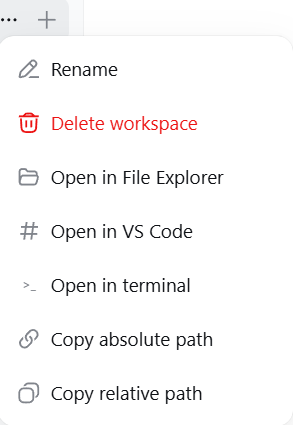
As shown above: hover a workspace in the sidebar, click the "..." at the end of the row, and this plugin adds five actions — Open in File Explorer (the default), Open in VS Code, Open in terminal, Copy absolute path, Copy relative path. Every action shows a result toast in the bottom-right corner (success/failure), so nothing fails silently.
code CLI and the standard install paths automatically)dsh web --host 127.0.0.1 --port 3080)git optional (used for the cleanest patch path; a built-in fallback exists)Copy the plugin package
Copy-Item -Recurse .\plugin\dsh-workspace-launcher "$env:USERPROFILE\.dsh\profiles\node_modules\"Patch the workspace client bundle
cd "$env:USERPROFILE\.dsh\profiles\node_modules\@deepseek-ai\dsh-client-ui-workspace\lib"
git -c core.autocrlf=false apply --unsafe-paths --directory="$PWD" ..\..\..\..\..\..\dsh-workspace-launcher\patch\dsh-client-ui-workspace.patch
(If git is unavailable, run .\install.ps1 which applies the same changes with a built-in fallback.)
Register the plugin — append to %USERPROFILE%\.dsh\profiles\web\cordis.patch.yml:
- insert:
    - id: workspace-open
      name: 'dsh-workspace-launcher'
Restart the harness — close the DeepSeek Harness Server window and run start-dsh.bat (or restart the dsh web process), then hard-refresh the browser (Ctrl+F5).
Why a hard refresh: dsh serves each client bundle with a content hash; the browser must re-fetch after the bundle changes.
.\install.ps1 # installs everything and restarts the harnessCopy/paste this whole paragraph into your AI assistant (any coding agent that can run shell commands):
Deploy the dsh-workspace-launcher plugin from
https://github.com/chou109/dsh-workspace-launcher(mainland-China mirror:https://gitee.com/chill109/dsh-workspace-launcher) to my local DeepSeek Harness web profile.
- Run
.\install.ps1(Windows) — or followinstall.shon macOS/Linux — from the repo root. It copies the plugin package into%USERPROFILE%\.dsh\profiles\node_modules, patches@deepseek-ai/dsh-client-ui-workspace's client bundle (adding the workspace row menu entries), and registers the plugin inprofiles\web\cordis.patch.yml.- If you cannot run the scripts, follow the README "For AI" deployment section exactly (copy files, apply
patch/dsh-client-ui-workspace.patchwithgit -c core.autocrlf=false apply, append the cordis insert, restart the harness).- After the harness is back, verify:
Invoke-RestMethod -Uri http://127.0.0.1:3080/workspace-open/open -Method Post -ContentType 'application/json' -Body '{"path":"D:\\","app":"explorer"}'returns{"ok":true}and a File Explorer window opens. Then tell me to hard-refresh the browser.
.\install.ps1 -Uninstallor manually: delete profiles\node_modules\dsh-workspace-launcher, remove the workspace-open insert from cordis.patch.yml, and reverse the patch (git apply -R) or reinstall @deepseek-ai/dsh-client-ui-workspace@0.1.0-rc.6. Then restart the harness.
This part is written for AI agents that install, debug, or extend this plugin. It assumes you can run shell commands on the target machine and can read the dsh source packages in node_modules.
A DeepSeek Harness web-profile plugin that adds "open / copy" actions for workspace folders:
plugin/dsh-workspace-launcher/lib/index.js, a cordis plugin exposing POST /workspace-open/open { path, app: "explorer" | "vscode" | "terminal" }. It spawns detached, stdio-ignored processes (explorer.exe / code / Windows Terminal→PowerShell fallback) and validates that path is absolute (relative paths → HTTP 400).plugin/dsh-workspace-launcher/lib/client.js declares dsh.client so the package stays a valid client-module entry, but registers no UI.patch/dsh-client-ui-workspace.patch (5 hunks) edits @deepseek-ai/dsh-client-ui-workspace/lib/client.js: it injects 5 items into the hardcoded workspaceMenuItems of ProjectRowItem (the sidebar workspace "..." menu), wires onSelect to fetch("/workspace-open/open") / writeClipboard, adds a showNotice() toast, and adds 8 locale keys (zh+en).Why a patch and not a pure plugin? The workspace row "..." menu is hardcoded in the shipped dsh-client-ui-workspace client bundle; there is no slot to inject menu items (verified: the slot catalog has sidebar.workspaces as a single-occupant slot for the whole browser, not per-row). Editing the bundle is the supported pattern here because dsh serves client bundles at runtime from disk — no rebuild, no republish.
$profiles = "$env:USERPROFILE\.dsh\profiles"          # or $env:DSH_HOME\profiles
Copy-Item -Recurse plugin\dsh-workspace-launcher "$profiles\node_modules\"$dir = "$profiles\node_modules\@deepseek-ai\dsh-client-ui-workspace\lib"
git -c core.autocrlf=false apply --unsafe-paths --directory="$dir" patch\dsh-client-ui-workspace.patchclient.js with a/client.js/b/client.js headers; run it from the repo root.-c core.autocrlf=false is mandatory on Windows or git rewrites the file to CRLF (breaks the served bundle hash semantics — actually just makes a noisier diff; still runs, but keep it clean).@deepseek-ai/dsh-client-ui-workspace@0.1.0-rc.6. If git apply fails, the installed version differs — re-download the pristine file (npm pack @deepseek-ai/dsh-client-ui-workspace@0.1.0-rc.6) and re-diff, or use install.ps1's literal fallback (it aborts loudly on anchor mismatch).install.ps1 skips patching if the marker dsh-workspace-open: reveal the workspace folder is already present.Append to $profiles\web\cordis.patch.yml (skip if dsh-workspace-launcher already present):
- insert:
    - id: workspace-open
name: 'dsh-workspace-launcher'Kill the dsh web node process tree (also reaps the MCP server children; they respawn on boot) and start it again — e.g. rerun start-dsh.bat. Then the browser must hard-refresh: the boot manifest (window.__DSH_BOOT__) carries per-bundle content hashes; client-modules hashes are live-updated by the HMR watcher, but an already-open page keeps its old bundle until reload.
# 1. host endpoint lives
Invoke-RestMethod -Uri http://127.0.0.1:3080/workspace-open/open -Method Post `
  -ContentType 'application/json' -Body '{"path":"D:\\","app":"explorer"}'
# -> {"ok":true} and an Explorer window opens

# 2. guard: relative path rejected
Invoke-WebRequest -Uri http://127.0.0.1:3080/workspace-open/open -Method Post `
  -ContentType 'application/json' -Body '{"path":"relative","app":"explorer"}' -UseBasicParsing
# -> HTTP 400

# 3. patched bundle is served
(Invoke-WebRequest http://127.0.0.1:3080/plugins/@deepseek-ai/dsh-client-ui-workspace/client.js).Content.Contains('open-explorer')
# -> True

# 4. boot manifest hash matches the file (browser will fetch the new bundle)
$html = (Invoke-WebRequest http://127.0.0.1:3080/).Content
# compare window.__DSH_BOOT__ rev for dsh-client-ui-workspace with:
(Get-FileHash "$dir\client.js" -Algorithm SHA1).Hash.Substring(0,12)| Symptom | Cause | Fix |
|---|---|---|
| Menu items missing after refresh | Browser served a stale bundle (old rev) | Hard refresh (Ctrl+F5); verify step 4 |
| Click does nothing | (a) fetch failed — check browser console (network tab) for the POST; (b) explorer.exe silently ignores a non-existent path |
(a) re-run step 1 verification; (b) copy the path first and check the folder exists |
git apply fails |
Installed workspace package version ≠ rc.6 | Use install.ps1 literal fallback or re-diff against npm pack |
| Endpoint 400 | Relative path or empty path |
The client always sends absolute row.cwd; a 400 means a bad caller |
code not opening |
VS Code CLI not on PATH / VS Code installed somewhere unusual | The plugin locates VS Code in this order: code CLI on PATH → registry App Paths\Code.exe (HKCU/HKLM) → standard install paths (%LOCALAPPDATA%\Programs\..., %ProgramFiles%…) → drive-root probe (X:\Microsoft VS Code\Code.exe). If truly not installed, the toast shows spawn code ENOENT |
taskkill /F /T /PID <node dsh web pid> then npx -y @deepseek-ai/dsh web --host 127.0.0.1 --port 3080. install.ps1 does this automatically (detached cmd so it survives).install.ps1 -Uninstall (removes package, reverses patch via git apply -R, strips the cordis entry) → restart.openWorkspace(app, path) in lib/index.js (host) and add a menu item in the patch; both halves reload without rebuild (bundle is served from disk).explorer → open/xdg-open; terminal → macOS open -a Terminal, Linux x-terminal-emulator; vscode → code.node_modules at /plugins/<id>/client.js?rev=<hash> (see @deepseek-ai/dsh-client-modules). Bundles are plain JS evaluated in the browser via window.__ModuleLoader__.load({ id, factory }). Therefore editing a shipped bundle is a hot update: change the file, the HMR watcher re-hashes it, the next page load fetches the new code. No pnpm build, no republish.dsh-archives (a sibling custom plugin in the same profile) established the pattern of a small HTTP endpoint under ctx.webServer.register(...) + fetch() from the client — this plugin follows it, keeping harness.handle machinery untouched.row.cwd from the workspace state (workspaces.items[].path on the wire; group nodes carry cwd), so the host never needs to resolve "current workspace" itself — the browser hands it over per click.Menu primitive's items schema is flat ({id,label,icon,danger}); a nested submenu would require forking the primitive. Three flat items deliver the same UX with a minimal patch.explorer.exe.npm update/pnpm install overwrite my edits? The profile node_modules is a junction to the npx cache; re-running npx -y @deepseek-ai/dsh with a newer version could replace packages. Re-apply the patch after upgrades (the installer is idempotent).LICENSE file and update the badge at the top.Made for DeepSeek Harness users who like their folders one click away.
CLASSIFICATION EVIDENCE
系统优先读取 GitHub Topics,再与站内分类词典和词根规则比对。
aooyoo
Zero-token DuckDuckGo search provider for the DeepSeek Harness (DSH) web seam — local headless browser, no API key, no m…
awa-123-cw
DSH 图片/音视频托管插件:自动拉起 8899 静态服务 + 3080 /files/ 路由(HTTP Range 流式)+ WebUI 内点击即播(视频静音/音频 20% 音量/互斥懒加载)
awa-123-cw
DSH 设置页「关于」栏位 + 一键检测更新插件(About page with update checking for DeepSeek Harness WebUI)