其他
技能
dsh-web-search-ddg
aooyoo
Zero-token DuckDuckGo search provider for the DeepSeek Harness (DSH) web seam — local headless browser, no API key, no m…
deepseek-harnessdeepseek-harness-plugindsh-bundledsh-ctest
PROJECT TOPICS
PROJECT README
English | 中文
Archived-session drawer at the bottom of the DSH web sidebar — grouped by workspace, one-click restore & open, fork, or unarchive.
Repository mirrors
dsh-archives is a plugin for the DeepSeek Harness (DSH) web app.
DSH has a frustrating design: once a session is archived, there is no way to view it or restore it — it simply disappears from the sidebar. The log and data are still on disk, but the UI leaves no trace. This plugin adds an "Archived (n)" button at the bottom of the sidebar that lists every hidden session, grouped by workspace, so you can restore anything with one click.
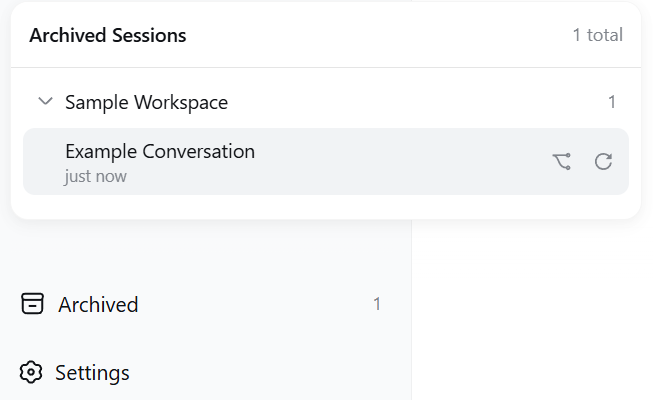
Prerequisite: a machine with DSH installed and dsh web running.
git clone https://gitee.com/chill109/dsh-archives.git    # mainland China, faster
git clone https://github.com/chou109/dsh-archives.git    # international mirror
You get the dsh-archives folder
profiles/node_modules, not under profiles/web; paths resolve via $DSH_HOME, default ~/.dsh):$dsh = if ($env:DSH_HOME) { $env:DSH_HOME } else { "$env:USERPROFILE\.dsh" }
Copy-Item -Recurse .\dsh-archives "$dsh\profiles\node_modules\"cp -r dsh-archives "${DSH_HOME:-$HOME/.dsh}/profiles/node_modules/"$DSH_HOME/profiles/web/cordis.patch.yml (default ~/.dsh/profiles/web/cordis.patch.yml when unset) and append:- insert:
- id: archives
name: 'dsh-archives'dsh web, run dsh web again, open http://127.0.0.1:3080The "If you are an AI agent, read this" section below is an executable deployment manual written for AI (one-command deploy, verification checklist, troubleshooting). You don't have to type any commands — just copy this prompt to any AI assistant (DeepSeek / GPT / Claude …):
Please deploy the dsh-archives plugin to my DeepSeek Harness Web.
Repo location: https://gitee.com/chill109/dsh-archives.git (recommended in mainland China)
or https://github.com/chou109/dsh-archives.git
First read the README in the repo (especially the "If you are an AI agent" part),
then follow its one-command deploy steps, run the verification checklist,
and tell me the result. Locate the DSH home directory yourself ($DSH_HOME env var, default ~/.dsh).The AI will do it all: locate the DSH directory → copy the plugin → write the config → restart → verify.
MIT — see LICENSE.
This is an executable deployment and operations manual. Whenever you are asked to "deploy / install / use / debug dsh-archives", follow it as-is — paths and commands are exact, do not improvise.
A DSH dual-half client plugin — no build step, no third-party runtime dependencies.
| Path | Purpose |
|---|---|
package.json |
Package manifest; name must equal the client bundle id and the loader name |
lib/index.js |
Host half: POST /archives/unarchive endpoint |
lib/client.js |
Browser half: the sidebar UI (client bundle) |
tests/smoke-test.cjs |
Client smoke test (bundle load → apply registration → SSR render, 9 assertions) |
tests/host-test.mjs |
Host smoke test (route → unarchive → idempotence → validation, no external deps) |
docs/screenshot_*.png |
README screenshots |
Get the repo (if not already local):
git clone https://gitee.com/chill109/dsh-archives.git(recommended in mainland China) orgit clone https://github.com/chou109/dsh-archives.git, thencd dsh-archivesbefore running the steps below.
TL;DR — one command (Linux / macOS bash):
DSH_HOME="${DSH_HOME:-$HOME/.dsh}"
cp -r ./dsh-archives "$DSH_HOME/profiles/node_modules/"
mkdir -p "$DSH_HOME/profiles/web"
cat >> "$DSH_HOME/profiles/web/cordis.patch.yml" <<'EOF'
# dsh-archives: archived sessions at the sidebar foot
- insert:
- id: archives
name: 'dsh-archives'
EOFTL;DR — one command (Windows PowerShell):
$dsh = if ($env:DSH_HOME) { $env:DSH_HOME } else { "$env:USERPROFILE\.dsh" }
Copy-Item -Recurse .\dsh-archives "$dsh\profiles\node_modules\"
Add-Content "$dsh\profiles\web\cordis.patch.yml" @"
# dsh-archives: archived sessions at the sidebar foot
- insert:
    - id: archives
      name: 'dsh-archives'
"@Full procedure (exact paths):
$DSH_HOME (default ~/.dsh when unset; %USERPROFILE%\.dsh on Windows).web profile's deps live one level above the profile dir ($DSH_HOME/profiles/node_modules/, flat hoisted layout), not inside profiles/web/node_modules:cp -r dsh-archives "$DSH_HOME/profiles/node_modules/"$DSH_HOME/profiles/web/cordis.patch.yml (create the file with this content if it does not exist):# Your patch layer for this dsh profile.
- insert:
- id: archives
name: 'dsh-archives'id is an arbitrary loader row name; name must equal the package name (dsh-archives).
dsh web process, run dsh web again, open http://127.0.0.1:3080.# Linux/macOS
curl -s -o /dev/null -w "bundle=%{http_code}\n" http://127.0.0.1:3080/plugins/dsh-archives/client.js # expect bundle=200
curl -s -o /dev/null -w "route=%{http_code}\n" http://127.0.0.1:3080/archives/unarchive # expect route=405# Windows PowerShell
(Invoke-WebRequest http://127.0.0.1:3080/plugins/dsh-archives/client.js -UseBasicParsing).StatusCode # 200
(Invoke-WebRequest http://127.0.0.1:3080/archives/unarchive -UseBasicParsing).StatusCode # 405The other two: window.__DSH_BOOT__ in the served page source contains dsh-archives; the "Archived (n)" button appears at the sidebar foot (requires at least one archived session to be visible).
| Symptom | Diagnosis |
|---|---|
| bundle 404 | Plugin not in $DSH_HOME/profiles/node_modules/, or name: in cordis.patch.yml mismatches the directory/package name → fix and restart |
| route 404/500 | Host half did not load → dsh --profile web --dump-config to confirm the archives row is composed |
| bundle 200 but no button | Open the browser console (F12): a component render crash is silently abdicated by the slot machinery, so the console error is the only clue; confirm the page is refreshed |
| API returns 500 | The host log prints [dsh-archives] unarchive failed: ... (server console) |
| Panel data wrong | Check global.archivedSessionIds in $DSH_HOME/storages/workspace.json |
| Code edits not taking effect | The client bundle is read per request: UI changes only need a page refresh; host changes (lib/index.js) need a restart |
Live frame check (verify the unarchive push path): connect to ws://127.0.0.1:3080/api/events.host; after one unarchive you should receive a host/archived-sessions-changed frame carrying the full updated archive set.
HTTP endpoint
| Item | Value |
|---|---|
| Path | POST /archives/unarchive |
| Body | {"sessionId": "session-..."} |
| Success | 200 {"ok":true,"changed":true} (removed); or {"ok":true,"changed":false} (was not archived — idempotent) |
| Bad request | 400 (body not JSON / invalid sessionId) |
| Method error | 405 (not POST) |
| Server error | 500 |
UI actions
| Action | Effect |
|---|---|
| Click session row | Restore & open: unarchive → subscribe to ctx.workspaces.list until the set syncs → sessions.open |
| ⿻ button | sessions.fork as a new session and open the child (the original stays archived) |
| ↻ button | Unarchive only, do not open |
| Click group header | Collapse/expand; state persisted to localStorage (key dsh.archived.panel.expanded.v1) |
| Click outside the panel | Close the panel |
Data contract
global.archivedSessionIds in $DSH_HOME/storages/workspace.jsonsession.list (only hidden from grouping views); log and accounting slot are untouchedopen()ing a still-archived session is cleared immediately by the runtime (by design) — so "restore" must unarchive first, wait for the set to sync, then openPOST /archives/unarchive {sessionId}
└─ host: workspaceRegistry.enqueueOperation → requireState → setState
└─ workspace.domain.global.set (disk + memory + domain/changed event)
└─ api-proxy observes the event → pushes host/archived-sessions-changed
└─ client: installArchived → useWorkspaces updates → the panel drops the sessionIt uses the registry's own write path (serialized on its operation tail), exactly like built-in operations: live across tabs, survives restarts.
window.__ModuleLoader__.load({id, ...}) must equal package.json nameuseSessions / useWorkspaces require a selector — the engine's bindSnapshotSelector does not default a missing one (crashes with w is not a function)host/archived-sessions-changed is a framework constant — never rename itopen(), so the projection sweep cannot clear the fresh selectionopen() a still-archived session directlycordis.patch.yml togethernode tests/smoke-test.cjs # client smoke test; react resolves via $DSH_HOME/profiles/node_modules by default, override with DSH_PROFILE_NODE_MODULES
node tests/host-test.mjs # host smoke test; no external dependenciesopen()ing an archived session is cleared by the runtime (by design); use restore & open or forkMIT — see LICENSE.
CLASSIFICATION EVIDENCE
系统优先读取 GitHub Topics,再与站内分类词典和词根规则比对。
aooyoo
Zero-token DuckDuckGo search provider for the DeepSeek Harness (DSH) web seam — local headless browser, no API key, no m…
awa-123-cw
DSH 图片/音视频托管插件:自动拉起 8899 静态服务 + 3080 /files/ 路由(HTTP Range 流式)+ WebUI 内点击即播(视频静音/音频 20% 音量/互斥懒加载)
awa-123-cw
DSH 设置页「关于」栏位 + 一键检测更新插件(About page with update checking for DeepSeek Harness WebUI)