其他
技能
dsh-web-search-ddg
aooyoo
Zero-token DuckDuckGo search provider for the DeepSeek Harness (DSH) web seam — local headless browser, no API key, no m…
deepseek-harnessdeepseek-harness-plugindsh-bundledsh-ctest
PROJECT TOPICS
PROJECT README
在 DeepSeek Harness「设置 → 插件」里发现、确认并安装社区插件;另有公开目录站供浏览与复制安装命令。



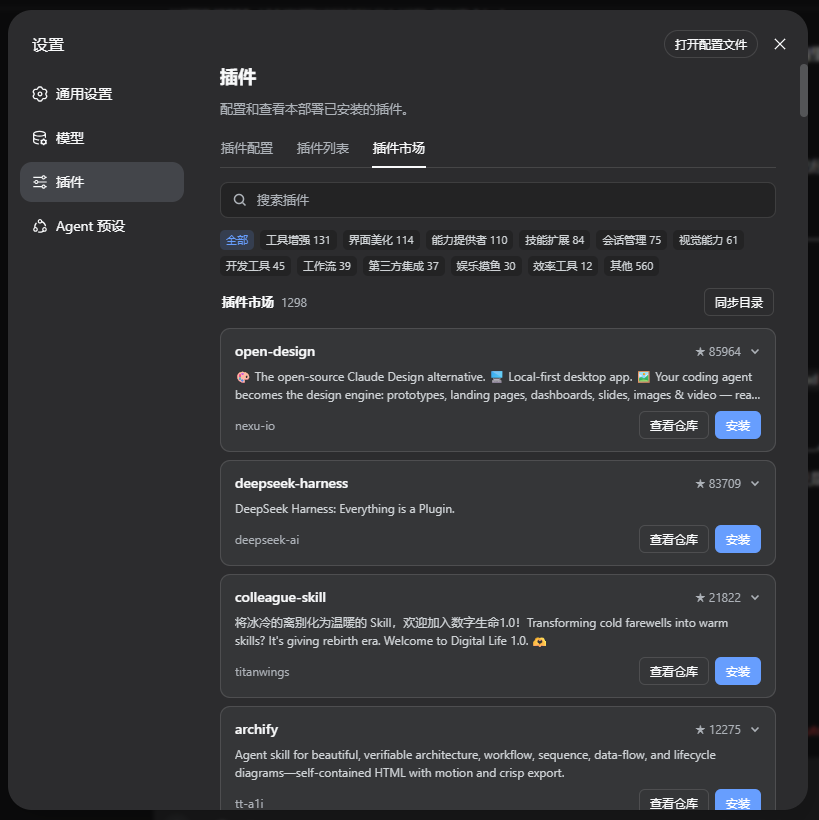
公开浏览:https://dsh-plugin-market.vercel.app
dsh plugin add/remove,不执行第三方安装脚本dsh plugin --profile web add github:chnjames/dsh-plugin-market
# 或
npx @deepseek-ai/dsh plugin --profile web add github:chnjames/dsh-plugin-market安装后重启 dsh web,打开 设置 → 插件 → 插件市场。
Web profile 通常关闭配置热重载;改完插件后请重启再强刷页面。
设置内卡片:
卸载本市场插件:
dsh plugin --profile web remove dsh-plugin-market线上目录:https://dsh-plugin-market.vercel.app
?sort= / ?page=) dsh plugin add、README 摘要 本站只浏览与复制命令;真正安装在本机 DSH 设置里完成。
本地开发与 Vercel 部署见 website/README.md;设计约束见 website/design.md。
常用项(写入 cordis.patch.yml 中本插件的 config):
| 键 | 说明 |
|---|---|
install.dshCommand |
npx 用户设为 "npx @deepseek-ai/dsh" |
catalog.urls |
自定义 registry.json 地址(自建域名时) |
catalog.fallbackToSearch |
目录全失败时是否回退本机 GitHub / npm 搜索 |
ui.showRiskLevel |
是否显示外观类 / 高权限等启发式提示 |
完整默认块见 cordis.yml。
- insert:
    - id: plugin-market
      name: dsh-plugin-market
      config:
        catalog:
          fallbackToSearch: true
          # urls: ["https://your-domain/registry.json"]
        sources:
          github:
            enabled: true
            topic: "dsh-plugin"
          npm:
            enabled: true
            keyword: "dsh-plugin"
        cache:
          ttl: 21600
          autoRefresh: true
          refreshInterval: 21600
        ui:
          showRiskLevel: true
        install:
          defaultProfile: "web"
          confirmBeforeInstall: true
# dshCommand: "npx @deepseek-ai/dsh"需插件已加载:
| 工具 | 用途 |
|---|---|
plugin_market_search |
按关键词搜索目录 |
plugin_market_detail |
查看单条插件详情 |
plugin_market_install |
经官方 CLI 安装(带确认策略) |
plugin_market_list_installed |
列出本机已装插件 |
dsh plugin add/remove,确认后才调用;不执行第三方安装脚本dangerouslySetInnerHTMLpermissionLevel 是文案启发式,默认「未评估」,不是权限审计;只安装你信任的来源| 现象 | 处理 |
|---|---|
| 设置里没有「插件市场」Tab | 确认 package.json 的 dsh.client.immediately;重启 DSH;检查 lib/client.js 是否已构建 |
| 列表为空 | 等同步;或 npm run build:registry 后提交 website/public/registry.json;检查 catalog.urls |
| 安装失败(Windows) | 确认调用的是 dsh.cmd / npx.cmd;npx 用户设 install.dshCommand |
日志仍出现 Web UI running at :3789 |
旧 profile 残留 ui.webPort:从 cordis.patch.yml 删掉并重启(本机已不再提供独立 HTTP 面板) |
手动挂载:若 dsh plugin add 未自动写入 patch,把仓库里的 cordis.yml 追加到 <DSH_HOME>/profiles/web/cordis.patch.yml。
本地 file: 挂载(路径按本机调整):
dsh plugin --profile web add file:C:/path/to/dsh-plugin-market本地目录缓存:<DSH_HOME>/plugin-market.db(删除后下次启动会重新拉目录)。
GitHub Actions ──► registry.json ──► Vercel 网站(浏览 / CORS)
                         └──► DSH host(sql.js 缓存 + Typert Remote)
└──► 设置 → 插件 → 插件市场(本机安装)| 层 | 说明 |
|---|---|
| Host | PluginMarketService(服务名 pluginMarket);安装 Remote 方法为 installPlugin(不能叫 install) |
| Client | 设置 Tab(settings.plugins.tab);经嵌套 inject 调用 remote.pluginMarket |
| 分类 / 风险 | src/utils/classifier.ts 与 shared/classifier.mjs 须保持同步 |
| README 摘要 | Host 截断下发;UI 再摘成可读段落(设置 Tab 不做完整 Markdown 渲染) |
本机拉取目录顺序:Vercel → jsDelivr → GitHub raw → 包内 lib/registry.snapshot.json →(可选)本机搜索。
npm install
npm run build          # tsc + 复制 client + registry snapshot
npm run typecheck
npm run build:registry # 生成 website/public/registry.json

cd website && npm install && npm run dev # http://localhost:3000CI:.github/workflows/ci.yml(构建)、registry.yml(定时刷新目录)。
重启 DSH 后:
registry.json,而非 GitHub Search)dsh plugin list 可见变化:3789cd website && npm run build 成功;复制命令与 /registry.json CORS 正常other(关键词启发式)| 文档 | 内容 |
|---|---|
| website/README.md | 公开站本地开发与 Vercel |
| website/design.md | 公开站设计系统 |
| cordis.yml | 插件默认配置 |
MIT
CLASSIFICATION EVIDENCE
系统优先读取 GitHub Topics,再与站内分类词典和词根规则比对。
aooyoo
Zero-token DuckDuckGo search provider for the DeepSeek Harness (DSH) web seam — local headless browser, no API key, no m…
awa-123-cw
DSH 图片/音视频托管插件:自动拉起 8899 静态服务 + 3080 /files/ 路由(HTTP Range 流式)+ WebUI 内点击即播(视频静音/音频 20% 音量/互斥懒加载)
awa-123-cw
DSH 设置页「关于」栏位 + 一键检测更新插件(About page with update checking for DeepSeek Harness WebUI)