生活娱乐
插件
dsh-web-speech-input
leozou320-ai
Voice-to-text for the DeepSeek Harness Web UI — live, editable, never auto-sends. | DeepSeek Harness 网页语音输入
accessibilitydeepseekdeepseek-harnessdsh-plugin
PROJECT TOPICS
PROJECT README
A tiny whale that lives inside DeepSeek Harness.
This is an unofficial community project. Not affiliated with, endorsed by, or maintained by DeepSeek. DeepSeek and related marks belong to their respective owners.
dsh plugin --profile web add github:cakeni/harness-petHarness Pet is an open-source, native DSH web plugin—not a browser extension. It renders an original pixel whale inside the Harness page and reacts to structured session signals exposed by the official client runtime.
localStorage.Harness 0.1.0-rc.6 and pnpm on PATH are required. Installing or removing a plugin changes the host roster, so restart the dsh web process after one of these commands. A code-only rebuild of an existing link installation needs only a page refresh.
The package name is reserved for a future npm release. Until it is published, use the Git or local-link installation below.
dsh plugin --profile web add harness-petdsh plugin --profile web add github:cakeni/harness-petGit dependencies run this package's prepare build. If pnpm blocks that build, add the exact package key printed by the CLI to the profile's pnpm-workspace.yaml, for example:
allowBuilds:
  harness-pet: true
Then repeat the install command. The profile is normally under $DSH_HOME/profiles/web.
Run this from the repository's parent directory:
dsh plugin --profile web add link:../harness-petBuild and refresh during development:
cd harness-pet
pnpm bundle
Do not run more than one link installation for the same profile.
The adapter subscribes to the current ctx.sessions list and SessionFace snapshot. It also observes ctx.connection.hostDescription; after a connection has existed, that structured value becoming absent indicates reconnecting. It never matches translated UI text or scrapes the DOM.
Priority is: error > success > waiting > searching/bash/editing > working > thinking > idle.
| Pet state | Structured detection | Confidence | Failure degradation |
|---|---|---|---|
idle |
No higher-priority signal | High | Remains idle |
thinking |
partial is present and no tool is running |
High | Idle if the field is absent or malformed |
working |
running === true, or non-empty unknown runningCalls |
High | Idle after all running signals clear |
searching |
Running tool name matches the adapter's web-tool table | Medium | Unknown tool names degrade to working |
bash |
Running tool name matches the adapter's shell-tool table | Medium | Unknown tool names degrade to working |
editing |
Running tool name matches the adapter's file-write/editor table | Medium | Unknown tool names degrade to working |
waiting |
Non-empty pending, or a queue item with placement: 'queued' |
High | Falls through to the active lower-priority state |
error |
promptError, latest turn-error, lastAgentError, or reconnecting |
High | Falls through when the structured error clears |
success |
Derived from a clean running: true → false edge for about 3 seconds |
Derived | Returns to the latest real state, usually idle |
The tool-name table is intentionally isolated in src/adapters/deepseek-harness.ts. Pre-1.0 Harness releases may rename tools; an unrecognized active tool is reported only as working, never fabricated as a specialized state.
SessionFace.prompt(..., 'queue') method.× button when it gets in the way. It stays closed for the current session; use Show Dialog in settings to restore it. A different session opens the card again.Both the operating-system prefers-reduced-motion: reduce preference and the manual Reduced Motion setting stop continuous animation while retaining the correct static state.
No telemetry. Harness Pet sends no conversation data to any third party.
The plugin makes no independent fetch, analytics, telemetry, cloud-sync, or third-party request. It reads the minimum structured fields needed to render the latest local user prompt and Harness reply. Displayed conversation text is never persisted. Only when you explicitly submit the follow-up input is that text delivered to the current Harness session through Harness's existing official transport. Only settings are stored in browser localStorage; the plugin asks for no browser permissions.
| Harness client API | Status |
|---|---|
0.1.0-rc.6 |
Targeted and type-checked against the published client contracts |
Later 0.1.x prereleases |
Unverified; the client API is pre-1.0 and may change |
| Browser extension mode | Unsupported; this project is a native DSH plugin |
| Desktop window | Chromium 116+ Document Picture-in-Picture; unsupported browsers keep the control disabled |
All Harness coupling is kept in the adapter so API updates have one repair point.
pnpm install
pnpm run typecheck
pnpm test
pnpm bundle
The bundle must start with a window.__ModuleLoader__.load registration for harness-pet and export { apply, inject } from its factory.
Automated tests cover the state mapper and priority, success transitions and timeout, unknown-signal degradation, corrupt storage, singleton reuse, and subscription/timer cleanup. Loading inside a real Harness page, drag behavior, visual animation, SPA navigation, and long-running leak checks still require manual browser verification.
After installing and restarting dsh web yourself:
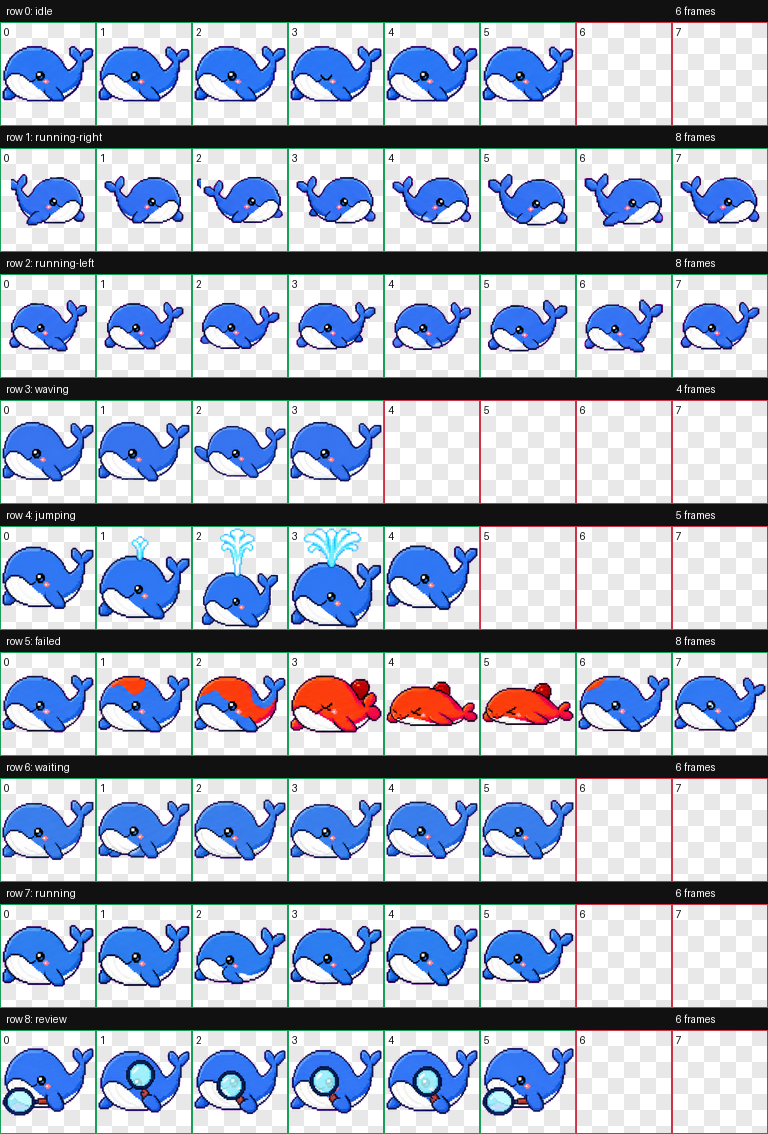
window.__DSH_BOOT__.entries contains harness-pet./plugins/harness-pet/client.js returns HTTP 200.The current 8×9 animation atlas is embedded into client.js, so the plugin performs no asset request at runtime. It uses fixed 192×208 cells and transparent unused slots; semantic effects are connected to the whale and remain inside their frame—water from the blowhole, a magnifier held by the flipper, and red-hot fault coloring. To replace or add a sprite:
assets/whale/.assets/whale/ATTRIBUTION.md. Unregistered assets must not be distributed.client.js (for example as an imported data URL) instead of fetching a remote URL at runtime.Never download or include artwork of unknown provenance.
CLASSIFICATION EVIDENCE
系统优先读取 GitHub Topics,再与站内分类词典和词根规则比对。
leozou320-ai
Voice-to-text for the DeepSeek Harness Web UI — live, editable, never auto-sends. | DeepSeek Harness 网页语音输入
lhenlihai-hub
该仓库暂未提供项目说明。
misterbig5222-oss
DeepSeek Harness highlight annotation plugin: 8-color text highlighting, notes, tags, copy/delete, and context-positione…