其他
技能
dsh-web-search-ddg
aooyoo
Zero-token DuckDuckGo search provider for the DeepSeek Harness (DSH) web seam — local headless browser, no API key, no m…
deepseek-harnessdeepseek-harness-plugindsh-bundledsh-ctest
PROJECT TOPICS
PROJECT README
Windows 桌面壳:双击一个 exe,就能启动已安装的 DeepSeek Harness 并注入桌面体验。不依赖 harness 源码仓库,不替用户安装任何东西,不修改用户的任何资料。
dsh-desktop-plugin 是一个独立插件工作区:只发布一个自包含的 DeepSeekHarness.Desktop.exe(WPF 壳,.NET 8 自包含发布,无需任何运行时)。壳做的事:
dsh),从未安装则显示安装教程 + 一键安装按钮(npm install -g @deepseek-ai/dsh,仅用户点击才执行,绝不自动下载);dsh web --desktop 交接的服务器),进程永不残留;子进程挂载 kill-on-close Job Object,壳崩溃也不留孤儿;%LOCALAPPDATA%\DeepSeekHarness\shell.json 与日志。pnpm install # 解析 @deepseek-ai/* 依赖
pnpm --filter dsh-desktop build:shell # dotnet publish -> packages/dsh-desktop/bin/
pnpm --filter dsh-desktop build # tsc -> lib/index.js
pnpm --filter dsh-desktop pack # npm 包(含 bin/)用户侧只需双击 packages/dsh-desktop/bin/DeepSeekHarness.Desktop.exe。
packages/
  desktop-shell/    WPF 壳(.NET 8,自包含发布到 win-x64)
  dsh-desktop/      npm 包:挂载桌面启动器 host row,bin/ 携带壳的可执行文件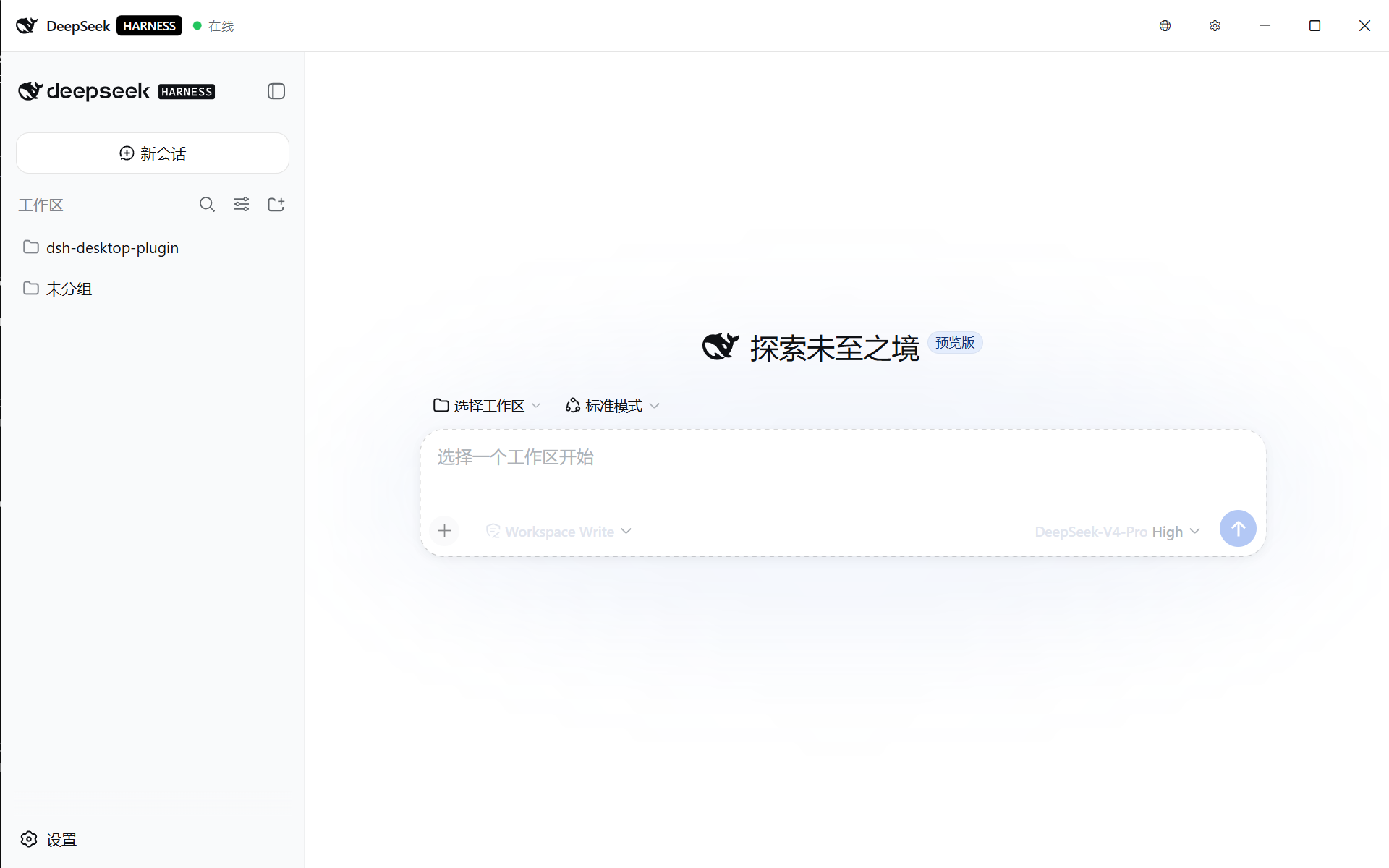
dsh-desktop-plugin is a standalone plugin workspace that ships one
self-contained DeepSeekHarness.Desktop.exe (a WPF shell, .NET 8
self-contained publish, no runtime needed). The shell:
dsh CLI on PATH); when none is installed it shows an install tutorial with a one-click button (npm install -g @deepseek-ai/dsh — user-initiated only, never downloads on its own);dsh web --desktop hand-off), so nothing survives; spawned children live in a kill-on-close job object, so even a shell crash orphans nothing;%LOCALAPPDATA%\DeepSeekHarness\shell.json and logs.pnpm install # resolves @deepseek-ai/* packages
pnpm --filter dsh-desktop build:shell # dotnet publish -> packages/dsh-desktop/bin/
pnpm --filter dsh-desktop build # tsc -> lib/index.js
pnpm --filter dsh-desktop pack # npm tarball including bin/End users just double-click packages/dsh-desktop/bin/DeepSeekHarness.Desktop.exe.
packages/
  desktop-shell/    The WPF shell (.NET 8, self-contained publish to win-x64)
  dsh-desktop/      The npm package: mounts the desktop-launcher host row and ships the shell executable in bin/
dsh-desktop-plugin 是一個獨立外掛工作區:只發佈一個自包含的 DeepSeekHarness.Desktop.exe(WPF 外殼,.NET 8 自包含發佈,無需任何執行環境)。外殼會:
dsh);若未安裝則顯示安裝教學與一鍵安裝按鈕(npm install -g @deepseek-ai/dsh,僅在使用者點擊時才執行,絕不自動下載);dsh web --desktop 交接的伺服器),行程絕不殘留;子行程掛載 kill-on-close Job Object,外殼崩潰也不留孤兒;%LOCALAPPDATA%\DeepSeekHarness\shell.json 與日誌。pnpm install # 解析 @deepseek-ai/* 相依套件
pnpm --filter dsh-desktop build:shell # dotnet publish -> packages/dsh-desktop/bin/
pnpm --filter dsh-desktop build # tsc -> lib/index.js
pnpm --filter dsh-desktop pack # npm 套件(含 bin/)使用者只需雙擊 packages/dsh-desktop/bin/DeepSeekHarness.Desktop.exe。
packages/
  desktop-shell/    WPF 外殼(.NET 8,自包含發佈至 win-x64)
  dsh-desktop/      npm 套件:掛載桌面啟動器 host row,bin/ 攜帶外殼可執行檔
CLASSIFICATION EVIDENCE
系统优先读取 GitHub Topics,再与站内分类词典和词根规则比对。
aooyoo
Zero-token DuckDuckGo search provider for the DeepSeek Harness (DSH) web seam — local headless browser, no API key, no m…
awa-123-cw
DSH 图片/音视频托管插件:自动拉起 8899 静态服务 + 3080 /files/ 路由(HTTP Range 流式)+ WebUI 内点击即播(视频静音/音频 20% 音量/互斥懒加载)
awa-123-cw
DSH 设置页「关于」栏位 + 一键检测更新插件(About page with update checking for DeepSeek Harness WebUI)