其他
技能
dsh-web-search-ddg
aooyoo
Zero-token DuckDuckGo search provider for the DeepSeek Harness (DSH) web seam — local headless browser, no API key, no m…
deepseek-harnessdeepseek-harness-plugindsh-bundledsh-ctest
PROJECT TOPICS
PROJECT README
Open the DeepSeek Harness Web UI on your computer from an Android phone, then create tasks and submit instructions through the familiar DSH interface.
Unofficial community project: this project is independently developed and maintained by the community. It is not reviewed, endorsed, or supported by DeepSeek. The current release is an MVP and does not yet provide end-to-end encryption.
DeepSeek Harness community post: Show Your Plugins! #2520. This is a community discovery entry, not an official review or endorsement.
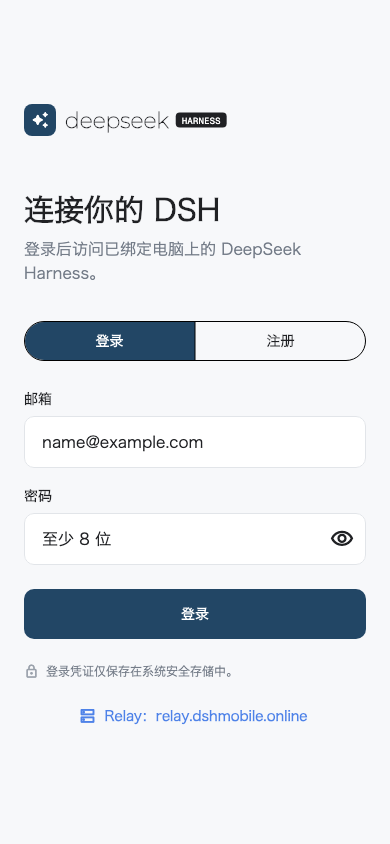 |
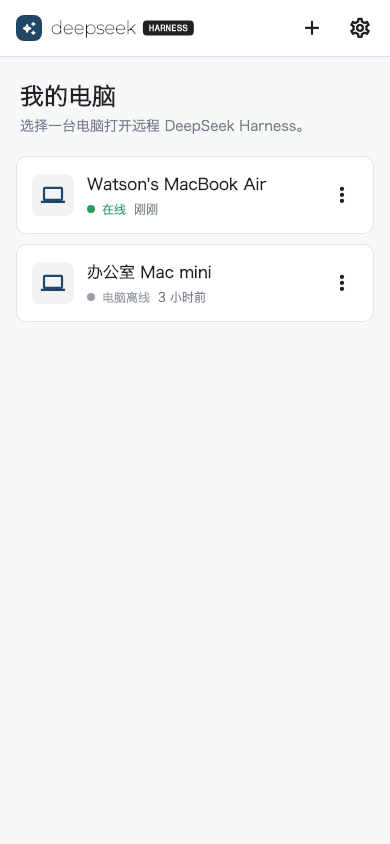 |
This repository pins three independently developed and released open-source components as Git submodules:
| Directory | Purpose | Repository |
|---|---|---|
dsh-mobile/ |
Flutter client for Android and iOS | april-jk/dsh-mobile |
dsh-plugin/ |
DSH plugin and Companion running on the computer | april-jk/dsh-mobile-plugin |
dsh-relay/ |
Accounts, pairing, short-lived tickets, and traffic relay | april-jk/dsh-relay |
The phone never connects directly to the computer. The plugin opens only an outbound WSS connection to the Relay, while DSH remains bound to 127.0.0.1:3080.
Default public Relay: https://relay.dshmobile.online
Download these files from the latest release:
dsh-mobile-android.apk: signed Android installerdsh-mobile-plugin.tgz: prebuilt DSH plugin packagedsh-relay-v*.tar.gz: Relay source package for private deploymentSHA256SUMS: SHA-256 checksums for every release assetVerify the downloaded files:
shasum -a 256 -c SHA256SUMSInstall the pinned plugin directly from GitHub, then start DSH. This path does not require a global DSH installation, a source checkout, or a local file path:
npx @deepseek-ai/dsh plugin --profile web add "github:april-jk/dsh-mobile-plugin#v0.1.2"
npx @deepseek-ai/dsh web
Install dsh-mobile-android.apk on your Android device. Android may ask you to allow the browser or file manager to install unknown apps. The application ID is io.github.apriljk.dshremote.
The plugin follows the DSH Web process lifecycle and does not need a separate background process. The phone shows the computer as offline when the computer or DSH is stopped, or when the plugin is disconnected from the Relay.
Download and extract dsh-relay-v*.tar.gz from the release, then run:
cp .env.example .env
# Edit .env and replace JWT_SECRET with a long random value.
docker compose up -d --build
curl http://127.0.0.1:8787/health
For public access, put an HTTPS reverse proxy in front of port 8787 and back up the SQLite data under /data. The MVP Relay must run as a single instance.
The computer and phone must use the same Relay:
DSH_RELAY=https://relay.example.com npx @deepseek-ai/dsh webOn the mobile login screen, tap Relay, or open Settings > Relay Server after logging in, and enter the same HTTPS origin. Changing the Relay logs out the current account because accounts and tokens are isolated between Relay instances.
See the Relay README for all environment variables and resource limits.
Report security issues privately as described in SECURITY.md. Do not disclose exploitable details in a public issue.
git clone --recurse-submodules https://github.com/april-jk/dsh-mobile-suite.git
cd dsh-mobile-suite
git submodule update --init --recursive
Commit component code in its own repository. This repository maintains cross-component documentation, the unified release workflow, and tested component revisions. See CONTRIBUTING.md to contribute.
The suite and all three components use the MIT License.
CLASSIFICATION EVIDENCE
系统优先读取 GitHub Topics,再与站内分类词典和词根规则比对。
aooyoo
Zero-token DuckDuckGo search provider for the DeepSeek Harness (DSH) web seam — local headless browser, no API key, no m…
awa-123-cw
DSH 图片/音视频托管插件:自动拉起 8899 静态服务 + 3080 /files/ 路由(HTTP Range 流式)+ WebUI 内点击即播(视频静音/音频 20% 音量/互斥懒加载)
awa-123-cw
DSH 设置页「关于」栏位 + 一键检测更新插件(About page with update checking for DeepSeek Harness WebUI)