其他
技能
dsh-web-search-ddg
aooyoo
Zero-token DuckDuckGo search provider for the DeepSeek Harness (DSH) web seam — local headless browser, no API key, no m…
deepseek-harnessdeepseek-harness-plugindsh-bundledsh-ctest
PROJECT TOPICS
PROJECT README

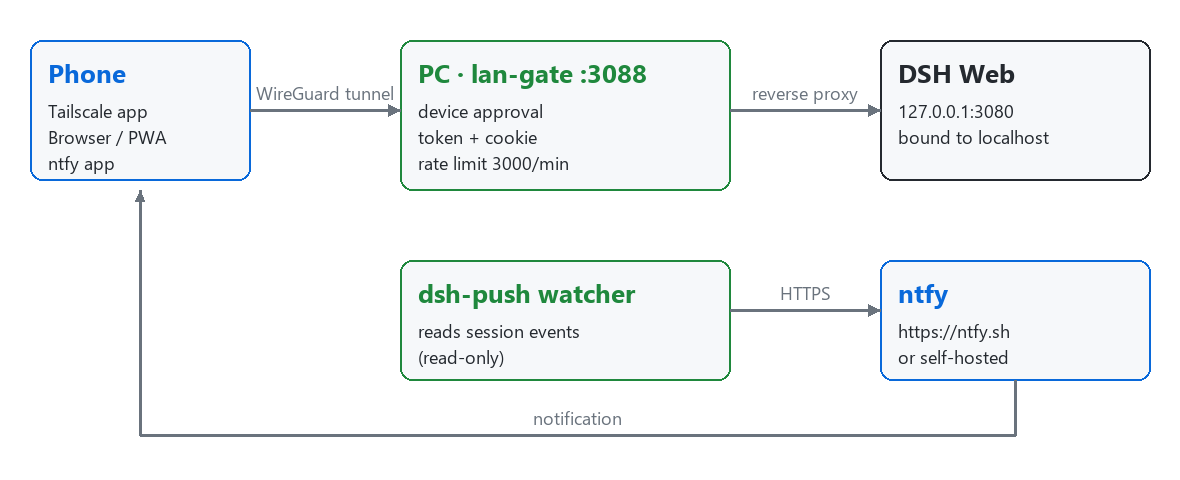
Everything you need to use DeepSeek Harness (DSH) from your phone: a secure LAN gate plugin with device approval, a mobile-friendly layout, phone push notifications, and PWA installation assets.
The core is a self-contained, dependency-free Cordis plugin (lan-gate.mjs)
that exposes your local DSH web UI to trusted LAN / Tailscale devices through a
device-approved, token-bound reverse proxy — plus an optional dsh-push helper
that forwards DSH session events to your phone over
ntfy.
auto, phone, or desktop. Phone mode injects a compact layout; desktop mode keeps the desktop layout even in a narrow window.HttpOnly/SameSite=Lax cookie (the Secure flag is added on the HTTPS/Tailscale Serve entry). Tokens expire after 90 days, and a browser on the same IP automatically re-claims instead of getting stuck on a "bound to another browser" page. Revoking a device drops its access immediately.429 on overflow to blunt scanners and brute-force attempts.crypto.randomUUID polyfill for non-HTTPS intranet contexts.POST /lan-gate/upload accepts files up to 20 MB, saved under $DSH_HOME/uploads/ with a 7-day automatic cleanup. A companion script tools/parse_file.py converts common attachment formats (txt/docx/pdf/zip/7z/rar) to readable text.<img>).dsh-push) — a standalone watcher that sends a high-priority notification when DSH is waiting for your approval or a reply, and a normal notification when a task turn finishes.The plugin is designed to run only on trusted networks. It does not provide end-to-end HTTPS and must never be exposed directly to the public internet.
3088 by default) only from your LAN or your Tailscale subnet (100.64.0.0/10). Everything else stays unreachable.127.0.0.1:3080; only the in-process gate proxy forwards to it. The local-only control routes (/lan-gate/status, /lan-gate/action, /lan-gate/upload) reject non-local requests by checking x-forwarded-for and additionally enforce an Origin allow-list (loopback / LAN IPs / *.ts.net) against CSRF.tailscale serve (HTTPS entry) comes from loopback but carries the tailscale-user-login header and x-forwarded-for; the gate trusts that forwarded IP only on loopback + Serve-header requests, so per-device approval still applies to each tailnet device instead of collapsing them all into the local machine.Warning: do not bind DSH itself to
0.0.0.0and do not port-forward the gate port to the public internet. Use it only inside a trusted LAN or a Tailscale tailnet.
web profile must serve the UI on 127.0.0.1:3080..mjs file with no dependencies).requests and zstandard packages for dsh-push.Copy lan-gate.mjs into your DSH home:
~/.dsh/lan-gate/lan-gate.mjs($DSH_HOME defaults to ~/.dsh; set DSH_HOME to override it.)
Merge the following into ~/.dsh/profiles/web/cordis.patch.yml (see cordis.patch.yml.example for the full annotated version):
- insert:
    - id: lan-gate
      name: 'file:///C:/Users/<you>/.dsh/lan-gate/lan-gate.mjs'
Adjust the file:/// path to your real, absolute lan-gate.mjs location (Windows file:///C:/..., macOS/Linux file:///home/... or file:///Users/...).
Restart DSH so the user patch is loaded. On startup the plugin logs:
[lan-gate] listening on 0.0.0.0:3088 -> 127.0.0.1:3080On a device on the same LAN, visit:
http://<lan-ip>:3088where <lan-ip> is this machine's LAN IP. The device shows a "waiting for approval" page until you approve it in Settings → LAN Access.
tools/parse_file.py converts a downloaded attachment into readable text (or
extracts an archive):
py tools/parse_file.py <file> [output][output], it writes <file>.parsed.txt and prints the first 500
characters to stdout.txt/md/csv/json/xml/yaml/log and common code files
(read as text), docx, pdf, and archives zip/7z/rar (extracted to a
same-named directory; rar needs WinRAR/unrar installed).Install its optional dependencies once:
pip install python-docx pypdf py7zr rarfile| Environment variable | Default | Description |
|---|---|---|
LAN_GATE_PORT |
3088 |
Port the gate proxy listens on. |
LAN_GATE_HOST |
0.0.0.0 |
Listen address. Set to 127.0.0.1 when a reverse proxy/tunnel (e.g. tailscale serve) sits in front. |
3000 requests/minute per IP (sliding window). It is intentionally not tunable via env; edit the RATE_LIMIT_PER_MIN constant in lan-gate.mjs if you must, then restart DSH.$DSH_HOME/lan-gate-state.json. Approvals expire after 90 days (TOKEN_TTL_MS); delete the file to reset all approvals immediately.$DSH_HOME/uploads/, auto-cleaned after 7 days.On the phone, follow the platform guide:
| Platform | Guide |
|---|---|
| 📱 Android | docs/phone-guide-android.md — Tailscale, entry addresses, PWA install, ntfy, troubleshooting |
| 🍎 iPhone / iPad | docs/phone-guide-ios.md — same steps, with the iOS home-screen and notification specifics |
The full administrator-side manual (architecture, firewall, maintenance,
upgrade) lives in docs/install-guide.md.
Find the desktop's Tailscale IP with:
tailscale ip -4tailscale serve provides a valid TLS certificate so the phone browser offers
the "Install app" (PWA) flow:
tailscale serve --bg --yes --https=3443 http://127.0.0.1:3088Then open https://<your-device>.your-tailnet.ts.net:3443 on the phone.
tailscale serve statustailscale serve resetThe PWA icon/manifest/service-worker assets for the DSH frontend are documented
in pwa/pwa-setup.md.
dsh-push forwards DSH events to your phone via ntfy. See
dsh-push/README.md for the full guide, privacy notes,
and configuration.
| Environment variable | Description |
|---|---|
NTFY_URL |
Push server, default https://ntfy.sh (self-hosting supported). |
NTFY_TOPIC |
Your topic name — treat it like a secret; never publish it. |
NTFY_TOKEN |
Optional ntfy access token. |
Run it (from dsh-push/):
py dsh_push.py            # run continuously
py dsh_push.py --test     # send a test notification
Or start it as a background process on Windows with dsh-push/start_push.bat (uses %~dp0, so it works from any location).
Install dependencies once:
pip install requests zstandardSubscribe your phone by opening https://ntfy.sh/<your-ntfy-topic> in the ntfy app.
headscale is a more advanced alternative.dist need to be re-applied after a DSH upgrade.MIT.
This project builds on the work of the following projects:
lan-gate.mjs plugin is derived from
hchao3335-maker/dsh-lan-gate
(MIT). This release preserves the upstream MIT license and adds: rate limit
120 → 3000, attachment upload endpoint, 7-day upload cleanup, phone
gallery/camera buttons, and menu layout adjustments. See NOTICE.dsh-push.CLASSIFICATION EVIDENCE
系统优先读取 GitHub Topics,再与站内分类词典和词根规则比对。
aooyoo
Zero-token DuckDuckGo search provider for the DeepSeek Harness (DSH) web seam — local headless browser, no API key, no m…
awa-123-cw
DSH 图片/音视频托管插件:自动拉起 8899 静态服务 + 3080 /files/ 路由(HTTP Range 流式)+ WebUI 内点击即播(视频静音/音频 20% 音量/互斥懒加载)
awa-123-cw
DSH 设置页「关于」栏位 + 一键检测更新插件(About page with update checking for DeepSeek Harness WebUI)