模型与 MCP
插件
dsh-mcp-proxy
ben7am1n
Context-cheap lazy MCP access for DeepSeek Harness
deepseek-harnessdsh-pluginmcpmodel-context-protocol
PROJECT TOPICS
PROJECT README

The world's first open-source AI-native vector design tool.
Concurrent Agent Teams • Design-as-Code • Built-in MCP Server • Multi-model Intelligence
English · 简体中文 · 繁體中文 · 日本語 · 한국어 · Français · Español · Deutsch · Português · Русский · हिन्दी · Türkçe · ไทย · Tiếng Việt · Bahasa Indonesia



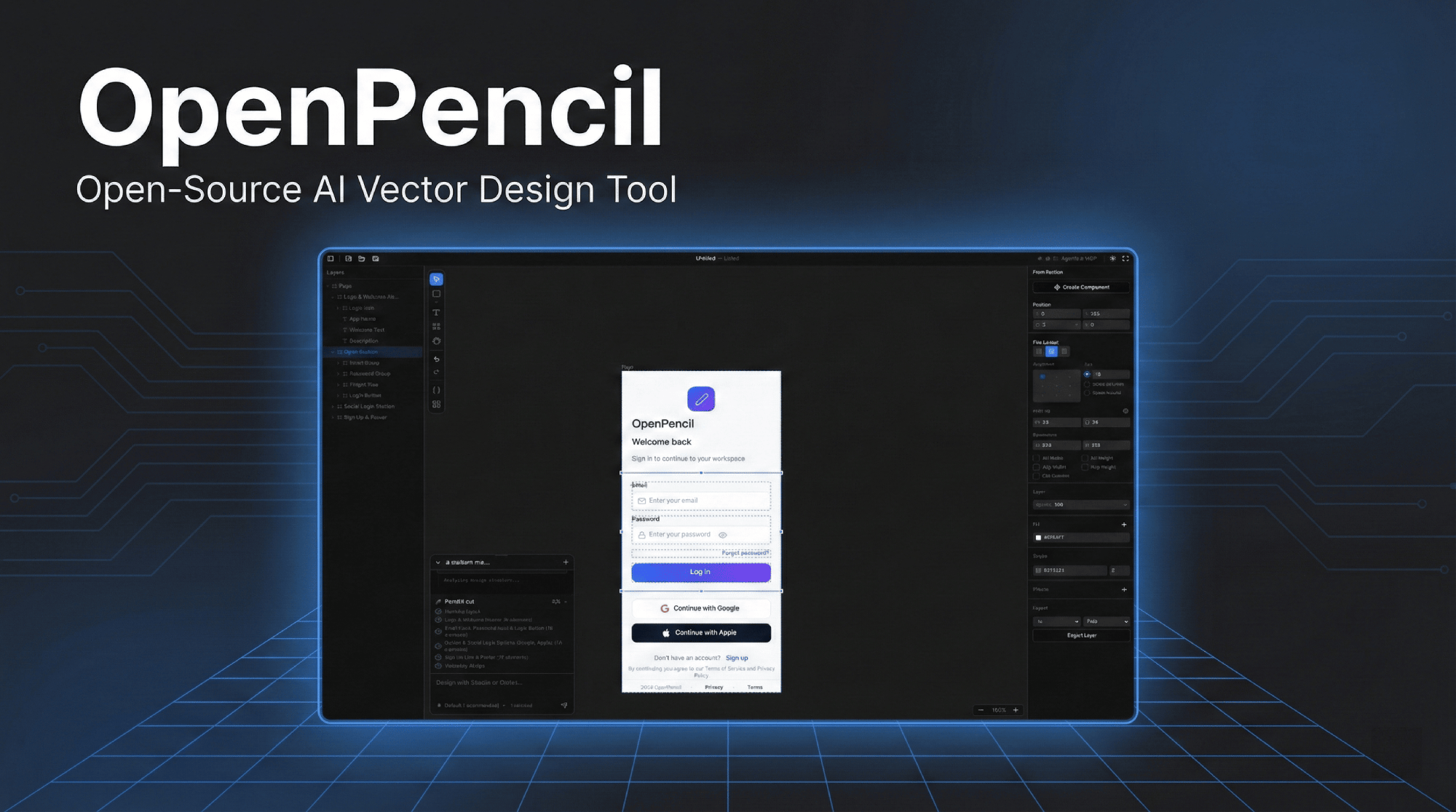
Click the image to watch the demo video
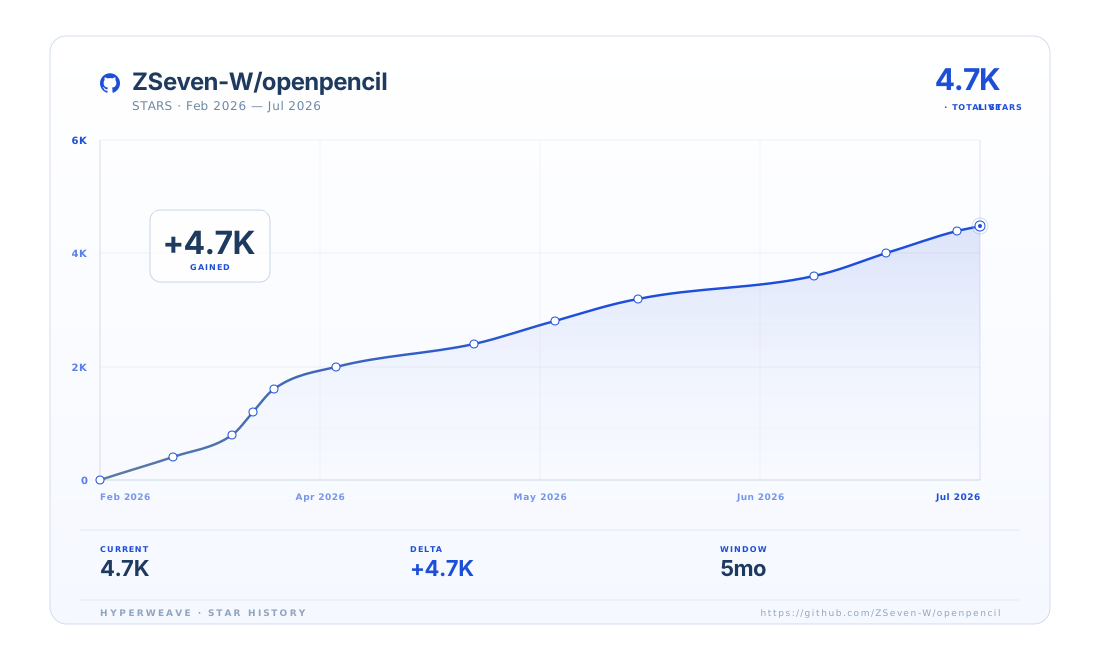
The trend above is rendered with HyperWeave — an experimental SVG artifact layer for agents. Explore →
🎨 Prompt → CanvasDescribe any UI in natural language. Watch it appear on the infinite canvas in real-time with streaming animation. Modify existing designs by selecting elements and chatting. |
🤖 Concurrent Agent TeamsThe orchestrator decomposes complex pages into spatial sub-tasks. Multiple AI agents work on different sections simultaneously — hero, features, footer — all streaming in parallel with per-member canvas indicators. |
🧠 Multi-Model IntelligenceAutomatically adapts to each model's capabilities. Claude gets full prompts with thinking; GPT-4o/Gemini disable thinking; smaller models (MiniMax, Qwen, Llama) get simplified prompts for reliable output. |
🔌 MCP ServerOne-click install into Claude Code, Codex, OpenCode, Kiro, or Copilot CLIs. Design from your terminal — read, create, and modify |
🎨 Style GuidesBuilt-in style guide library with tag-based fuzzy matching. Apply visual styles (glassmorphism, brutalist, retro, etc.) to AI-generated designs. MCP tools for external agent access. |
📦 Design-as-Code
|
🖥️ Runs EverywhereWeb app + native desktop on macOS, Windows, and Linux — one Rust core, a single self-contained binary, no browser engine. |
⌨️ CLI —
|
🎯 Multi-Platform Code ExportExport to React + Tailwind, HTML + CSS, Vue, Svelte, Flutter, SwiftUI, Jetpack Compose, React Native — all from one |
🧩 Embeddable SDK
|
🛡️ Design System KitManage reusable UIKits with style switching and component composition. Import/export kits from |
👥 Real-Time CollaborationDesign together over authenticated peer-to-peer sessions with a public relay and built-in regional hubs. Join with a short pairing code, see live remote cursors, and resolve conflicts with per-edit detail and replay. |
macOS (Homebrew):
brew tap zseven-w/openpencil
brew install --cask openpencil
Windows (Scoop):
scoop bucket add openpencil https://github.com/zseven-w/scoop-openpencil
scoop install openpencil
Linux / Windows direct download: GitHub Releases — .exe (Windows), .AppImage / .deb (Linux)
Antivirus flagged the Windows installer? That's a known heuristic false positive on new, low-prevalence releases — see how to verify your download.
Nix (Linux x86_64):
nix develop
nix run .                         # launch the desktop app
nix build .#openpencil            # native web host + CanvasKit web bundle
nix build .#op-cli                # the `op` CLI
nix build .#prebuilt              # use the matching upstream desktop archive
nix build .#prebuilt-cli          # use the matching upstream CLI archive
nix build .#web-server            # native GL-free web server + web bundle
nix build .#runtime-prebuilt      # prebuilt desktop + `op` CLI runtime
nix build .#web-sdk-packages      # npm tarballs for the web SDKs
nix build .#appimage              # portable desktop AppImage
The flake uses the pinned Rust toolchain from rust-toolchain.toml and is
currently published for x86_64-linux. A Debian package is not produced by
the flake yet; use the upstream release artifacts when a .deb is required.
The prebuilt outputs use the release version and hashes pinned in
nix/release-manifest.json, independently of the workspace source version.
After a release is published, the release workflow opens a PR to refresh that
manifest. Until it is merged, the prebuilt outputs continue to use the prior
published release; the source-built outputs always build the checked-out source.
CLI (op):
brew install zseven-w/openpencil/opOr use the install script (macOS / Linux):
curl -fsSL https://raw.githubusercontent.com/ZSeven-W/openpencil/main/scripts/install-op.sh | bashTo allow the newest pre-release:
curl -fsSL https://raw.githubusercontent.com/ZSeven-W/openpencil/main/scripts/install-op.sh | OP_PRERELEASE=1 bashWindows PowerShell:
irm https://raw.githubusercontent.com/ZSeven-W/openpencil/main/scripts/install-op.ps1 | iexTo allow the newest pre-release:
$env:OP_PRERELEASE = "1"; irm https://raw.githubusercontent.com/ZSeven-W/openpencil/main/scripts/install-op.ps1 | iexgit clone --recurse-submodules https://github.com/ZSeven-W/openpencil.git
# Or already cloned — sync first so stale submodule URLs pick up .gitmodules changes:
git submodule sync --recursive && git submodule update --init --recursiveThree submodules live under vendor/, all public and fetched over HTTPS (no SSH key needed): jian (GPU-Skia UI framework — widgets/render/events), casement (winit fork), and agent (agent-rs — cross-product Rust agent runtime, shared by OP + Zode). vendor/anthropic-agent-sdk is tracked in-tree, not a submodule.
# Web dev server (builds the CanvasKit wasm bundle, then runs the headless web host)
bash scripts/start-web-rust.sh
Browser-entered built-in provider, image-generation, and Openverse credentials
are kept in same-origin localStorage
(openpencil-rust-web-credentials) by default,
separate from ordinary web preferences. A credential needed by an AI request is
sent with that request, but the daemon does not write the browser snapshot to
settings.json.
Private deployments can opt into server persistence with
OPENPENCIL_PERSIST_WEB_CREDENTIALS_SERVER=true. This setting is
deployment-wide; each accepted browser snapshot replaces the shared
browser-owned copy. Enable it only for a trusted, access-controlled deployment
with one active administrator profile, behind HTTPS. Turning the setting off
removes previously persisted browser-owned credentials at the next startup
while preserving operator-owned configuration. As with all localStorage,
same-origin scripts can read these values, so the web origin must be protected
from untrusted scripts and XSS. Before downgrading to a release that predates
this switch, turn it off and start the current release once to scrub the
browser-owned copy.
The web host supports built-in API-key agents only. CLI and ACP agents remain
native-only: they are not shown in the web model picker, stored in browser
credential snapshots, synchronized to the server, or exposed through web
connect routes. Browser requests to credential and AI endpoints allow
loopback/localhost origins by default. A public reverse proxy must separately set
OPENPENCIL_WEB_ALLOWED_ORIGINS to a comma-separated list of exact origins,
for example https://demo.openpencil.dev.
Server persistence does not permit browser-controlled requests to loopback,
private, link-local, metadata, or reserved provider endpoints. A trusted private
deployment that intentionally uses an internal provider must separately set
OPENPENCIL_WEB_AI_ENDPOINT_ALLOWLIST to a comma-separated list of exact URL
origins, for example http://127.0.0.1:11434,https://llm.internal.example.
Or run as a desktop app:
cargo run -p op-host-desktopPrerequisites: Rust (stable) to build the product. Bun >= 1.0 and Node.js >= 18 are only needed for the web SDK under
packages/.
Tagged Rust releases publish a single web-host image. The retired TypeScript images with bundled AI CLIs are no longer published.
| Image | Includes |
|---|---|
ghcr.io/zseven-w/openpencil-web:vX.Y.Z |
Rust web host, wasm bundle, and CanvasKit assets |
The web UI exposes built-in agent profiles only; Claude/Codex/OpenCode/Copilot CLI tooling is not bundled into Docker images.
Run:
VERSION="$(scripts/workspace-version.sh)"
docker run -d -p 3100:3100 "ghcr.io/zseven-w/openpencil-web:v${VERSION}"
Then open http://localhost:3100/.
Build locally:
docker build -f Dockerfile.web-rust -t openpencil-web-rust .
docker run -p 3100:3100 openpencil-web-rustPrompt to UI
Multi-Agent Support
| Agent | Setup |
|---|---|
| Built-in (9+ providers) | Select from provider presets with region switcher — Anthropic, OpenAI, Google, DeepSeek, and more |
| Claude Code | No config — uses Claude Agent SDK with local OAuth |
| Codex CLI | Connect in Agent Settings (Cmd+,) |
| OpenCode | Connect in Agent Settings (Cmd+,) |
| GitHub Copilot | copilot login then connect in Agent Settings (Cmd+,) |
Model Capability Profiles — automatically adapts prompts, thinking mode, and timeouts per model tier. Full-tier models (Claude) get complete prompts; standard-tier (GPT-4o, Gemini, DeepSeek) disable thinking; basic-tier (MiniMax, Qwen, Llama, Mistral) get simplified nested-JSON prompts for maximum reliability.
i18n — Full interface localization in 15 languages: English, 简体中文, 繁體中文, 日本語, 한국어, Français, Español, Deutsch, Português, Русский, हिन्दी, Türkçe, ไทย, Tiếng Việt, Bahasa Indonesia.
MCP Server
op-mcp crate) — one-click install into Claude Code / Codex / OpenCode / Kiro / Copilot CLIs--mcp <path>), plus a live HTTP endpoint (127.0.0.1:<port>/mcp) from the running app.op files via any MCP-compatible agentdesign_skeleton → design_content → design_refine for higher-fidelity multi-section designsget_style_guide_tags and get_style_guide for applying visual styles via MCPCode Generation
opInstall via Homebrew or the install script, then control the design tool from your terminal:
brew install zseven-w/openpencil/opcurl -fsSL https://raw.githubusercontent.com/ZSeven-W/openpencil/main/scripts/install-op.sh | bashcurl -fsSL https://raw.githubusercontent.com/ZSeven-W/openpencil/main/scripts/install-op.sh | OP_PRERELEASE=1 bashirm https://raw.githubusercontent.com/ZSeven-W/openpencil/main/scripts/install-op.ps1 | iex$env:OP_PRERELEASE = "1"; irm https://raw.githubusercontent.com/ZSeven-W/openpencil/main/scripts/install-op.ps1 | iexop start # Launch desktop app
op start --headless --file design.op # Launch headless file-backed server
op design @landing.txt # Batch design from file
op design @ui.js # Sandboxed JavaScript with loops
op insert '{"type":"rectangle"}' # Insert a node
op import:figma design.fig # Import Figma file
cat design.dsl | op design - # Pipe from stdinSupports three input methods: inline string, @filepath (read from file), or - (read from stdin). Works with the desktop app, web server, or headless file-backed server. See the CLI command reference for all commands.
LLM Skill — install the OpenPencil Skill plugin to teach AI agents how to design with op. Run op install for detected agents, or target one explicitly with op install --target codex.
Canvas & Drawing
Design System
$variable referencesvar(--name) in code output.pen filesAI & Agents
design_skeleton → design_content → design_refine with focused prompts per phaseCollaboration
--serve-web daemon, authenticated against the op-hub with cross-account tenant sharingPresentation Decks
.pptx), or a hyperframes video compositionTemplates & Web Capture
.op file offlineGit Integration
MERGE_HEAD state trackingExport
Cmd+Shift+P)codegen_plan, codegen_submit_chunk, codegen_assemble, codegen_cleanFigma Import
.fig files with layout, fills, strokes, effects, text, images, and vectors preservedDesktop App
.op file association — double-click to open, single-instance lock| Core | Rust workspace (crates/) — editor state, widgets, hosts, MCP, AI, codegen |
| Rendering | GPU Skia everywhere — skia-safe (GL) on native, CanvasKit (WASM/WebGL2) in the browser |
| UI framework | jian — vendored pure-Rust GPU-Skia UI framework: widgets, layout, events, hot reload (vendor/jian) |
| Windowing | winit (vendored casement fork) |
| Desktop | Native binary openpencil-desktop — no browser engine |
| Web SDK | op-web-sdk + React 19 / Vue 3 adapters — read-only .op viewer (TypeScript) |
| CLI | op — terminal control, batch design DSL |
| AI | Built-in Rust agent runtime · Anthropic SDK · Claude Agent SDK · OpenCode SDK · Copilot SDK |
| Lint | clippy · rustfmt (Rust) · oxlint · oxfmt (web SDK) |
| File format | .op — JSON-based, human-readable, Git-friendly |
OpenPencil is part of a family of pure-Rust, AI-native tools from ZSeven-W. They compose: jian renders OpenPencil, agent-rs runs its agents, noema remembers, and zode designs from the terminal.
| Project | What it is |
|---|---|
 Zode Zode |
Open-source, AI-native coding assistant for your terminal — a fast Rust TUI (ratatui) that reads your code, runs commands, searches files, and manages git. Drives OpenPencil over MCP. |
| agent-rs | A pure-Rust async runtime for shipping LLM agents — multi-provider, tool-capable end-to-end, structured permissions, real MCP, zero unsafe. Powers OpenPencil's built-in agent runtime (vendor/agent) and Zode. |
 jian jian |
Pure-Rust, GPU-Skia UI framework — widgets, layout, events, and hot reload in one stack. Turns a declarative .op document into a native, AI-controllable app with no JS runtime, no DOM, no Electron. OpenPencil's UI framework (vendor/jian). |
 noema noema |
Local-first, non-vector memory system for coding agents. Durable memory as inspectable files, a review queue for new entries, and lexical (embedding-free) recall — works across Zode, Codex, Claude Code, and MCP runtimes. |
OpenPencil was rewritten from the ground up in Rust (#129). The rewrite is complete — the TypeScript + Electron editor was retired at v0.7.5, and the Rust workspace in this repo is the product: one native core that is dramatically smaller and faster, and runs on more platforms from a single codebase.
TypeScript + Electron (retired, v0.7.5) |
Rust (today) | |
|---|---|---|
| Desktop runtime | Electron — bundles Chromium + Node.js | Native window (winit + GPU Skia), no browser engine |
| Desktop footprint | Full Chromium runtime per install | Single self-contained binary — 55.5 MB |
| Web payload | JS + WASM bundle | 8.2 MB wasm / 2.18 MB gzip over the wire |
| Rendering | CanvasKit/Skia on web | One GPU-accelerated Skia backend on every target |
| Memory | JavaScript GC pauses | No GC — Rust ownership, predictable latency |
| Codebase | Web stack + Electron | One Rust workspace: editor · CLI · MCP · AI · codegen · Figma · Git |
| Targets | Web + desktop, two separate stacks | Desktop (macOS/Win/Linux) · mobile (iOS/Android) · browser — one core |
Measured improvements
skia-safe on a GL context; the browser renders through CanvasKit on WebGL2 — the same drawing code, the same output.cargo-deny supply-chain gating in CI.Status: the TypeScript editor was retired at
v0.7.5and lives only in git history; this repository is the Rust workspace. The Rust product is under active development (see the Roadmap below).
openpencil/
├── crates/                   Rust workspace — the product
│   ├── op-editor-core/       Canonical `.op` (PenDocument) editor state + EditorCommand + design variables
│   ├── op-editor-ui/         Platform-free widgets + RenderBackend facade (wasm32-clean)
│   ├── op-editor-host-core/  Transport-free host state machines shared by all hosts
│   ├── op-collab/            Open collaboration wire types, canonical hashes, and exact document apply
│   ├── op-collab-transport/  Native Noise/TCP transport, bounded admission, and optional LAN discovery
│   ├── op-collab-smoke/      Two-process authenticated collaboration recovery matrix
│   ├── op-host-native/       Native host lib — winit + skia-safe GL (desktop + mobile)
│   ├── op-host-web/          Browser bundle — wasm32 cdylib, CanvasKit renderer
│   ├── op-host-desktop/      Desktop binary `openpencil-desktop`; also the `--serve-web` daemon
│   ├── op-host-services/     Headless serve-web / MCP daemon lib
│   ├── op-host-web-server/   Thin GL-free web-server binary
│   ├── op-cli/               CLI tool — `op` command
│   ├── op-mcp/               MCP server — tools, batch design, layered workflow
│   ├── op-ai/                AI providers, chat runtime, streaming
│   ├── op-ai-skills/         AI prompt skill engine (phase-driven prompt loading)
│   ├── op-orchestrator/      Concurrent agent-team orchestration
│   ├── op-codegen/           Code generators (React, HTML, Vue, Flutter, ...)
│   ├── op-figma/             Figma .fig file parser and converter
│   ├── op-git/               Git integration — clone, branch, push/pull, merge
│   └── ...                   op-opmerge / op-pen-loader / op-design-lint / op-i18n /
│                             op-config-store / op-process-io / op-acp / op-smoke / ...
├── packages/                 Web SDK workspace (Bun)
│   ├── op-web-sdk/           Read-only `.op` web viewer SDK (wraps the wasm bundle)
│   ├── op-web-sdk-react/     React 19 adapter
│   └── op-web-sdk-vue/       Vue 3 adapter
├── vendor/                   Vendored subsystems (git submodules)
│   ├── jian/                 GPU-Skia UI framework — widgets/render/events
│   ├── casement/             winit fork
│   └── agent/                Cross-product Rust agent runtime (agent-rs)
└── .githooks/ Pre-commit version drift check| Key | Action | Key | Action | |
|---|---|---|---|---|
V |
Select | Cmd+S |
Save | |
R |
Rectangle | Cmd+Z |
Undo | |
O |
Ellipse | Cmd+Shift+Z |
Redo | |
L |
Line | Cmd+C/X/V/D |
Copy/Cut/Paste/Duplicate | |
T |
Text | Cmd+G |
Group | |
F |
Frame | Cmd+Shift+G |
Ungroup | |
P |
Pen tool | Cmd+Shift+P |
Export (PNG/JPG/WEBP/PDF) | |
H |
Hand (pan) | Cmd+Shift+C |
Code panel | |
Del |
Delete | Cmd+Shift+V |
Variables panel | |
[ / ] |
Reorder | Cmd+J |
AI chat | |
| Arrows | Nudge 1px | Cmd+, |
Agent settings | |
Cmd+Alt+U |
Boolean union | Cmd+Alt+S |
Boolean subtract | |
Cmd+Alt+I |
Boolean intersect | Cmd+Shift+S |
Save As |
# Product (Rust — run from the repo root)
cargo build --workspace              # Build all crates (add --release for prod)
cargo test --workspace               # Run all tests
cargo check --workspace              # Type check
cargo clippy --workspace --all-targets -- -D warnings   # Lint
cargo fmt --all                      # Format
bash scripts/start-web-rust.sh       # Web dev server (wasm bundle + headless host)
cargo run -p op-host-desktop         # Desktop app (binary: openpencil-desktop)
cargo run -p op-cli -- <args>        # CLI (binary: op)

# Web SDK / JS tooling (run from packages/)
cd packages && bun run lint          # Lint the web SDK (oxlint); also: bun run format
cd packages && bun run generate-iconify-catalog   # Regenerate the Rust icon catalog assets

# Version synchronization (run from repository root)
scripts/sync-version.sh                            # Sync all managed versions from root Cargo.toml
tools/check-version-sync.sh # Verify all managed versions match root Cargo.tomlThe Rust-ification is complete — the Rust workspace is the product. Kickoff spec: openpencil-docs/superpowers/specs/2026-05-02-rust-ification-kickoff.md (v7 FROZEN).
# Install Rust toolchain (rust-toolchain.toml auto-pins 1.94)
rustup toolchain install 1.94
rustup target add wasm32-unknown-unknown

# build / test / lint
cargo check --workspace
cargo test --workspace
cargo clippy --workspace --all-targets -- -D warnings
cargo check --target wasm32-unknown-unknown -p op-collab --no-default-features
cargo check --target wasm32-unknown-unknown -p op-host-web --no-default-features --features web  # kickoff §1.2 wasm32 invariant
cargo deny check && cargo deny --target wasm32-unknown-unknown check bans        # cargo-deny (native + wasm32 bans; CI uses cargo-deny-action@v2)
Entry crates (crates/ — build targets):
| Crate | Category | wasm32 |
|---|---|---|
| op-host-web | Browser bundle entry — wasm32 cdylib, renders via CanvasKit | ✅ |
| op-host-native | Native host lib — WidgetHostNative + skia-safe GL backend (desktop + mobile) | ❌ (native only) |
| op-host-desktop | Desktop binary openpencil-desktop (winit + skia-safe GL) — also the --serve-web daemon that hosts the web bundle |
❌ (native only) |
| op-cli | op command-line tool |
❌ (native only) |
Shared library crates: op-editor-core (canonical .op state), op-editor-ui (platform-free widgets + RenderBackend), op-editor-host-core (transport-free host state machines), op-collab (open, transport-free collaboration protocol/hash/exact apply), op-collab-transport (native Noise/TCP, bounded admission, and optional LAN discovery), op-mcp, op-ai, op-ai-skills, op-codegen, op-orchestrator, op-figma, op-git, op-opmerge, op-pen-loader, op-design-lint, op-config-store, op-process-io, op-acp, op-i18n, op-rpc-transport — plus op-collab-smoke (authenticated two-process collaboration/recovery matrix) and op-smoke (headless design-turn test runner). The browser bundle renders through the official CanvasKit skia WASM (loaded separately), so the retired skia-safe-op wasm fork + wasm-libc-shim no longer exist.
Submodule: vendor/agent → github.com/ZSeven-W/agent-rs (cross-product Rust agent runtime).
Contributions are welcome! See CLAUDE.md for architecture details and code style.
git config core.hooksPath .githooksgit checkout -b feat/my-featurecargo test --workspace && cargo clippy --workspace --all-targets -- -D warningsfeat(canvas): add rotation snappingmain.fig importop) for terminal controlOpenPencil is free and open-source. Development is funded by people who find it useful — thank you for keeping the canvas open.

Thanks to MrQyun — want your name here too? Become a sponsor →
 Join our Discord
— Ask questions, share designs, suggest features.
Join our Discord
— Ask questions, share designs, suggest features.
Recognized community: LINUX DO
We are grateful to the upstream maintainers whose work OpenPencil builds on. These copies are maintained only for OpenPencil-specific integration needs:
Each project remains subject to its respective upstream license.
MIT — Copyright (c) 2026 ZSeven-W
CLASSIFICATION EVIDENCE
系统优先读取 GitHub Topics,再与站内分类词典和词根规则比对。
ben7am1n
Context-cheap lazy MCP access for DeepSeek Harness
bpc-oss
Faithful control of your real, logged-in Chrome profiles: MCP server + MV3 extension + authenticated localhost bridge. N…
gongyijie85
Repo bootstrap guidance for DeepSeek Harness: read-only repo_setup_scan tool — claude-code-setup counterpart