其他
技能
dsh-web-search-ddg
aooyoo
Zero-token DuckDuckGo search provider for the DeepSeek Harness (DSH) web seam — local headless browser, no API key, no m…
deepseek-harnessdeepseek-harness-plugindsh-bundledsh-ctest
PROJECT TOPICS
PROJECT README
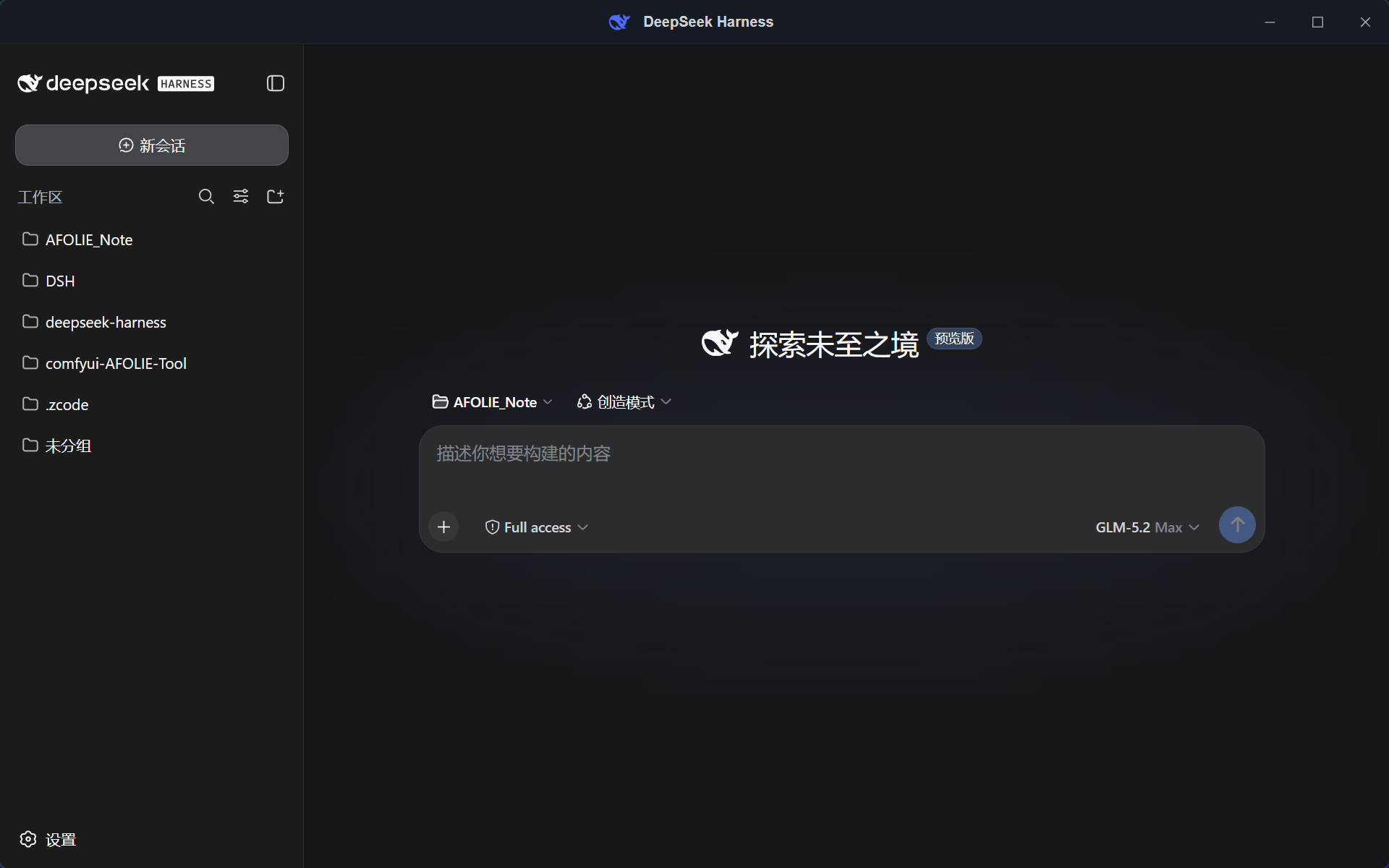
DeepSeek Harness(DSH)的 Windows 桌面壳,基于 Tauri v2 + React 18 + TypeScript。 打开应用 → 自动拉起本机 DSH Web 服务 → 窗口直接显示原生 webchat → 托盘常驻,任务完成弹系统通知。 交付物是单个免安装裸 exe(约 4.4 MB)。
推荐用法:在任意文件夹执行 pnpm add @deepseek-ai/dsh(或 npm i @deepseek-ai/dsh),把 exe 放进同一文件夹的根目录双击即可——应用自动发现旁边的 node_modules\.bin\dsh.cmd,启动零下载、零配置、不询问。
pnpm dsh web),就绪后窗口直接打开 http://127.0.0.1:3080/ 的原生 webchat 界面(不自创聊天 UI、不做反向代理)~/.dsh 持久化,不丢失IsPromoted),图标不再每次被收进任务栏角溢出taskkill /T 杀掉自己拉起的整棵进程树,零孤儿进程%LOCALAPPDATA%\dsh-desktop\DSH_CMD 环境变量(失败自动降级,不再卡死)→ 自定义路径(启动页可填,永久记住)→ PATH 全局安装的 dsh web → 项目本地 node_modules\.bin\dsh.cmd(exe 同目录/工作目录/用户目录)→ 已确认过的 npx;全都找不到时启动页提供一键全局安装(应用直接执行 npm install -g @deepseek-ai/dsh,约 1-3 分钟,装完永久走最快路径、终端获得 dsh 命令)、npx 下载(备选)、手动填路径、重新检测、退出——不会静默下载任何东西目标机器需已具备(exe 不携带):
| 项 | 要求 |
|---|---|
| Node.js | ^22.19 或 ≥ 24(必须;DSH 的 Node 版本要求) |
| DSH | 可选,三种方式任一:全局安装 npm i -g @deepseek-ai/dsh(最快,推荐);本地安装(在 exe 旁或任意被搜索目录执行 pnpm add @deepseek-ai/dsh);都没有则首次启动时点「下载并启动」走 npx |
| 从源码跑 DSH 的开发者 | 设 DSH_CMD(pnpm dsh web)与 DSH_CWD(DSH 仓库路径)环境变量 |
| WebView2 | Windows 11 自带 |
方式一:装 DSH 插件(推荐给 DSH 用户)
dsh plugin --profile web add dsh-desktop-plugin重启 DSH 后插件自动把 exe 装到 %LOCALAPPDATA%\Programs\dsh-desktop-windowos\,并在桌面生成两个快捷方式——「DeepSeek Harness」(桌面应用)和「DeepSeek Harness Web」(浏览器打开前端);之后每次激活还会自动升级 exe 到最新 Release(应用运行中也能安全替换)。对话里说“打开桌面应用”可通过 desktop_launch 工具直接拉起(exe 缺失时走后台任务安装,完成后自动启动,聊天里可轮询进度)。首次运行 exe 会弹 SmartScreen(未签名),点「更多信息 → 仍要运行」即可。插件 npm 包仅在功能变更时发布(当前 1.5.9;应用版本自由前进),桌面端会自动把已装插件对齐 npm 最新版。详见 plugin/README.md。
方式二:直接下载 exe
dsh-desktop-windowos-v<版本>.exe,双击运行(免安装单文件,无需解压)。首次运行 Windows SmartScreen 可能拦截(exe 未签名):点「更多信息 → 仍要运行」即可dsh web)→ 自动附加,直接使用,无需 Node 在 PATHnpm i -g @deepseek-ai/dsh,推荐)→ 启动最快,无需网络pnpm add @deepseek-ai/dsh)→ 自动发现 node_modules\.bin\dsh.cmd 并使用npx --yes @deepseek-ai/dsh web 拉起(首选项记录在 %LOCALAPPDATA%\dsh-desktop\settings.json)npm install -g @deepseek-ai/dsh,约 1-3 分钟)/「下载并启动(npx,备选)」/粘贴已知 dsh.cmd 路径/「重新检测」/「退出」,不会未经同意就下载;需 Node.js(^22.19 或 ≥ 24)pnpm install # 本项目是独立工作区根
pnpm tauri dev # 开发模式
pnpm tauri build # 产物:src-tauri\target\release\dsh-desktop-windowos.exePOST /api/host.describe 探测就绪(result.ok === true 即就绪);启动走本地优先候选链:DSH_CMD 环境变量(首个候选,失败自动降级)→ 自定义路径(启动页输入,持久化在 settings.json)→ dsh web(PATH 全局,经 where dsh 检查)→ node_modules\.bin\dsh.cmd(exe 同目录/工作目录/用户目录)→ 已确认过的 npx --yes @deepseek-ai/dsh web;链空则发 notfound 事件,启动页提供一键 npm install -g(应用代跑)、npx 备选、路径输入等选项;每个候选独立就绪窗口,失败自动降级并在日志/错误信息中记录每次尝试;子进程经 cmd /S /C 拉起(加 CREATE_NO_WINDOW,stdout/stderr 写日志)ws://127.0.0.1:3080/api/events.host,在 host/session-status 的 running 出现 true→false 边沿且主窗口隐藏时,经 session.list 取会话标题弹通知HKCU\Software\Classes\AppUserModelId\com.dsh.desktop)保证通知可达src/ React boot 页(等待/错误态;就绪后整窗跳转 3080)
src-tauri/src/
dsh.rs DSH 生命周期:探测 / spawn / 等就绪 / taskkill /T 退出清理
monitor.rs events.host WS 监听:running 边沿 + 两按钮通知 + 断线重连
lib.rs 托盘、窗口 X=隐藏、single-instance、AUMID 注册
plugin/ DSH 插件(npm: dsh-desktop-plugin):自动安装/升级 exe + 双快捷方式 + desktop_launch 工具
icon-src/ 图标源(DeepSeek 鲸鱼标,品牌蓝 #4D6BFE)A Windows desktop shell for DeepSeek Harness (DSH), built with Tauri v2 + React 18 + TypeScript. Launch the app → it auto-starts the local DSH web service → the window shows the native webchat → tray-resident with system notifications on task completion. Ships as a single portable bare exe (~4.4 MB, no installer).
Recommended setup: run pnpm add @deepseek-ai/dsh (or npm i @deepseek-ai/dsh) in any folder, then drop the exe into that folder's root and double-click — the app auto-discovers the adjacent node_modules\.bin\dsh.cmd: zero download, zero config, no questions asked.
pnpm dsh web); once ready, the window opens the native webchat at http://127.0.0.1:3080/ (no custom chat UI, no reverse proxy)~/.dshIsPromoted) at startup, so the icon no longer falls into the overflow on every launchtaskkill /T with zero orphans%LOCALAPPDATA%\dsh-desktop\DSH_CMD env var (falls through on failure instead of stalling) → a custom path entered on the boot page (remembered) → PATH-global dsh web → project-local node_modules\.bin\dsh.cmd → a previously consented npx; when nothing local exists the boot page offers a one-click global install (the app runs npm install -g @deepseek-ai/dsh for you, ~1-3 min, permanently on the fast path with a terminal dsh command), the npx download as fallback, a manual path input, re-detect, and exit — nothing downloads silentlyNot bundled with the exe:
| Item | Requirement |
|---|---|
| Node.js | ^22.19 or ≥ 24 (required; the Node version DSH declares) |
| DSH | optional, any of: global install npm i -g @deepseek-ai/dsh (fastest, recommended); local install (pnpm add @deepseek-ai/dsh beside the exe or in any searched dir); or click "下载并启动" on first launch to go through npx |
| Running DSH from source | set the DSH_CMD (pnpm dsh web) and DSH_CWD (DSH repo path) env vars |
| WebView2 | included with Windows 11 |
Option A: install the DSH plugin (recommended for DSH users)
dsh plugin --profile web add dsh-desktop-pluginAfter restarting DSH, the plugin auto-installs the exe into %LOCALAPPDATA%\Programs\dsh-desktop-windowos and creates two desktop shortcuts — "DeepSeek Harness" (the desktop app) and "DeepSeek Harness Web" (the web UI in a browser); each later activation also auto-updates the exe to the latest Release (safe even while the app is running). Saying "open the desktop app" in chat launches it via the desktop_launch tool (a missing exe installs as a background job that auto-launches when done, with progress pollable in chat). First run of the unsigned exe shows SmartScreen — click "More info → Run anyway". The plugin npm package ships only when the plugin changes (currently 1.5.9; the app version advances independently); the desktop app aligns installed plugins to npm latest automatically. See plugin/README.md.
Option B: download the exe directly
dsh-desktop-windowos-v<version>.exe from Releases and double-click it (single portable file, no unzip needed). Windows SmartScreen may warn on first run (the exe is unsigned): click "More info → Run anyway"dsh web yourself) → auto-attach, works immediately, no Node needed on PATHnpm i -g @deepseek-ai/dsh, recommended) → fastest launch, no network neededpnpm add @deepseek-ai/dsh beside the exe, in the working dir, or the user profile) → node_modules\.bin\dsh.cmd is discovered and usednpx --yes @deepseek-ai/dsh web (choice persisted in %LOCALAPPDATA%\dsh-desktop\settings.json)npm install -g @deepseek-ai/dsh itself, ~1-3 min) / "下载并启动" (npx fallback) / paste a known dsh.cmd path / "重新检测" (re-detect) / "退出" (exit). Nothing downloads without consent; Node.js ^22.19 or ≥ 24 is requiredpnpm install # this project is its own workspace root
pnpm tauri dev # dev mode
pnpm tauri build # output: src-tauri\target\release\dsh-desktop-windowos.exePOST /api/host.describe (result.ok === true); launch runs a local-first candidate chain: DSH_CMD env var (first candidate, falls through on failure) → custom path from the boot page (persisted in settings.json) → dsh web (PATH-global, checked via where dsh) → node_modules\.bin\dsh.cmd (exe dir / working dir / user profile) → a previously consented npx --yes @deepseek-ai/dsh web; an empty chain emits notfound and the boot page offers a one-click npm install -g (run by the app), the npx fallback, and a manual path input — each candidate has its own readiness window, falls through on failure with every attempt logged; the child is spawned via cmd /S /C (with CREATE_NO_WINDOW; stdout/stderr to a log file)ws://127.0.0.1:3080/api/events.host; on a true→false edge of running in host/session-status while the window is hidden, it resolves the session title via session.list and fires the toastHKCU\Software\Classes\AppUserModelId\com.dsh.desktop) to make notifications workCLASSIFICATION EVIDENCE
系统优先读取 GitHub Topics,再与站内分类词典和词根规则比对。
aooyoo
Zero-token DuckDuckGo search provider for the DeepSeek Harness (DSH) web seam — local headless browser, no API key, no m…
awa-123-cw
DSH 图片/音视频托管插件:自动拉起 8899 静态服务 + 3080 /files/ 路由(HTTP Range 流式)+ WebUI 内点击即播(视频静音/音频 20% 音量/互斥懒加载)
awa-123-cw
DSH 设置页「关于」栏位 + 一键检测更新插件(About page with update checking for DeepSeek Harness WebUI)