开发工具
插件
dsh-doctor
asdf17128
Find what your DeepSeek Harness (dsh) patches silently broke — dead patches, config fields dropped by whole-config repla…
agentclicordisdeepseek
PROJECT TOPICS
PROJECT README
Before using this extension: start the DeepSeek Harness server from your terminal first — the extension connects to it inside VS Code.
npx @deepseek-ai/dsh web
中文版 | Publisher: Jager · Latest: 0.12.76
Use DeepSeek Harness (dsh) directly in VS Code, alongside ChatGPT / Copilot: the built-in @dsh chat participant, secondary sidebar / standalone chat windows, workspaces / jobs / trajectory / settings panels, turn-level Git rollback, and a multi-language UI (简体中文 / 繁體中文 / English / 日本語 / 한국어 / Deutsch / Français / Español / Português / ไทย / Bahasa Indonesia / Türkçe / Русский / العربية — follows the VS Code display language or switch manually).
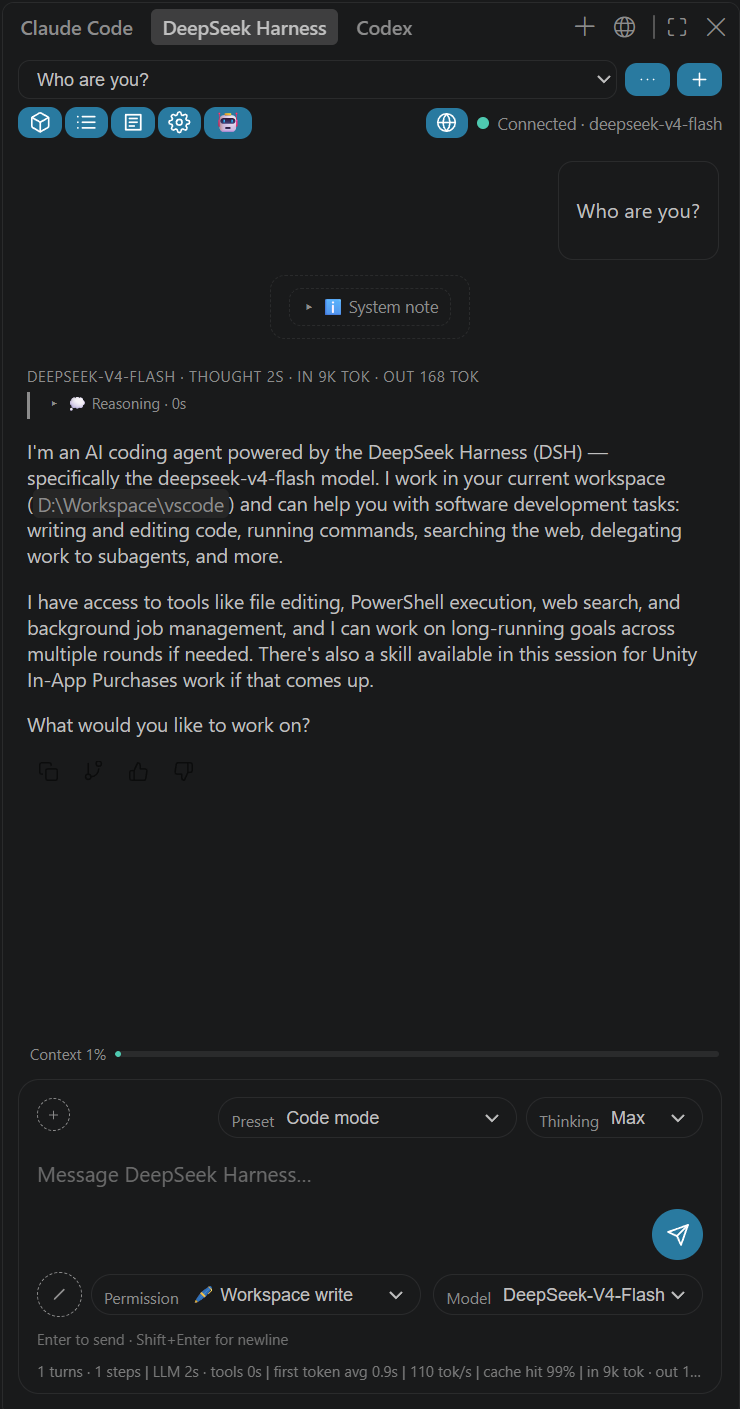
@dsh: type @ in the native Chat panel (Ctrl+Alt+I); streamed replies with tool calls and approval buttons; slash commands /new, /session <ID>, /preset <name>.DSH: Open Standalone Chat Window./feedback) / message header shows model · thinking time · per-step tokens.dsh-git-rollback snapshots the workspace's git state (tracked + untracked files) at every turn start into hidden refs (refs/dsh/checkpoints/<sid>, zero pollution of your branch history) and records them under .dsh/rollback; the button restores the workspace to the state before that turn. Commands /rollback [N], /redo, /checkpoints work in both the web command panel and the VS Code chat (rollback is non-destructive: the pre-rollback state is saved first, /redo restores it, ignored files are never touched)./plan, click to exit./ menu (official skill.list)..claude/commands, .claude/skills, .codex/skills (SKILL.md), .github/copilot-instructions.md, .github/instructions, .github/agents and .github/prompts are listed in the / menu and insertable./permission command).dsh.participantSessionMode: global to share one session.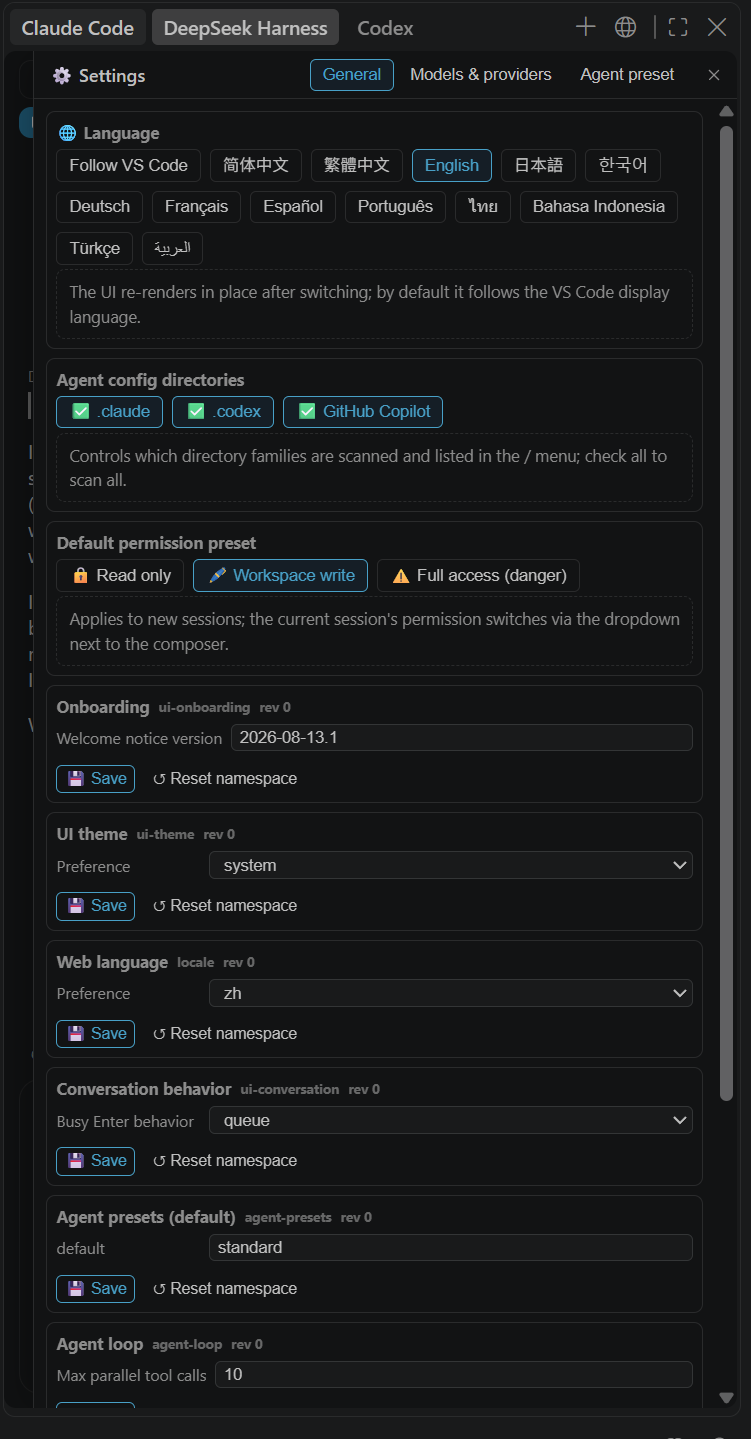
DSH: Generate Commit Message) reads the staged/unstaged git diff and generates a Conventional Commits-style message in a disposable session (archived immediately, never shown in the session list) with a lightweight model (default deepseek-v4-flash + low effort; configurable via dsh.commitModel / dsh.commitReasoningEffort), writing the result into the SCM input box and auto-cancelling on timeout or when the model requests extra interaction.dsh.language / the 🌐 section of the settings panel.cd <this folder>
npm install
npm run package # outputs Releases/dsh-vscode-<version>.vsixVS Code → Extensions → … → Install from VSIX → pick the file in Releases\ → reload.
Prerequisites: VS Code ≥ 1.90 (built-in chat ≥ 1.95; secondary sidebar container ≥ 1.106); DSH CLI or npx fallback; model credentials configured (same as dsh web).
/ button (bottom-left): command menu (plan / compact / goal / feedback / permission / skills / .claude) — inserts the command into the input; press Enter to run.+ button next to it: add file / add folder; the blue chip is the auto-attached active file.DSH: Send Selection to @dsh; file → DSH: Ask @dsh About This File.| Key | Default | Description |
|---|---|---|
dsh.url |
http://127.0.0.1:3080 |
DSH web server URL |
dsh.autoStart |
true |
On VS Code startup, start dsh web if the server is not running |
dsh.command |
dsh |
Start command; falls back to npx |
dsh.autoStartTimeoutSec |
60 |
Auto-start timeout (seconds) |
dsh.participantSessionMode |
per-workspace |
@dsh session scope: per-project / global |
dsh.openPanelOnStartup |
false |
Open the standalone window on startup |
dsh.defaultReasoningEffort |
"" |
Default thinking depth for new sessions (off/high/max, model-dependent) |
dsh.commitModel |
deepseek-v4-flash |
Model used to generate commit messages (resolved from the DSH model catalog; falls back to the session's current model) |
dsh.commitReasoningEffort |
low |
Reasoning effort for commit messages (low = no thinking on DeepSeek models, fastest) |
dsh.language |
auto |
UI language: auto / zh-cn / zh-tw / en / ja / ko / de / fr / es / pt / th / id / tr / ru / ar |
dsh.installRollbackPlugin |
true |
Auto-install the turn-level Git rollback server plugin into the DSH web profile (enables /rollback, /redo, /checkpoints) |
dsh-git-rollback server plugin and installs it into your DSH web profile (~/.dsh/profiles/web) on activation (idempotent, version-tracked). If your DSH server was already running, the extension offers a one-click restart when it detects the plugin is not loaded yet.dsh plugin --profile web add dsh-git-rollback (published on npm), then restart dsh web..dsh/rollback records + hidden refs (refs/dsh/checkpoints/<sessionId>). Disable the auto-install with dsh.installRollbackPlugin: false.DSH: Show Diagnostics; check the extension runtime state for validation errors.DSH: Repair Chat View (Reset View Locations) or Restart Extension Host.%APPDATA%\Code\Service Worker\CacheStorage.DSH: Start Server; check dsh.url.[server] log in the "DeepSeek Harness" output channel. If the error mentions 0xC0000142/EPERM, VS Code was launched from a DSH session or a restricted terminal (child process creation blocked) — launch VS Code normally, or set that session's permission to danger-full-access.npm install
npm run typecheck
npm run build
npm run package # → Releases/src/extension.ts, src/dsh/* (API client, server manager, session store, chat participant, project-session mapping, commit message generation).src/webview/{channel,panel,window,ui}.ts + media/chat.css; icon media/icon.png.package.nls.json + package.nls.zh-cn/zh-tw/ja/ko/de/fr/es/pt/th/id/tr/ar.json, l10n/bundle.l10n.json + bundle.l10n.zh-cn/zh-tw/ja/ko/de/fr/es/pt/th/id/tr/ar.json, the EN_TEXT dictionary in ui.ts + src/webview/texts/*.json.plugins/<name>/ (all new DSH server plugins go there); npm run build compiles them and syncs the bundle into resources/<name>/ via tools/sync-plugins.mjs for packaging into the vsix. Unit tests: cd plugins/<name> && npm test.使用前请先启动 DSH Web 服务:先在命令行中执行以下命令,安装并启动
dsh web,之后才能在 VS Code 中使用本插件。npx @deepseek-ai/dsh web
English version | 发布者:Jager · 最新版本:0.12.76
在 VS Code 中直接使用 DeepSeek Harness(dsh),与 ChatGPT / Copilot 一样融入 VS Code 聊天体系:内置聊天参与者 @dsh、辅助侧栏 / 独立聊天窗口、工作区 / 后台任务 / 轨迹 / 设置面板、回合级 Git 回退,以及多语言界面(简体中文 / 繁體中文 / English / 日本語 / 한국어 / Deutsch / Français / Español / Português / ไทย / Bahasa Indonesia / Türkçe / Русский / العربية,跟随 VS Code 显示语言或手动切换)。
@dsh:VS Code 原生 Chat 面板(Ctrl+Alt+I)输入 @ 选择 dsh;助手回复流式渲染,含工具调用与审批按钮;支持 /new、/session <ID>、/preset <名> 斜杠命令。DSH: 打开独立聊天窗口。/feedback 记录)/ 消息头显示模型名 · 思考耗时 · 本步 token 消耗。dsh-git-rollback 在每个回合开始时把工作区 git 状态(含未跟踪文件)快照到隐藏引用(refs/dsh/checkpoints/<sid>,用户分支历史零污染)并记录在 .dsh/rollback;点击按钮即可把工作区恢复到该回合之前的状态。/rollback [N]、/redo、/checkpoints 命令在 web 命令面板与 VS Code 聊天面板通用——回退非破坏性(先存保存点,/redo 可恢复,ignored 文件永不触碰)。plan/mode 状态实时同步。/permission 命令。/session <ID> 显式切换;dsh.participantSessionMode: global 可全局共用。
DSH: 生成提交信息),读取 git 暂存/未暂存 diff,在一次性会话(创建即归档,不占用会话列表)中用轻量模型按 Conventional Commits 风格生成提交信息并写入 SCM 输入框;模型与思考深度可配置(dsh.commitModel / dsh.commitReasoningEffort),超时或模型请求额外交互时自动取消。dsh.language / 设置面板 🌐 就地切换。cd <本目录>
npm install
npm run package # 生成 Releases/dsh-vscode-<版本>.vsixVS Code 中:扩展 → … → 从 VSIX 安装 → 选择 Releases\ 下的 .vsix → 重载窗口。
npm install
npm run watch
用 VS Code 打开本目录,按 F5 启动扩展开发宿主。
@dsh 需要 ≥ 1.95;辅助侧栏容器需要 ≥ 1.106(旧版自动回退活动栏)。dsh),或允许扩展用 npx --yes @deepseek-ai/dsh@latest 自动启动服务器。dsh web 一致)。| 入口 | 说明 |
|---|---|
内置 Chat @dsh |
输入 @ 选 dsh;DSH: 打开内置聊天 (@dsh) 或状态栏 DSH 图标可自动填入 |
| 辅助侧栏 tab | 视图 → 外观 → Secondary Side Bar(Ctrl+Alt+B) |
| 独立窗口 | DSH: 打开独立聊天窗口 |
| SCM 提交按钮 | 源代码管理视图标题栏的 ✨ 按钮(DSH: 生成提交信息),多仓库时弹出选择 |
Enter 发送,Shift+Enter 换行;运行中发送按钮(纸飞机线条图标)变为停止(方块线条图标),输入文字变回发送(消息排队)。/ 按钮:命令菜单(计划模式 / 压缩上下文 / 设置目标 / 记录反馈 / 切换权限 / 技能 / .claude 命令与技能)—— 点击插入命令到输入框,回车执行。+ 按钮:添加文件 / 添加文件夹(二选一);附件行蓝色芯片为自动附加的激活文件(× 移除)。DSH: 发送选中代码到 @dsh;文件右键 → DSH: 向 @dsh 询问此文件。| 配置项 | 默认值 | 说明 |
|---|---|---|
dsh.url |
http://127.0.0.1:3080 |
DSH Web 服务器地址(修改后需重载) |
dsh.autoStart |
true |
VS Code 启动时若服务器未运行则自动启动 dsh web |
dsh.command |
dsh |
启动命令;找不到时回退 npx |
dsh.autoStartTimeoutSec |
60 |
自动启动最长等待秒数 |
dsh.participantSessionMode |
per-workspace |
@dsh 会话范围:每项目 / 全局 |
dsh.openPanelOnStartup |
false |
启动时自动打开独立聊天窗口 |
dsh.defaultReasoningEffort |
"" |
新会话默认思考深度(off/high/max 等,取决于模型) |
dsh.commitModel |
deepseek-v4-flash |
生成提交信息所用的模型(从 DSH 模型目录解析,找不到时回退当前模型) |
dsh.commitReasoningEffort |
low |
生成提交信息时的思考深度(DeepSeek 模型上 low 表示不开思考,最快) |
dsh.language |
auto |
界面语言:auto / zh-cn / zh-tw / en / ja / ko / de / fr / es / pt / th / id / tr / ru / ar |
dsh.installRollbackPlugin |
true |
自动把回合级 Git 回退服务端插件安装到 DSH web profile(启用 /rollback、/redo、/checkpoints) |
dsh-git-rollback 服务端插件,激活时幂等安装到你的 DSH web profile(~/.dsh/profiles/web,带版本标记增量更新)。若 DSH 服务器已在运行,扩展检测到插件未加载时会提示一键重启(仅限本扩展启动的服务器)。dsh plugin --profile web add dsh-git-rollback(已发布到 npm),然后重启 dsh web。.dsh/rollback + 隐藏引用 refs/dsh/checkpoints/<会话ID>)。可设置 dsh.installRollbackPlugin: false 关闭自动安装。DSH: 显示诊断信息。DSH: 修复聊天视图(重置视图位置),或命令面板 Restart Extension Host。%APPDATA%\Code\Service Worker\CacheStorage。DSH: 启动服务器;检查 dsh.url 端口。dsh web(失败后每 15 秒重探,服务器上线即自动连接);具体失败原因见输出通道 "DeepSeek Harness" 的 [server] 日志。若报错含 0xC0000142/EPERM,说明 VS Code 是从 DSH 会话或受限终端启动的(子进程创建被拦截)——改用普通方式启动 VS Code,或把该会话权限调为 danger-full-access。npm install
npm run typecheck # 类型检查
npm run build # 构建
npm run package # 打包到 Releases/src/extension.ts、src/dsh/*(API 客户端 / 服务器管理 / 会话存储 / Chat Participant / 项目会话映射 / 提交信息生成)。src/webview/{channel,panel,window,ui}.ts + media/chat.css;图标 media/icon.png。package.nls.json + package.nls.zh-cn/zh-tw/ja/ko/de/fr/es/pt/th/id/tr/ar.json(贡献点)、l10n/bundle.l10n.json + bundle.l10n.zh-cn/zh-tw/ja/ko/de/fr/es/pt/th/id/tr/ar.json(宿主运行时)、ui.ts 的 EN_TEXT 词典 + src/webview/texts/*.json(Webview)。plugins/<name>/(以后所有新插件都建在此目录);npm run build 会自动编译并同步到 resources/<name>/(tools/sync-plugins.mjs)随 vsix 打包分发。插件单元测试:cd plugins/<name> && npm test。CLASSIFICATION EVIDENCE
系统优先读取 GitHub Topics,再与站内分类词典和词根规则比对。
asdf17128
Find what your DeepSeek Harness (dsh) patches silently broke — dead patches, config fields dropped by whole-config repla…
asdf17128
Manage DeepSeek Harness profiles — list, create, clone, diff, and share a whole dsh setup as one portable file.
aust24lzy
DeepSeek Harness (DSH) 开源插件导航站 —— 实时同步 dsh-plugin 生态,按 Stars 动态排行