文件与数据
插件
dsh-plugin-verified-search
f0909172434
Verified current-source search workflow for DeepSeek Harness
deepseekdeepseek-harnessdshdsh-plugin
PROJECT TOPICS
PROJECT README
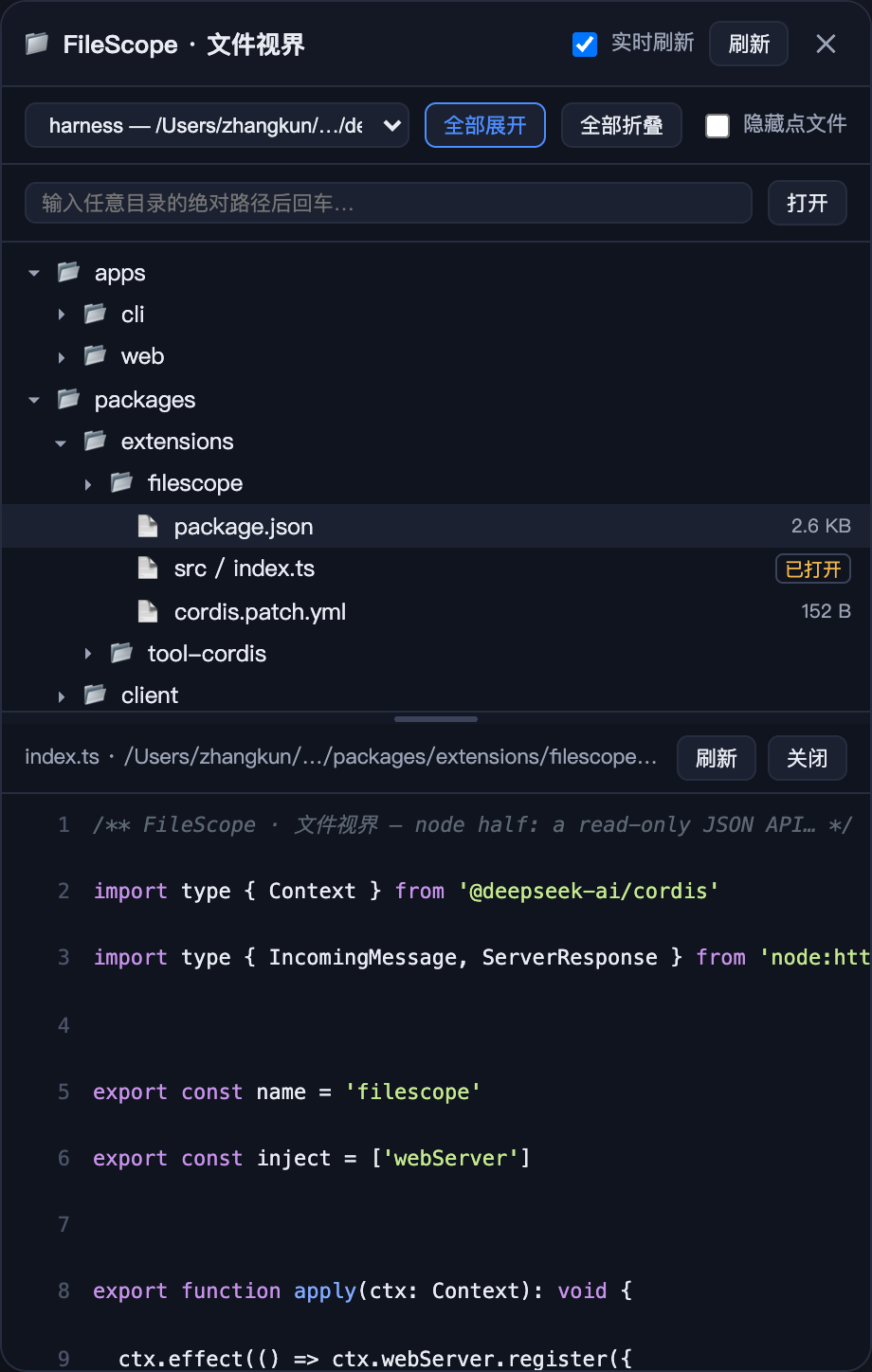
把当前工作区的完整目录树搬进 DeepSeek Harness Web 页面的右侧抽屉:任意层级展开、 点击文件实时预览、切换会话自动跟随对应工作区、抽屉宽度与目录树高度均可拖拽调整。 只读浏览,不修改任何文件。
🔖 关联 topic:
dsh-plugin·deepseek-harness·file-explorer·workspace
dsh plugin --profile web add dsh-filescopedsh plugin 会自动安装依赖并把包名登记进该 profile 的 dsh.profile.bundles。
dsh plugin --profile web add file:/绝对路径/dsh-filescope-plugin进入 profile 目录:cd $DSH_HOME/profiles/web(没有则先运行一次 dsh --profile web 触发初始化);
在 profile 的 package.json 中:
{
  "dependencies": { "dsh-filescope": "0.1.2" },
  "dsh": { "profile": { "bundles": ["@deepseek-ai/dsh-base", "@deepseek-ai/dsh-web-app", "dsh-filescope"] } }
}
在 profile 目录执行 pnpm install。
# 停掉当前 dsh web 进程后重新启动
dsh --profile web
Host 组合在进程启动时加载,新行需要重启才会挂载;重启后刷新浏览器页面
(Cmd+Shift+R)即可看到入口。
. 开头条目;react、ui-slots 等平台模块,与 Host 的 webServer 行);dsh-web-app 层(@deepseek-ai/dsh-web-app)。| Endpoint | 返回 |
|---|---|
GET /filescope/workspaces |
{ workspaces: [{ id, title, path, status }] } |
GET /filescope/dir?path=<abs> |
{ entries: [{ name, type, path, size? }] } |
GET /filescope/stat?path=<abs> |
{ exists, type, version, size? } |
GET /filescope/file?path=<abs> |
{ kind: text\|binary\|too-large, content?, size, version, hex? } |
dsh-filescope-plugin/
├── package.json          # 包清单(dsh.bundle 补丁 + dsh.client 浏览器声明)
├── cordis.patch.yml      # 组合补丁:把 filescope 宿主行插入 profile
├── docs/
│   ├── screenshot.png    # 效果图
│   └── preview.html      # 效果图源文件
├── lib/
│   ├── index.js          # Host 半(/filescope 只读 API,零运行时依赖)
│   ├── client.js         # 浏览器半(抽屉 UI,预构建 bundle)
│   └── types/            # TypeScript 声明(供接入方类型检查)
├── src/                  # 源码(参考/二次开发用)
├── LICENSE
└── README.mdMIT © 2025 zhangkun
CLASSIFICATION EVIDENCE
系统优先读取 GitHub Topics,再与站内分类词典和词根规则比对。
f0909172434
Verified current-source search workflow for DeepSeek Harness
fryghost
Community plugin for DeepSeek Harness: give text-only models eyes - paste images natively, described via an OpenAI-compa…
gloryxpnv
Local-first vision for DeepSeek Harness: structured JSON evidence (OCR/layout/semantics) from local VLMs (LM Studio/Olla…