文件与数据
插件
dsh-plugin-verified-search
f0909172434
Verified current-source search workflow for DeepSeek Harness
deepseekdeepseek-harnessdshdsh-plugin
PROJECT TOPICS
PROJECT README
Unable to generate images directly in DeepSeek Harness? This plugin adds Image2
generation through a third-party relay that exposes an OpenAI Images-compatible
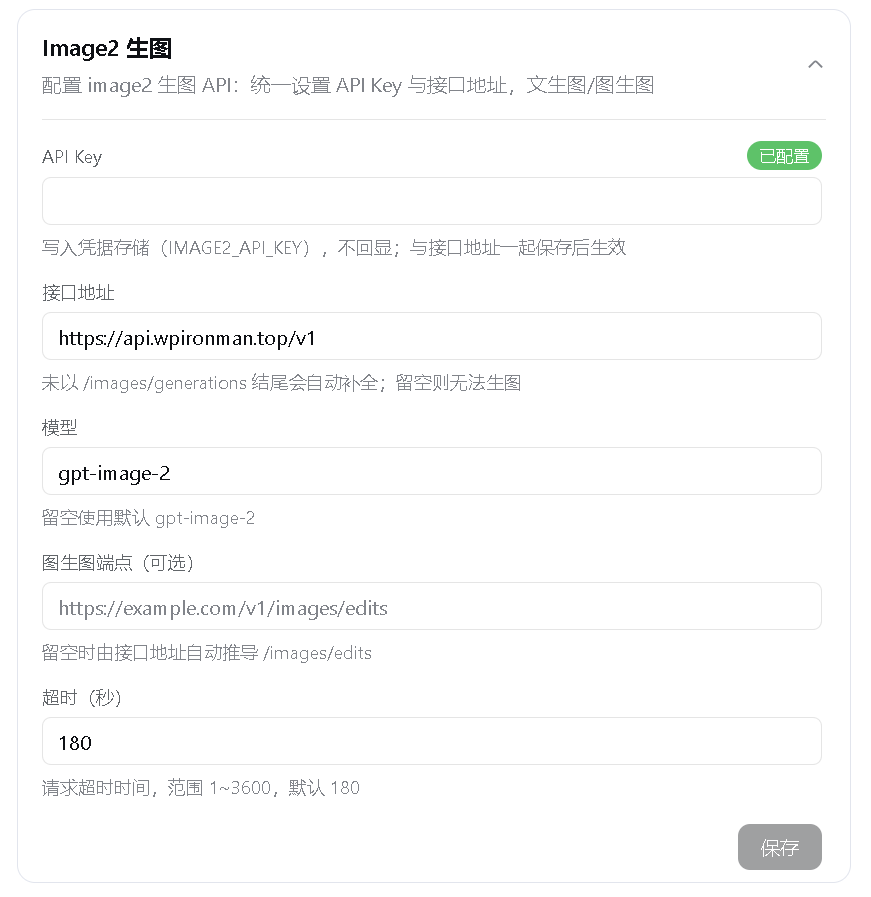
API. Configure only a baseURL and an API Key, then use gpt-image-2 for
text-to-image and image-to-image tasks in chat.
Third-party service recommendation (referral link)
If you are looking for an OpenAI-compatible API relay, you can take a look at WPIronman API. This is my referral link, and I may receive a referral benefit if you register through it; any promotion or benefit is subject to the provider's current terms. This plugin is independent of that service and does not require any particular relay. Evaluate pricing, reliability, and privacy terms before choosing a provider.
New users can redeem the gift quota with code
99F509ABC6C38F77.
Need independent reasoning-effort controls for third-party models in DeepSeek Harness? See my other plugin: DSH Reasoning Settings. It configures reasoning levels, provider defaults, and API wire values for custom providers and models.
baseURL and an API Key; the default model is gpt-image-2.https://example.com/v1 and appends
/images/generations automatically./images/edits, with an optional explicit
editURL override.image2-generate for 1-8 sequential text-to-image generations.image2-edit with 1-8 PNG, JPEG, or WebP reference images.outputs/image2/ in the current session working
directory and numbers duplicate names instead of overwriting files.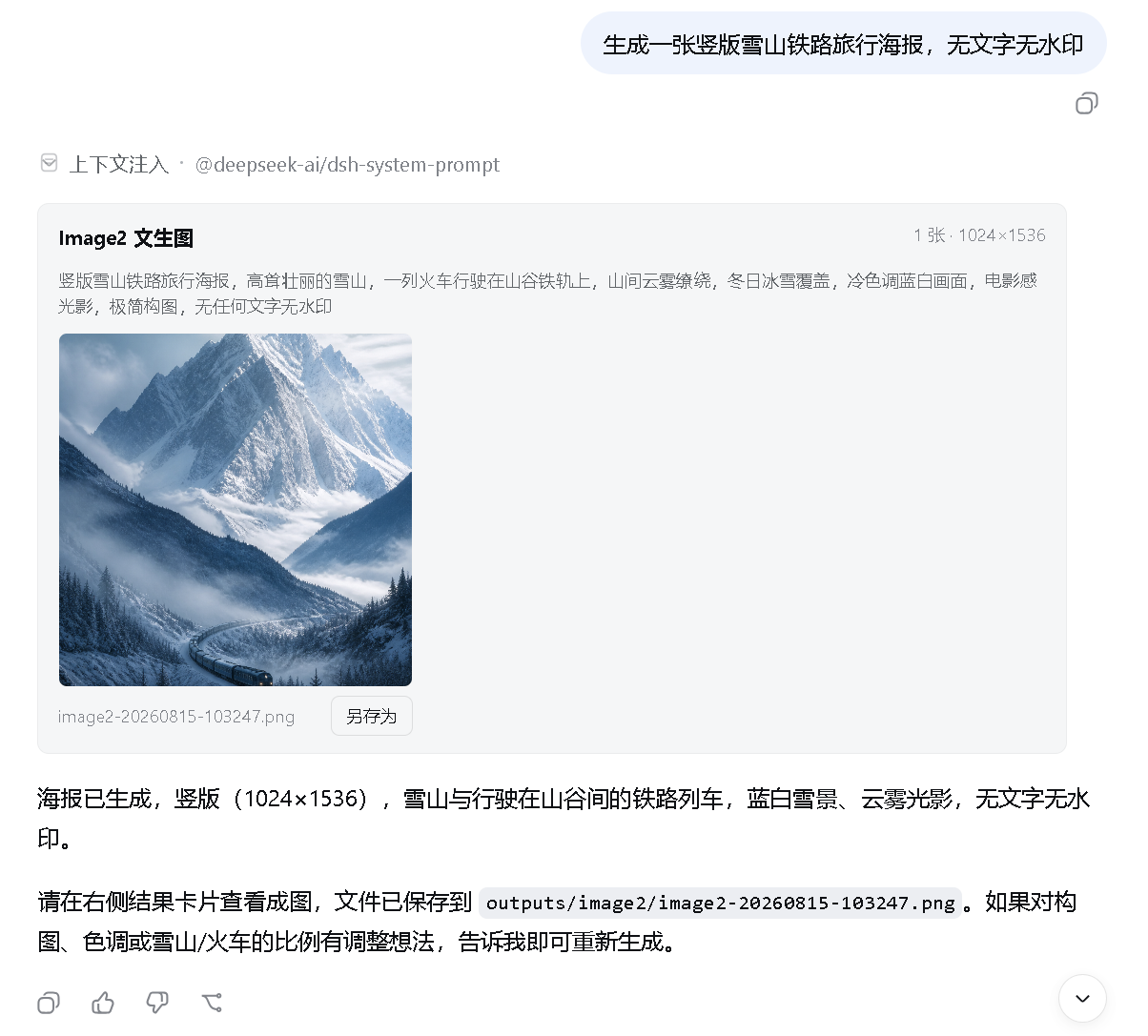
npm
and npx.dsh plugin invokes it in the
profile directory to install or remove plugins.registry.npmjs.org and github.com. Configure a
working network proxy if npm or GitHub is unavailable or unstable.Check the basic environment first:
node --version
npx --version
git --version
corepack enable
pnpm --version
If corepack enable fails with a permission error, run it once from an
Administrator PowerShell. Alternatively, use another option from the
pnpm installation guide.
If downloads remain on a spinner or fail with ECONNRESET, ETIMEDOUT, or a
GitHub connection error, set a proxy for the current PowerShell window. Port
7890 is only an example; replace it with your proxy's actual port:
$proxy = "http://127.0.0.1:7890"
$env:HTTP_PROXY = $proxy
$env:HTTPS_PROXY = $proxy
$env:npm_config_proxy = $proxy
$env:npm_config_https_proxy = $proxy
These variables only affect the current PowerShell window and disappear when it is closed.
This method does not require a DeepSeek Harness source checkout or a global
dsh installation, but Git and pnpm must already be available. On its first
run, npx downloads @deepseek-ai/dsh and its dependencies, which can take
several minutes:
npx --yes -p @deepseek-ai/dsh dsh plugin --profile web add github:JuneLearn/dsh-image2-drawStart Web through the same package runner after installation:
npx --yes -p @deepseek-ai/dsh dsh webUse this method if you already cloned deepseek-harness and want to run its
source directly. First confirm pnpm is available:
pnpm --versionEnter the DeepSeek Harness source root. Install its dependencies once, then install the plugin:
cd D:\deepseek-harness
pnpm install
pnpm dsh plugin --profile web add github:JuneLearn/dsh-image2-draw
Start Web from that source directory afterward:
cd D:\deepseek-harness
pnpm dsh web
The package's dsh.bundle declaration adds the plugin to the Web profile
automatically. Neither method requires editing cordis.patch.yml. Web listens
on http://127.0.0.1:3080 by default; it uses another port only when the default
is occupied or you explicitly select one.
Run the corresponding install command again to upgrade. No uninstall or profile-patch maintenance is required.
npx method:
npx --yes -p @deepseek-ai/dsh dsh plugin --profile web add github:JuneLearn/dsh-image2-drawpnpm source method:
cd D:\deepseek-harness
pnpm dsh plugin --profile web add github:JuneLearn/dsh-image2-drawnpx method:
npx --yes -p @deepseek-ai/dsh dsh plugin --profile web remove dsh-image2-drawpnpm source method:
cd D:\deepseek-harness
pnpm dsh plugin --profile web remove dsh-image2-draw
DSH removes both the dependency and its bundle layer. Restart dsh web; the
Image2 Draw card and image-generation tools are removed.
https://example.com/v1.image2-generate, or provide
reference image paths and use image2-edit.Example prompts:
Call image2-generate to create a portrait cinematic poster of a future city at high quality.Call image2-edit with D:\images\room.png and restyle the room with light Japanese wood while preserving the layout.Support for gpt-image-2, image editing, custom dimensions, and quality levels
depends on the relay implementation. If the API returns HTTP 400 or 404, check
the provider's model name and Images endpoint documentation.
npm install
npm testBuilt against the public dual-end plugin, settings namespace, credentials, tool
registration, client slot, and WebServer lifecycle interfaces of DeepSeek
Harness 0.1.0-rc.6. Harness is still in Developer Preview; if the plugin stops
loading after an upgrade, check these interfaces and the dsh.client.inject
declaration.
Parts of the in-conversation attachment and dedicated tool-card implementation were adapted from the MIT-licensed dsh-multimodal. See THIRD_PARTY_NOTICES.md for the complete third-party copyright and license notice.
CLASSIFICATION EVIDENCE
系统优先读取 GitHub Topics,再与站内分类词典和词根规则比对。
f0909172434
Verified current-source search workflow for DeepSeek Harness
fryghost
Community plugin for DeepSeek Harness: give text-only models eyes - paste images natively, described via an OpenAI-compa…
gloryxpnv
Local-first vision for DeepSeek Harness: structured JSON evidence (OCR/layout/semantics) from local VLMs (LM Studio/Olla…