界面增强
完整应用
dsh-desktop
Jedeiah
DeepSeek Harness 桌面端(macOS):双击即用的官方 dsh「壳」应用。内置 Node 与完整依赖闭包,电脑无需安装任何环境;跟随上游自动更新、干净卸载、局域网手机/平板浏览器访问。
ai-agentdeepseekdesktop-appdsh-plugin
PROJECT TOPICS
PROJECT README
A native macOS shell for the DeepSeek Harness (dsh) web UI.
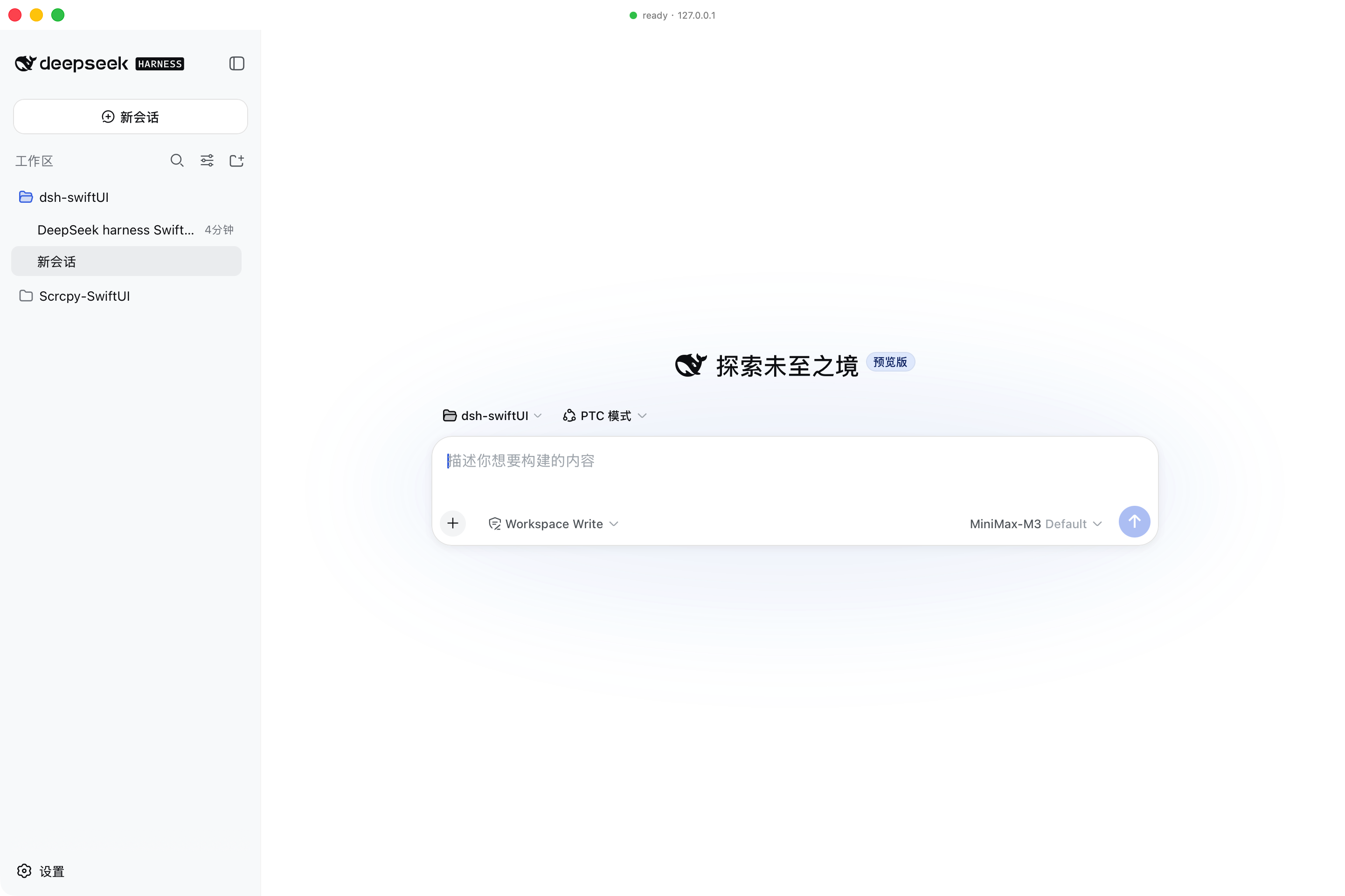
dsh ships its product as a CLI that boots a local HTTP server and serves a SPA front-end. dsh-swiftUI wraps that experience in a native SwiftUI application: it owns the window, the menu, the lifecycle, and (by default) forks dsh web itself. The dsh SPA is rendered inside a WKWebView; the native side stays out of dsh's way.
Pure shell. dsh-swiftUI does not modify dsh, does not bundle dsh, and does not write any dsh client plugin. It talks to dsh the same way a browser does: a single HTTP/WebSocket origin on
127.0.0.1.
This first milestone delivers the main panel only — the WKWebView pointing at the dsh SPA, with a transparent titlebar and a floating status badge. The roadmap for future native panels (Git, file tree, in-process terminal) is captured in docs/ROADMAP.md; that work is intentionally deferred.
| Stage | State |
|---|---|
| Repository skeleton + docs | ✅ |
| SwiftPM package + Xcode project (XcodeGen-generated) | ✅ |
DSHShellCore framework — process manager, endpoint resolver, health/attach probes, settings store |
✅ |
SwiftUI DSHShell app — AppDelegate-owned AppCoordinator, native window, WKWebView surface |
✅ |
DSHProcessManager — fork dsh web, capture URL, crash-time auto-restart, clean shutdown via kill/waitpid |
✅ |
launchMode == .attach fallback (scan loopback for an existing dsh) |
✅ |
| App icon, transparent titlebar, floating status badge | ✅ |
| Preferences (binary path, listen host/port, trusted hosts, timeouts, auto-restart) | ✅ |
Unit tests for DSHShellCore |
✅ 10/10 |
swift build and xcodebuild both clean |
✅ 0 warnings, 0 errors |
| Git / File tree / Terminal panels | ⏳ Roadmap only |
dsh --version should print 0.1.0-rc.6 or later.npm install -g @deepseek-ai/dshThe first launch needs the dsh front-end dist to be built (pnpm run build from the dsh repo). dsh-swiftUI does not ship the dsh dist.
If you have multiple Xcode versions installed, point the active developer directory at the beta once:
sudo xcode-select -s /Applications/Xcode-beta.app/Contents/Developerbrew install xcodegen # one-time
./scripts/generate-xcodeproj.sh # regenerates DSHShell.xcodeproj
open DSHShell.xcodeprojThen ⌘R. The first build expects a signing identity. For a local-only build, set the team to "None" and enable "Sign to Run Locally"; the project already disables Hardened Runtime because ad-hoc-signed frameworks would otherwise fail dyld library validation (no shared Team ID).
swift build -c release           # builds DSHShellCore + DSHShell
swift test                       # runs the 10 unit tests
To produce a .app bundle, use the Xcode project (Option A).
Settings live at ~/Library/Application Support/dsh-swiftUI/settings.json. Defaults:
{
  "dshBinaryPath": "/Users/djx/.npm-global/bin/dsh",
  "launchMode": "spawn",
  "listenHost": "127.0.0.1",
  "preferredPort": 0,
  "trustedHosts": ["127.0.0.1", "localhost"],
  "pollIntervalSeconds": 0.5,
  "spawnTimeoutSeconds": 30,
  "autoRestartOnCrash": true
}| Field | Meaning |
|---|---|
dshBinaryPath |
Absolute path to the dsh executable. |
launchMode |
spawn → fork dsh web ourselves; attach → only connect to an already-running instance. |
listenHost |
Local host passed to dsh web --host. 0.0.0.0 is not supported (mirrors dsh's own policy). |
preferredPort |
0 → let the OS assign; otherwise forwarded to dsh web --port. |
trustedHosts |
Hosts appended to dsh web --trusted-host (repeatable). |
spawnTimeoutSeconds |
How long to wait for the dsh web: URL line on stdout before failing. |
autoRestartOnCrash |
One-shot exponential back-off restart on unexpected child exit. |
The shell forwards no working directory to dsh web — the dsh SPA picks its own workspace inside the browser UI.
+-----------+   fork    +----------+    http   +-----------+
| DSHShell  | --------▶ | dsh web  | --------▶ | WKWebView |
| (macOS)   |           | (child)  |           |  + SPA    |
+-----------+           +----------+           +-----------+
       │                      │
       │  ⌘Q / terminate    │  crash
       ▼                      ▼
kill+waitpid respawn w/ backoffdsh web, captures the dsh web: http://127.0.0.1:NNNN/ line, and points the WKWebView at it.applicationWillTerminate the AppDelegate calls AppCoordinator.shutdownBlocking(): it signals the child with SIGTERM, escalates to SIGKILL after 5s, and uses waitpid to confirm the child has reaped before the process exits. This is the path that prevents orphan dsh processes — a Swift Task would not have run in time during runtime teardown.Lifecycle events flow through OSLog with subsystem ai.deepseek.dsh-shell. To see them:
log stream --predicate 'subsystem == "ai.deepseek.dsh-shell"' --info --debugOr read the last minute:
log show --predicate 'subsystem == "ai.deepseek.dsh-shell"' --last 1m --info --debugIf a launch fails with EADDRINUSE, a previous dsh web is still bound to a port. The error message tells you to run pkill -f 'dsh web'.
See docs/ARCHITECTURE.md for the layered view, the dsh integration boundary, the process model, and the App Sandbox stance. The roadmap for native panels lives in docs/ROADMAP.md.
MIT. See LICENSE.
CLASSIFICATION EVIDENCE
系统优先读取 GitHub Topics,再与站内分类词典和词根规则比对。
Jedeiah
DeepSeek Harness 桌面端(macOS):双击即用的官方 dsh「壳」应用。内置 Node 与完整依赖闭包,电脑无需安装任何环境;跟随上游自动更新、干净卸载、局域网手机/平板浏览器访问。
awa-123-cw
DeepSeek Harness WebUI 动效美化插件:聊天背景黑客帝国代码雨,雨字内容 = 当前会话 AI 思考链(流式实时),设置页调色盘 + 全套 DIY
baiyun200
DSH 插件看板 · DeepSeek Harness 插件生态可视化(shadcn/ui,每日自动构建部署)