消息通讯
渠道适配
dsh-notify
baka-world
DeepSeek Harness desktop notification plugin (notify-send / D-Bus)
cordisdbusdeepseek-harnessdesktop-notification
PROJECT TOPICS
PROJECT README
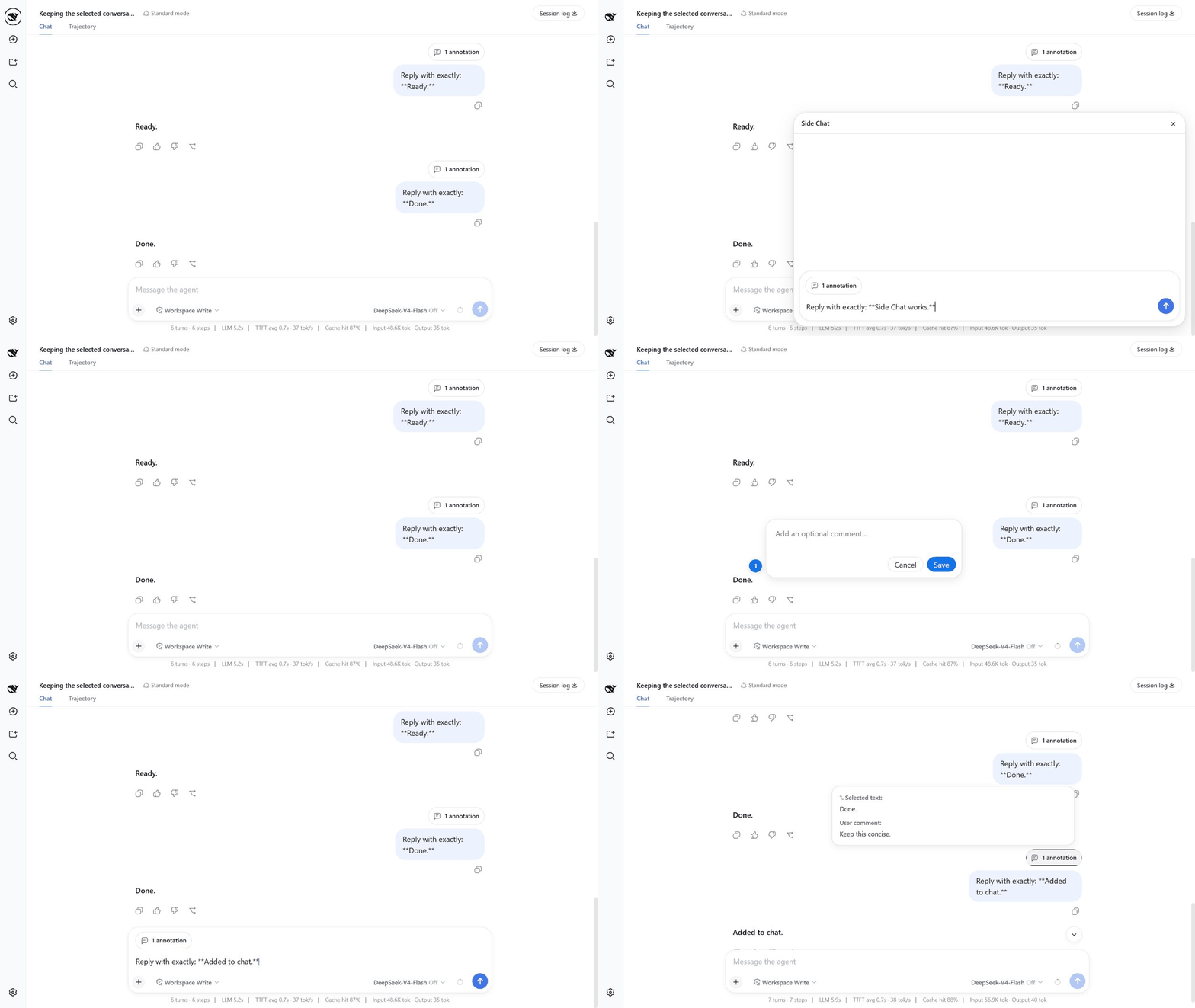
Ask a focused follow-up about selected text without leaving your current DeepSeek Harness conversation.
Compatibility: this release targets
@deepseek-ai/dsh@0.1.0-rc.6exactly.
Install DSH rc.6 if it is not already available. Refresh only this package's registry metadata before adding it, so pnpm cannot reuse an older latest value immediately after a release:
npm install --global @deepseek-ai/dsh@0.1.0-rc.6
pnpm cache delete "@ahggg/dsh-side-chat"
dsh plugin --profile web add @ahggg/dsh-side-chat@latest
Start DSH from the project you want the agent to work in:
cd E:\path\to\your-project
dsh web --port 3080
Open the URL printed by DSH. The plugin loads automatically in the Web client.
Add to chat to add an optional comment before attaching the passage to the main composer, More details to send an explanation request immediately, or Ask in side chat to write a focused question.Enter to send it.Esc or click × when you are done.Useful details:
Shift+Enter inserts a newline.Add to chat, press Enter or click Save to keep the annotation. Click outside the comment box or click Cancel to discard it.Add to chat keeps any existing draft text and can collect multiple numbered passages, each with its own optional comment, in one annotation capsule.N annotations to preview every selected passage and its comment.× to remove it; after sending, the same capsule appears above the user message.The first send creates a real DSH Session fork at the selected message. The child inherits the complete event prefix, presets, and workspace. Its initial model choice uses the last accepted Side Chat choice when one is saved, otherwise it snapshots the parent configuration; later model or reasoning-effort changes apply to subsequent child steps without changing or following the parent conversation. Keeping the prefix unchanged is friendly to provider prompt caching, although a cache hit is never guaranteed.
Closing Side Chat stops active work, archives the child Session, and releases its Agent. It does not delete the child's history from disk. The child and copied prefix therefore consume normal DSH Session storage.
The parent and child share the same workspace. File changes, commands, and other tool side effects made in Side Chat are real and are not reverted when the panel closes.
/side are not supported yet.Refresh this package's registry metadata, update to the latest stable version, and restart DSH:
pnpm cache delete "@ahggg/dsh-side-chat"
dsh plugin --profile web update @ahggg/dsh-side-chat --latest
Remove the plugin with:
dsh plugin --profile web remove @ahggg/dsh-side-chatMIT
CLASSIFICATION EVIDENCE
系统优先读取 GitHub Topics,再与站内分类词典和词根规则比对。
baka-world
DeepSeek Harness desktop notification plugin (notify-send / D-Bus)
drscrewdriver
go 语言实现的ai 基座+ tui +server系统
fieldnote-ops
Independent, default-off DingTalk Stream relay plugin for DeepSeek Harness: allowlisted sessions, ACK-first replies, and…