其他
技能
dsh-web-search-ddg
aooyoo
Zero-token DuckDuckGo search provider for the DeepSeek Harness (DSH) web seam — local headless browser, no API key, no m…
deepseek-harnessdeepseek-harness-plugindsh-bundledsh-ctest
PROJECT TOPICS
PROJECT README
English | 简体中文
Show a system-level Web Notification when the model finishes a reply in the DeepSeek Harness Web UI — whether or not the page is focused.
🐳 Model Replied, body = the user message of this turn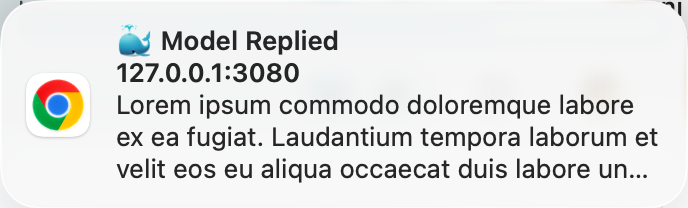
turnEnds (Map<turn, endSeq>); a turn count increase means one reply completed — multi-session replies each fire their own notification. The triggering user message text is read from the chat nodes.dsh-reply-done-<sessionId>-<turn>) with renotify: true. Same-tag notifications have replace semantics — while the previous one is still visible, the replacement does not re-show a banner on macOS/Chrome.build.mjs wraps src/client/index.js in the window.__ModuleLoader__.load({ id, factory }) handshake, which the browser module table executes.Prerequisites: dsh installed (npx @deepseek-ai/dsh) and the web profile initialized.
# 1. Install the bundle
npx @deepseek-ai/dsh plugin --profile web add https://github.com/2h0n/dsh-web-notification/archive/refs/tags/v0.1.0.tar.gz

# 2. Restart
npx @deepseek-ai/dsh web
Verify: no dsh-web-notification errors in the browser console; send two messages in the same session and confirm each reply fires a notification; restart once more and confirm the plugin is still there.
npx @deepseek-ai/dsh plugin --profile web addforwards its arguments to pnpm inside the profile directory, and because the package declaresdsh.bundle, it automatically appends the package todsh.profile.bundles. If you install with a barepnpm addinstead, add the bundles entry manually.- If installation fails with
ERR_PNPM_TARBALL_INTEGRITY(stale lockfile checksums from other moving-branch dependencies in the profile), runpnpm install --update-checksumsfirst and retry.
dsh-web-notification/
├── package.json          # Manifest: exports + dsh.bundle.patch + dsh.client
├── cordis.patch.yml      # Patch entry (plugin rows), referenced by dsh.bundle.patch
├── dsh.plugin.json       # Plugin manifest
├── build.mjs             # Build script (zero dependencies)
├── src/
│   ├── index.js          # Plugin entry (Node side): no-op (no host logic)
│   └── client/index.js   # Client plugin (browser side): all logic (the only file you edit)
└── lib/                  # Build output (do not edit; generated by build.mjs)
    ├── index.js
└── client.js # Browser bundle in __ModuleLoader__ handshake formatThe official way: install the local checkout into the profile (npx @deepseek-ai/dsh plugin add links the directory and registers the bundle automatically):
# 1. Build
node build.mjs

# 2. Install the local checkout
npx @deepseek-ai/dsh plugin --profile web add "$PWD"

# 3. Restart
npx @deepseek-ai/dsh web
If pnpm is not available, link it manually (equivalent result):
ln -s "$PWD" ~/.dsh/profiles/web/node_modules/dsh-web-notification
# And edit ~/.dsh/profiles/web/package.json by hand:
#   dependencies:        "dsh-web-notification": "file:$PWD"
#   dsh.profile.bundles: append "dsh-web-notification"
Iteration loop after editing code (symlinked, no reinstall needed):
node build.mjs            # regenerate lib/
npx @deepseek-ai/dsh web # restart (file: symlink — no reinstall needed)The official way (removes the dependency and its bundle layer together):
npx @deepseek-ai/dsh plugin --profile web remove dsh-web-notificationFor a manually linked install, undo the steps:
rm ~/.dsh/profiles/web/node_modules/dsh-web-notification
# And edit ~/.dsh/profiles/web/package.json:
#   remove "dsh-web-notification" from dependencies and dsh.profile.bundles
Restart npx @deepseek-ai/dsh web afterwards.
MIT
CLASSIFICATION EVIDENCE
系统优先读取 GitHub Topics,再与站内分类词典和词根规则比对。
aooyoo
Zero-token DuckDuckGo search provider for the DeepSeek Harness (DSH) web seam — local headless browser, no API key, no m…
awa-123-cw
DSH 图片/音视频托管插件:自动拉起 8899 静态服务 + 3080 /files/ 路由(HTTP Range 流式)+ WebUI 内点击即播(视频静音/音频 20% 音量/互斥懒加载)
awa-123-cw
DSH 设置页「关于」栏位 + 一键检测更新插件(About page with update checking for DeepSeek Harness WebUI)