其他
技能
dsh-web-search-ddg
aooyoo
Zero-token DuckDuckGo search provider for the DeepSeek Harness (DSH) web seam — local headless browser, no API key, no m…
deepseek-harnessdeepseek-harness-plugindsh-bundledsh-ctest
PROJECT TOPICS
PROJECT README
Web 设置 → 插件 里的"插件列表"标签页增强:每个插件卡片展开后显示插件包自身 package.json 的 description 原文,第三方插件在名字后面带一个小标签,搜索框支持按描述搜索。
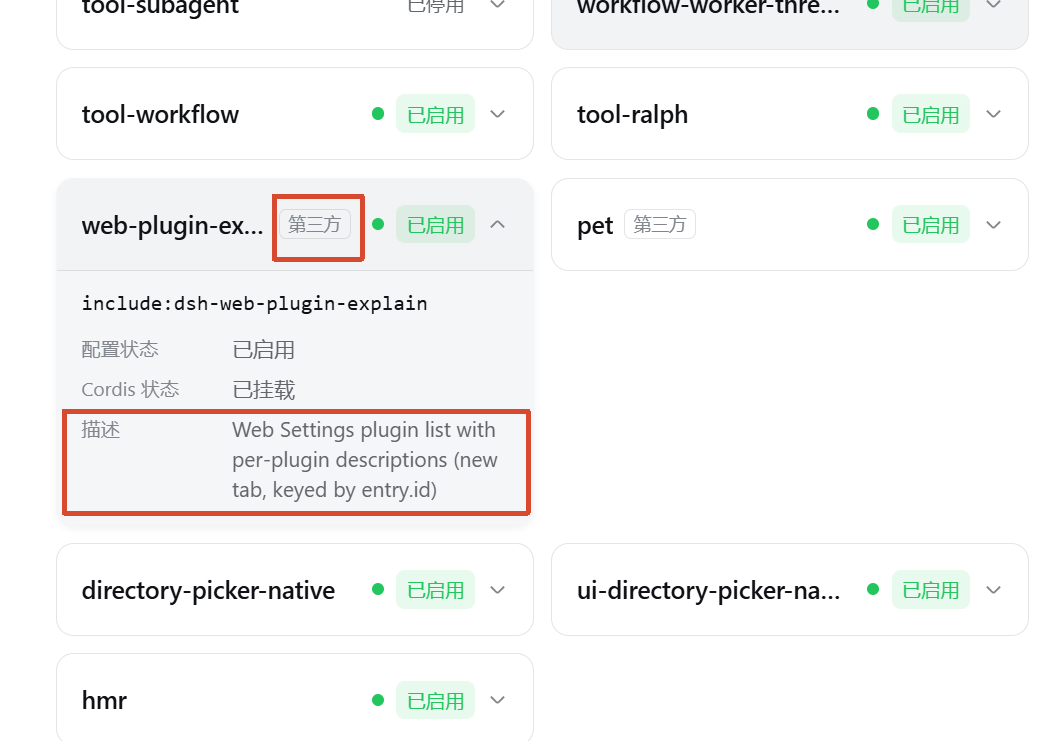
package.json 的 description 原文(解析不到时显示 —)。@deepseek-ai/、cordis: 开头)在卡片名字后面显示「第三方」小标签;@deepseek-ai/* 与 cordis:* 内置行即使字典未覆盖也绝不误标。插件已发布到 npm,无需克隆仓库或本地构建:
dsh plugin --profile web add dsh-web-plugin-explain装完重启 dsh web(typert-loader 会在启动时注册本插件的 strict 端点),打开 设置 → 插件 → 「插件列表」,展开任意插件卡片即可看到描述。
dsh plugin add 会自动识别包里的 dsh.bundle 声明,把它追加为 web profile 的一层;zod 与 @deepseek-ai/dsh-client-* 等依赖由 pnpm 自动安装。
git clone https://github.com/2710165659/dsh-web-plugin-explain.git
cd dsh-web-plugin-explain
npm install
npm run build          # 构建 lib/(index.js + client.js + typert.host.js)

dsh plugin --profile web add ./dsh-web-plugin-explain
同样重启 dsh web 生效。
dsh plugin --profile web remove dsh-web-plugin-explain重启 dsh web 后恢复内置的插件列表。
CLASSIFICATION EVIDENCE
系统优先读取 GitHub Topics,再与站内分类词典和词根规则比对。
aooyoo
Zero-token DuckDuckGo search provider for the DeepSeek Harness (DSH) web seam — local headless browser, no API key, no m…
awa-123-cw
DSH 图片/音视频托管插件:自动拉起 8899 静态服务 + 3080 /files/ 路由(HTTP Range 流式)+ WebUI 内点击即播(视频静音/音频 20% 音量/互斥懒加载)
awa-123-cw
DSH 设置页「关于」栏位 + 一键检测更新插件(About page with update checking for DeepSeek Harness WebUI)