开发工具
插件
dsh-doctor
asdf17128
Find what your DeepSeek Harness (dsh) patches silently broke — dead patches, config fields dropped by whole-config repla…
agentclicordisdeepseek
PROJECT TOPICS
PROJECT README
Dsh-client-ui-custom 是一个纯前端客制化插件:运行时把一份配置转换成主题 覆盖,并围绕「设置」界面做了一系列扩展。在设置上,本插件:
所有功能默认完全中性、功能默认关闭:不配置时界面与原生完全一致,全程零 shell 改动。
| 位置 | 类型 | 内容 |
|---|---|---|
| 设置 → 外观 | 新增页面 | 主题定制,包括壁纸、玻璃、强调色、表面不透明度、字体与质感 |
| 设置 → 快捷键 | 新增页面 | 自定义快捷键,包括新建对话、切换模型、思考强度、模型直达等 |
| 设置 → 应用用量 | 新增页面 | 用量统计,使用四窗口聚合、趋势图,展示会话用量排行 |
| 设置 → 通用 | 修改原有页 | 新增浮动历史条(可调节位置,数量)、用户消息 Markdown 渲染开关 |
| 设置 → 插件 | 修改原有页 | 新增「插件市场」tab:第三方插件目录 |
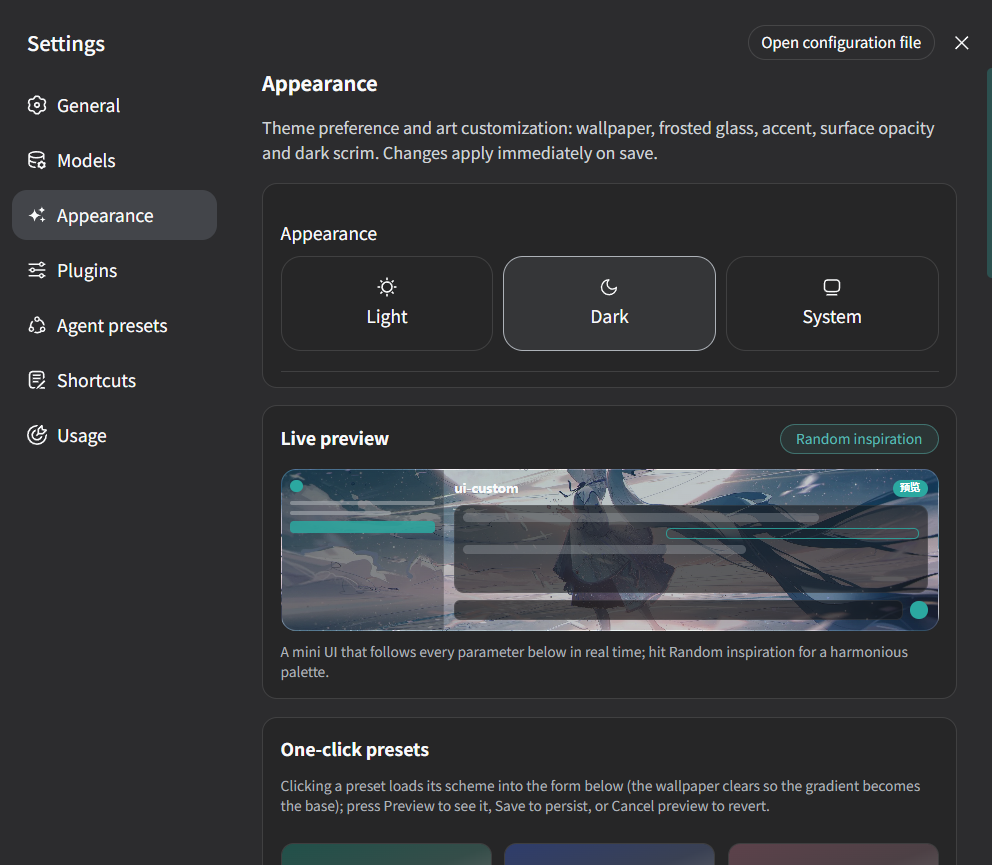
新增的设置页,提供完整的主题定制空间:壁纸、玻璃档位、强调色(可自动从
壁纸取色)、各表面不透明度、色调渐变、暗色遮罩、字体与字号、主题色滚动条
与内嵌晕影,并把 ui-theme 的主题偏好(浅色 / 深色 / 跟随系统)合并进本
栏。改动通过 ui-custom settings 命名空间保存并即时生效(主题实时重渲染,
无需重启)。
预览—— 主题定制支持小窗预览。
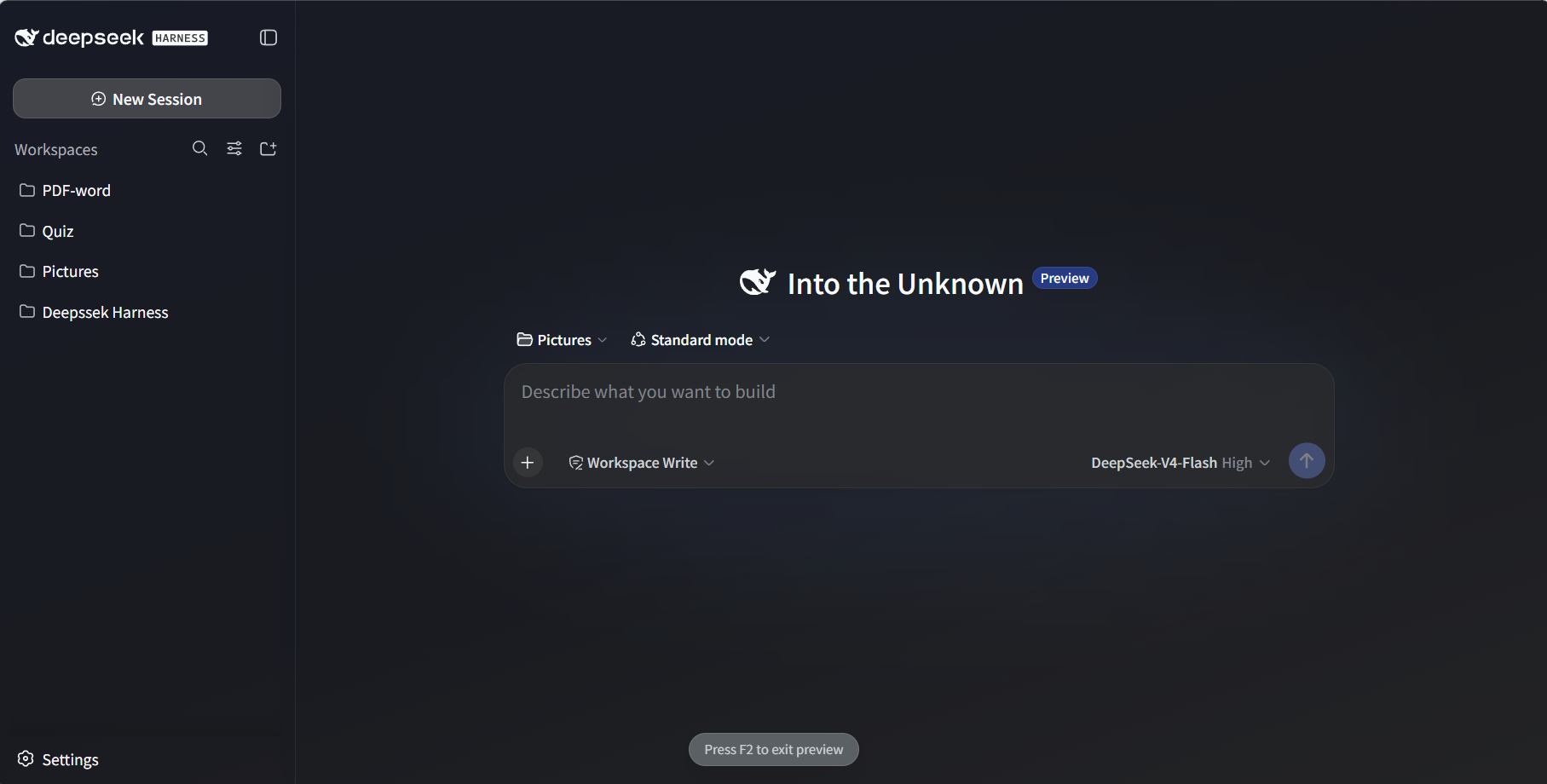
也支持全屏预览,按 F2 即可退出。
预设(Preset) —— 插件内置了六种预设,每个预设都有独立的风格(预设可独立生效,你自己的 wallpaper 仍会叠加在它之下):
| id | 名称 | 风格 |
|---|---|---|
ink-teal |
Ink Teal 黛青 | 青玉色渐变,静谧沉稳 |
ink-blue |
Ink Blue 黛蓝 | 黛蓝渐变,深邃克制的蓝 |
dusty-rose |
Dusty Rose 藕荷 | 藕荷色渐变,温润柔和的粉 |
apricot-gold |
Apricot Gold 杏金 | 杏金色渐变,温雅低调的金 |
mist-gray |
Mist Gray 雾灰 | 雾灰色渐变,清冷安静的灰蓝 |
ink-violet |
Ink Violet 墨紫 | 墨紫色渐变,沉静神秘 |
更多美术选择后续会扩展进这份列表 —— 见 src/client/presets.ts。
玻璃档位 —— glass 是"通透程度"的高层开关;显式设置 wallpaperBlur
时总是优先于档位的默认半径:
| 档位 | 模糊 | 饱和度 | 气质 |
|---|---|---|---|
off |
0px | 1.0 | 不透明,无玻璃 |
light |
6px | 1.15 | 轻微玻璃 |
frosted |
14px | 1.25 | 强毛玻璃(默认) |
mica |
22px | 1.1 | 柔和静态质感,保留壁纸色相 |
主题配置项 —— 所有字段均可选;显式配置永远优先于预设:
| 键 | 类型 | 默认值 | 含义 |
|---|---|---|---|
preset |
string | '' |
预设 id(见上表);'' = 不使用预设 |
wallpaper |
string | '' |
壁纸 URL/路径(Web 可访问);空字符串 = 插件保持关闭 |
wallpaperBlur |
number 0–60 | 玻璃档位默认 | #root 模糊半径(px);显式值优先于玻璃档位 |
glass |
enum | frosted |
off / light / frosted / mica(见玻璃档位表) |
accent |
string | #4176e6 |
强调色,整套 deepseek 色阶由它派生 |
autoAccent |
boolean | false |
从壁纸自动派生强调色(成功后覆盖 accent) |
surfaceOpacity |
number 0–100 | 100 |
主表面不透明度(聊天/细节列) |
sidebarOpacity |
number 0–100 | 100 |
侧栏不透明度 |
chatSurfaceOpacity |
number 0–100 | 100 |
聊天列不透明度(经 --dsw-chat-surface) |
inputOpacity |
number 0–100 | 100 |
输入框不透明度 |
codeBlockOpacity |
number 0–100 | 100 |
代码块/行内代码不透明度 |
darkSurfaceOpacity |
number 0–100 | surfaceOpacity |
暗色模式表面不透明度(独立档位) |
gradient |
string | '' |
亮色模式下叠加在壁纸上的渐变;空 = 无 |
darkScrim |
number 0–100 | 0 |
暗色模式下壁纸上的遮罩强度 |
fontFamily |
string | '' |
字体栈覆盖;空 = 主题默认 |
scrollbarAccent |
boolean | false |
滚动条使用强调色 |
vignette |
boolean | false |
应用根节点的柔和内嵌晕影 |
customCss |
string | '' |
原样追加的自定义 CSS(逃生舱) |
customVars |
object | {} |
额外写到 <html> 上的 CSS 自定义属性(逃生舱) |
完整示例:
config:
  preset: 'ink-teal'
  wallpaper: 'https://example.com/wall.jpg'
  glass: 'mica'              # 或 wallpaperBlur: 8 自定义半径
  autoAccent: true           # 强调色由壁纸自动派生
  chatSurfaceOpacity: 70
  customCss: |
    .some-hashed-class { border-radius: 16px; }
  customVars:
'--my-accent-soft': 'rgb(255 127 178 / 0.3)'新增的设置页,提供可自定义的键位绑定。值存在 ui-custom settings
命名空间里,运行时的修改无需重启即可生效(loader 配置作为组合层 base,
「恢复默认」会回到 loader 默认值)。
语法为 Mod+Alt+Shift+<键>:Mod 匹配 Ctrl 或 Meta(跨平台),<键>
是字母、数字或具名键(space、enter、f5、arrowup 等)。空/缺省 = 关闭。
| 动作 | 作用 |
|---|---|
newConversation |
新建对话(与侧栏「新建会话」按钮一致) |
switchModel |
循环切换到会话目录中的下一个模型(循环;新模型使用自身默认思考强度) |
cycleThinking |
循环切换当前模型的思考强度(off → … → max,循环) |
sendMessage |
输入框发送手势(默认 Enter) |
newline |
输入框换行手势(默认 Shift+Enter) |
usagePanel |
呼出应用用量面板(默认未绑定,可在设置中开启,如 Mod+Alt+U) |
defaultWorkspace |
newConversation 打开的目标工作区(空 = 当前/最近) |
modelShortcuts |
一对一模型直达:每个组合键跳到指定模型(combo / provider / model) |

实例:
config:
  shortcuts:
    newConversation: 'Mod+Alt+N'
    switchModel: 'Mod+Alt+M'
    cycleThinking: 'Mod+Alt+T'
习惯 Enter 换行?把发送改为 Mod+Enter、换行改为 Enter 即可(两个手势
同时命中时发送优先):
config:
  shortcuts:
    sendMessage: 'Mod+Enter'
    newline: 'Enter'
模型动作走与内置模型选择器相同的 session.models / session.selectModel
RPC,输入区的模型显示会自动同步;被寻址的子代理会话会被跳过(与 UI 一致)。
不带 Mod 的组合键在输入框聚焦时不会触发,避免劫持正常打字。
新增的设置页:聚合各会话的用量投影(token-meter + session-stats),按四个 时间窗口(近一年 / 近一月 / 近一周 / 近三天)展示 总 / 输入 / 输出 Token、 缓存命中(含命中率)、使用时长、会话数与步数,并带用量趋势图与会话排行。 纯客户端实现:会话列表行已携带 Host 计算好的投影基线,无需额外 RPC。
面板可通过快捷键在任何界面呼出(默认未绑定,在「快捷键」页里把
usagePanel 设为如 Mod+Alt+U)。
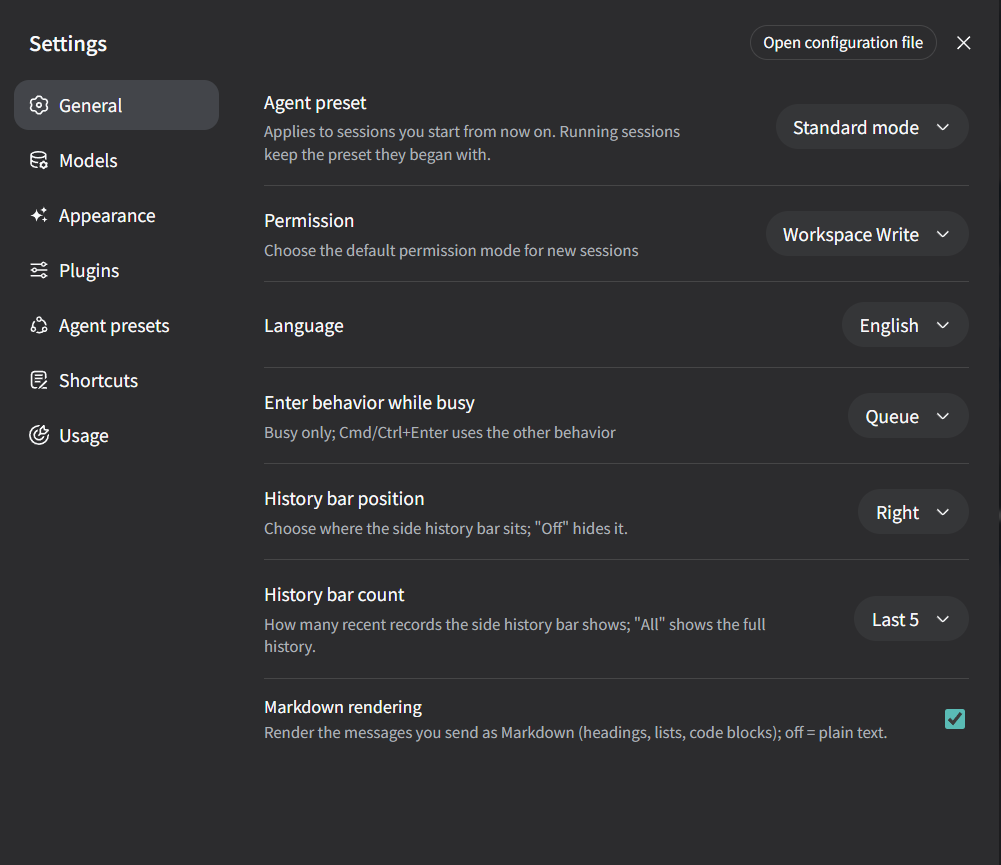
在「设置 → 通用」里新增了三行设置:
浮动历史条(位置 / 数量) —— 对话右缘悬浮一条最近回合的导航条:
left / right / off(默认 off,关闭时不显示);0 = 全部);用户消息 Markdown 渲染 —— 默认关闭;开启后你自己的消息按 Markdown
渲染(标题、列表、代码块、@子代理 / @技能 引用等),关闭时与原生
纯文本外观一致。
在「设置 → 插件」里新增第三个 tab 「插件市场」(与插件配置、插件列表 并列):第三方 DSH 插件目录,每项带一句话简介与 GitHub 源码跳转链接。 DSH 内置包已在 roster 中,故意不列出。
marketplaceUrl 配置(GitHub raw 清单 URL 和/或 GitHub 仓库
URL,可多个),拉取失败时保持空目录;本包自带一份 marketplace.json 示例;dsh-plugin topic 仓库并按 stars / 发布日期
排序合并进目录(discoverGitHub / discoverSort / discoverLimit);- insert: YAML 复制到剪贴板,粘贴进被实时监听的
profile 补丁文件(~/.dsh/profiles/web/cordis.patch.yml)即无需重启生效;
pnpm run build:lib:client)。~/.dsh/profiles/web/cordis.patch.yml(或你 profile 中对应的 dsh.client roster):- id: ui-custom
name: '@deepseek-ai/dsh-client-ui-custom'
config:
preset: 'ink-teal' # 选择预设;下面任意字段会覆盖它
wallpaper: '/my-wall.jpg'
wallpaperBlur: 14dsh web(profile 级改动在启动时读取),然后强制刷新页面。插件默认完全中性、功能默认关闭:未配置 wallpaper 时不做任何改动,
所有可选功能(Markdown 渲染、用量面板快捷键、浮动历史条、GitHub 自动发现)
默认关闭,需要时在设置里开启。想恢复默认主题:删除该行,或把 wallpaper
设为 ''。
自行构建者注意:设置页要能加载,ui-custom 命名空间必须在 Web 客户端的
设置暴露白名单里(packages/host/apiproxy/src/api-proxy.ts 的
WEB_SETTINGS_NAMESPACES)——本检出已加入。
preset(presets.ts),按 DEFAULTS ← 预设 ← 配置
合并并对每个字段做钳制(config.ts),再把 --dsu-* 自定义属性写到
<html>(apply.ts)。runner 会把 roster 行的 config 作为
apply(ctx, config) 的第二个参数传入。body / body[data-ds-dark-theme] 上重新声明主题 token,插件总是
赢得级联,且不修改任何插件或 shell 源码。#root 加 backdrop-filter,半透明表面透过它显示壁纸。ConversationRoot 读取
var(--dsw-chat-surface, var(--dsw-alias-bg-base)) —— 一行完全向后兼容
的回退写法(没有该 token 的原生 Harness 行为与之前完全一致),见
packages/client/ui-conversation。packages/client/ui-custom/
├── src/client/
│ ├── index.ts # 插件入口:解析预设 → 规范化 → 应用
│ ├── config.ts # CustomThemeConfig、DEFAULTS、normalizeConfig(类型收窄+钳制)
│ ├── presets.ts # ThemePreset 注册表 —— 美术选择的扩展面
│ ├── apply.ts # config → DOM:--dsu-* 变量、customCss、customVars
│ ├── custom.module.css # 消费 --dsu-* 变量的 token 覆盖
│ └── … # 其余功能子目录(appearance/ settings/ usage/ marketplace/ history/ pin/ markdown/)
├── tests/ # 配置管线单元测试
└── README.md # 本文档(中文 / English 双语)cordis.patch.yml 改动需要重启 dsh web 才生效。ui-settings-plugins 的 schema)。Dsh-client-ui-custom is a pure front-end customization plugin: at runtime it turns one config into theme overrides, and it extends the Settings surface in three ways:
Everything ships neutral and off by default: without configuration the UI is byte-for-byte stock, and no shell source is ever modified.
| Where | Kind | What |
|---|---|---|
| Settings → Appearance | new page | custom theming: wallpaper, glass, accent, surface opacity, fonts & texture |
| Settings → Shortcuts | new page | custom keybindings: new conversation, model switch, thinking effort, direct model jumps, etc. |
| Settings → App Usage | new page | usage stats: aggregated over four windows, with a trend chart and session ranking |
| Settings → General | added rows | floating history strip (adjustable position / count), user-message Markdown toggle |
| Settings → Plugins | added tab | "Plugin Marketplace": third-party plugin catalog |
A new settings page with a full theming space: wallpaper, glass level, accent
color (auto-extracted from the wallpaper), per-surface opacities, tone gradient,
dark scrim, fonts & scale, accent scrollbar and vignette — plus the merged
theme preference (light / dark / system) that ui-theme contributes to
this section. Changes save through the ui-custom settings namespace and
apply immediately (the theme re-renders live, no restart).
Preview — the theme supports a mini-window preview.
It also supports fullscreen preview — press F2 to exit.
Presets — the plugin ships six built-in presets, each with its own distinct
style (a preset works standalone, and your own wallpaper still layers under
it):
| id | name | look |
|---|---|---|
ink-teal |
Ink Teal 黛青 | jade-green gradient, quiet and deep |
ink-blue |
Ink Blue 黛蓝 | deep ink blue, restrained |
dusty-rose |
Dusty Rose 藕荷 | warm dusty-rose gradient, gentle |
apricot-gold |
Apricot Gold 杏金 | understated warm gold |
mist-gray |
Mist Gray 雾灰 | cool slate mist, calm |
ink-violet |
Ink Violet 墨紫 | quiet violet, tuned for dark mode |
More art choices will extend this list — see src/client/presets.ts.
Glass levels — glass is the high-level "how translucent" switch; an
explicit wallpaperBlur always overrides the level's default radius:
| Level | Blur | Saturation | Vibe |
|---|---|---|---|
off |
0px | 1.0 | opaque, no glass |
light |
6px | 1.15 | subtle glass |
frosted |
14px | 1.25 | strong acrylic (default) |
mica |
22px | 1.1 | soft static tint, keeps wallpaper hues |
Theme config keys — every field is optional; explicit values always win over the preset:
| Key | Type | Default | Meaning |
|---|---|---|---|
preset |
string | '' |
Preset id (see above); '' = none |
wallpaper |
string | '' |
Wallpaper URL/path served by the web server; empty string keeps the plugin off |
wallpaperBlur |
number 0–60 | glass default | Blur radius (px) on #root; explicit value overrides the glass level |
glass |
enum | frosted |
off / light / frosted / mica (see Glass levels) |
accent |
string | #4176e6 |
Accent color; the whole deepseek ramp is derived from it |
autoAccent |
boolean | false |
Derive the accent from the wallpaper automatically (overrides accent on success) |
surfaceOpacity |
number 0–100 | 100 |
Main surface opacity (chat/details columns) |
sidebarOpacity |
number 0–100 | 100 |
Sidebar surface opacity |
chatSurfaceOpacity |
number 0–100 | 100 |
Chat column opacity (via --dsw-chat-surface) |
inputOpacity |
number 0–100 | 100 |
Composer input opacity |
codeBlockOpacity |
number 0–100 | 100 |
Code block / inline code opacity |
darkSurfaceOpacity |
number 0–100 | surfaceOpacity |
Dark-mode surface opacity (independent knob) |
gradient |
string | '' |
Light-theme gradient layered over the wallpaper; empty = none |
darkScrim |
number 0–100 | 0 |
Dark-theme scrim strength over the wallpaper |
fontFamily |
string | '' |
Font stack override; empty = theme default |
scrollbarAccent |
boolean | false |
Tint scrollbars with the accent color |
vignette |
boolean | false |
Soft inset vignette on the app root |
customCss |
string | '' |
Raw CSS appended verbatim (escape hatch) |
customVars |
object | {} |
Extra CSS custom properties written on <html> (escape hatch) |
Full example:
config:
  preset: 'ink-teal'
  wallpaper: 'https://example.com/wall.jpg'
  glass: 'mica'              # or wallpaperBlur: 8 for a custom radius
  autoAccent: true           # accent derived from the wallpaper
  chatSurfaceOpacity: 70
  customCss: |
    .some-hashed-class { border-radius: 16px; }
  customVars:
'--my-accent-soft': 'rgb(255 127 178 / 0.3)'A new settings page with customizable keybindings. Values live in the
ui-custom settings namespace, so runtime changes apply immediately without a
restart (the loader config acts as the composition base, and Reset reverts to
the loader defaults).
Combos use Mod+Alt+Shift+<key> syntax: Mod matches Ctrl or Meta
(platform-agnostic), <key> is a letter, digit, or named key (space, enter,
f5, arrowup, …). Empty/absent = disabled.
| Action | What it does |
|---|---|
newConversation |
Start a new conversation (same as the sidebar's New Session button) |
switchModel |
Cycle to the next model in the session's catalog (wraps; new model starts at its own default effort) |
cycleThinking |
Cycle the current model's reasoning effort (off → … → max, wraps) |
sendMessage |
Composer send gesture (default: Enter) |
newline |
Composer newline gesture (default: Shift+Enter) |
usagePanel |
Pop the app-usage panel (unbound by default — opt in from Settings, e.g. Mod+Alt+U) |
defaultWorkspace |
Workspace the new-conversation shortcut opens in ('' = current/recent) |
modelShortcuts |
One-to-one model jumps: each combo goes straight to a specific model (combo / provider / model) |
Example:
config:
  shortcuts:
    newConversation: 'Mod+Alt+N'
    switchModel: 'Mod+Alt+M'
    cycleThinking: 'Mod+Alt+T'
Prefer Enter = newline? Swap the composer gestures — send moves to Mod+Enter,
plain Enter inserts a line break (send wins when both bindings match):
config:
  shortcuts:
    sendMessage: 'Mod+Enter'
    newline: 'Enter'
Model actions use the same session.models / session.selectModel RPCs as the
built-in model selector, so the composer seat updates automatically; addressed
subagent sessions are skipped (same guard the UI applies). Combos without Mod
are suppressed while you're typing in an input, so plain keys never hijack the
composer.
A new settings page that aggregates each session's usage projections (token-meter + session-stats) over four time windows — last year / month / week / 3 days — showing total / input / output tokens, cache hits (with hit rate), model time, sessions & steps, plus a usage trend chart and a top-sessions list. Pure client-side: the session list rows already carry the host-computed projections, so no extra RPCs.
The panel can be popped from anywhere via a shortcut (unbound by default — bind
usagePanel in the Shortcuts page, e.g. Mod+Alt+U).
Three new rows under Settings → General:
Floating history strip (position / count) — a strip of recent turns floats on the conversation's right edge:
left / right / off (default off — hidden until enabled);0 = all);User-message Markdown rendering — off by default; when enabled your own
messages render as Markdown (headings, lists, code blocks, @subagent /
@skill references, …). Off = the stock plain-text look.
A third tab "Plugin Marketplace" next to Plugin configuration and Plugin list: a catalog of third-party DSH plugins with one-line descriptions and GitHub source links. DSH built-ins already ship in the roster and are intentionally not listed.
marketplaceUrl config (raw GitHub manifest URL(s) and/or
GitHub repo URL(s), several allowed); on total failure the catalog stays
empty. This package ships a marketplace.json as an example;dsh-plugin topic,
merged after the configured sources and sorted by stars / publish date
(discoverGitHub / discoverSort / discoverLimit);- insert: YAML to the clipboard;
pasting it into the watched profile patch file
(~/.dsh/profiles/web/cordis.patch.yml) applies the plugin live, no restart;
Conversation outline (right-side jump map) — the right sidebar becomes a jump map of the current conversation: a floating pill on the right edge opens it, and the panel lists every segment (user question + following answer preview). Click a segment to smoothly scroll the chat there and flash an accent marker on the row. Segments come from the mounted chat snapshot, so jumping is a pure DOM operation — no extra RPCs.
Implementation note: the stock details column is a single slot whose stock
panel has no entry point, so the plugin shadows it (priority: -1, lowest
renders) with the outline panel. The tool-details seat declared by that panel
disappears with it; ui-tool defers via inject, so nothing throws and a stock
harness without this plugin is untouched.
pnpm run build:lib:client).~/.dsh/profiles/web/cordis.patch.yml (or the equivalent dsh.client
roster of your profile):- id: ui-custom
name: '@deepseek-ai/dsh-client-ui-custom'
config:
preset: 'ink-teal' # pick a preset; any field below overrides it
wallpaper: '/my-wall.jpg'
wallpaperBlur: 14dsh web (profile-level changes are read at boot) and hard-refresh
the page.The plugin ships neutral and feature-off by default: with no wallpaper
configured it changes nothing, and every opt-in feature (Markdown rendering,
the usage-panel shortcut, the floating history strip, GitHub discovery) stays
off until you turn it on in Settings. To go back to the stock theme, remove the
row or set wallpaper: ''.
Self-builders: for the settings pages to load, the ui-custom namespace must
be in the web client's settings exposure allowlist
(WEB_SETTINGS_NAMESPACES in packages/host/apiproxy/src/api-proxy.ts) — it is
in this checkout.
preset (presets.ts), merges
DEFAULTS ← preset ← config, clamps every field (config.ts), and writes
--dsu-* custom properties onto <html> (apply.ts). The runner passes the
roster row's config to apply(ctx, config).body / body[data-ds-dark-theme] with selectors that
out-specify the theme sheets, so the plugin always wins the cascade. No
plugin or shell source is modified.backdrop-filter to #root; translucent surfaces
read through it.ConversationRoot reading
var(--dsw-chat-surface, var(--dsw-alias-bg-base)) — a one-line, fully
backwards-compatible fallback (stock harnesses without the token behave
exactly as before). See packages/client/ui-conversation.packages/client/ui-custom/
├── src/client/
│ ├── index.ts # plugin entry: resolve preset → normalize → apply
│ ├── config.ts # CustomThemeConfig, DEFAULTS, normalizeConfig (coerce+clamp)
│ ├── presets.ts # ThemePreset registry — the extension surface for art choices
│ ├── apply.ts # config → DOM: --dsu-* vars, customCss, customVars
│ ├── custom.module.css # token overrides consuming the --dsu-* vars
│ └── … # remaining feature subdirectories (appearance/ settings/ usage/ marketplace/ history/ pin/ markdown/)
├── tests/ # config pipeline unit tests
└── README.md # this file (中文 / English bilingual)cordis.patch.yml changes require a dsh web restart.CLASSIFICATION EVIDENCE
系统优先读取 GitHub Topics,再与站内分类词典和词根规则比对。
asdf17128
Find what your DeepSeek Harness (dsh) patches silently broke — dead patches, config fields dropped by whole-config repla…
asdf17128
Manage DeepSeek Harness profiles — list, create, clone, diff, and share a whole dsh setup as one portable file.
aust24lzy
DeepSeek Harness (DSH) 开源插件导航站 —— 实时同步 dsh-plugin 生态,按 Stars 动态排行