部署运维
插件
dsh-webui-perf
awa-123-cw
DeepSeek Harness WebUI 性能优化开关插件:长代码流式渲染/历史加载/高亮缓存优化,设置面板一键开关(with official-package patches)
deepseek-harnessdshdsh-pluginperformance
PROJECT TOPICS
PROJECT README
English | 简体中文
A community DeepSeek Harness (DSH) web-profile plugin that keeps provider-reported token usage locally. It provides both a persistent sidebar summary and a native Token Usage settings page.
TOKEN USAGE
Today       …
Yesterday   …
Total       …
This is a community plugin, not an official DeepSeek plugin.
node:sqlite, WAL journal) instead
of a monolithic JSON root. A new invocation is one small row-level upsert, so write
latency stays effectively flat no matter how many historical records accumulate.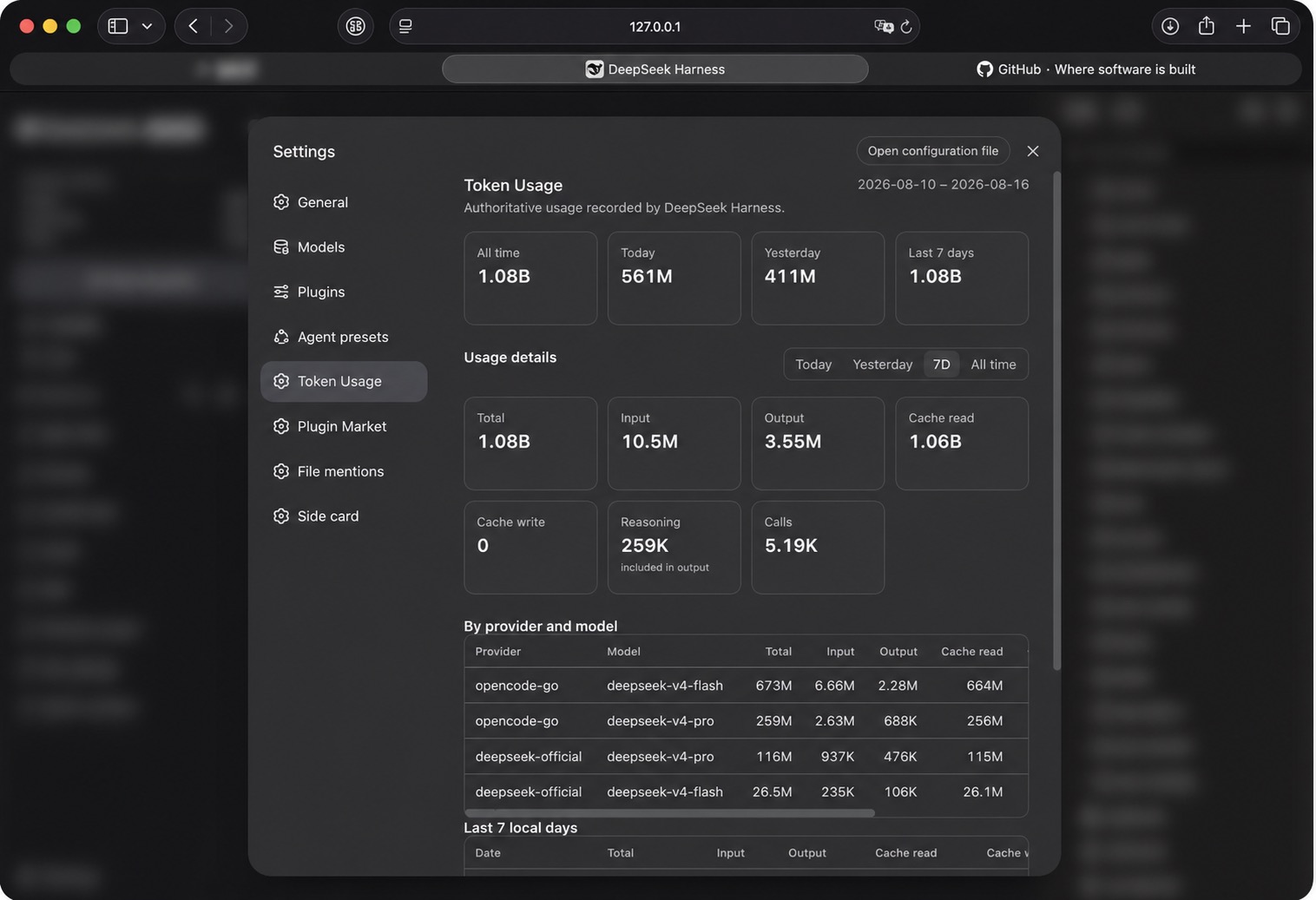
Copy this message into an agent that can access your DSH installation:
Please follow https://github.com/y2zyyr/dsh-token-usage-sidebar to install this plugin into DeepSeek Harness's web profile.Review third-party source before authorizing an agent to install it. Pin a commit when your workflow requires a reproducible dependency revision.
Install from GitHub into the DSH web profile, then restart DSH:
dsh plugin --profile web add github:y2zyyr/dsh-token-usage-sidebar
# Restart `dsh web` after installation.
Update the installed plugin, then restart DSH:
dsh plugin --profile web update dsh-token-usage-sidebar
# Restart `dsh web` after updating.dsh plugin --profile web remove dsh-token-usage-sidebar
# Restart `dsh web` after removal.Removing the plugin does not reset its separately persisted local accounting data.
DSH/provider usage records
        ↓
historical and live collection
        ↓
deduplication
        ↓
persistent local accounting
        ↓
sidebar summary
The plugin uses provider/runtime-reported usage records rather than tokenizer estimates. Total is input + cache read + cache write + output; Reasoning is displayed as an output subdivision and is never added to Total a second time. It uses the final committed assistant message's message.source.provider and message.source.model when available.
All day-based ranges use the DSH host's local calendar days. Last 7 days includes today plus the previous six local days. The settings page receives aggregate results only; it never receives the individual invocation ledger.
v1.0.0/v1.0.1 performs one idempotent replay of recoverable persistent DSH session events to enrich existing calls with their exact buckets and model metadata. A previously recorded call is only enriched, or replaced by a higher-sequence final message: it is not added to lifetime usage again.
Some legacy calls may have a reliable All time total but no recoverable date, bucket, provider, or model. Those tokens remain included in All time and are explicitly shown as unclassified coverage. They are never invented into a date or model row.
History reporting is honest (v1.0.1). The plugin keeps two distinct signals:
Total's meaning: Lifetime Total is the deduplicated union of every authoritative usage record the plugin recovered from durable sources plus usage recorded after tracking began — it reflects what the plugin can recover, not a claim about the DSH account's full lifetime usage when not all history is provably recoverable.
On first startup after upgrading to v1.1, the plugin detects the v1.0.1 JSON ledger and:
.pre-v1.1-<timestamp>.bak
file in the same data directory.sum(records) == global).The migration is idempotent: a completed migration is a no-op on later restarts, and no records are duplicated. New usage recorded after cutover is exactly-once.
See docs/migrations/v1.0.1-to-v1.1.0.md for the full design.
Usage accounting stays local to the DSH runtime. The source repository does not receive, contain, or upload a user's token ledger. Runtime persistence is separate from the source code and release artifacts.
The plugin stores accounting metadata needed for reliable totals, such as deduplication identity, date bucket, and token totals. It does not persist prompts, assistant text, tool output, API keys, credentials, or conversation content as part of its ledger.
${DSH_HOME:-~/.dsh}/storages/dsh_token_usage_sidebar.sqlite, plus its WAL/shm
companions. The exact path respects the DSH_HOME environment variable when set.
It is never the source repo or the package install directory, so it survives
upgrades, re-installs, and restarts.sessionId:turn:step),
token bucket totals, provider/model labels, local dates, and accounting metadata.
It never stores prompts, assistant text, tool output, API keys, credentials, or
conversation content..pre-v1.1-<timestamp>.bak file in the same directory. The v1 source is never deleted.Current release: v1.1.0.
Verified with DeepSeek Harness 0.1.0-rc.6 and its web profile, on a runtime whose
Node.js provides the built-in node:sqlite module (Node with node:sqlite).
No broader DSH-version or operating-system compatibility is claimed. Running against
later desktop builds (e.g. DSH Desktop 2.0.0 / Node 26) has been observed locally but
is not formally claimed.
sessionId:turn:step; the final
committed assistant/message.usage supersedes an earlier assistant/chunk sample, and
replays/duplicates never double-count (higher-seq wins).usage_records is authoritative; aggregate tables are a
derived, rebuildable cache. If an aggregate drifts, it is rebuilt from records.npm install
npm test
npm run build
npx tsc --noEmit # typecheck (v1.1 adds this gate)npm test runs the accounting, historical-recovery, insights, durable SQLite, migration,
and property/equivalence tests. npm run build writes the shipped host and browser
bundles to lib/ and keeps the root-compatibility client.js byte-aligned. GitHub
Actions CI (.github/workflows/ci.yml) runs npm ci, npm test, npm run build, and
a git diff --exit-code so committed artifacts must always match source.
CLASSIFICATION EVIDENCE
系统优先读取 GitHub Topics,再与站内分类词典和词根规则比对。
awa-123-cw
DeepSeek Harness WebUI 性能优化开关插件:长代码流式渲染/历史加载/高亮缓存优化,设置面板一键开关(with official-package patches)
caiyfa
deepseek-harness (dsh) 全局 Token 用量看板插件 —— 一行命令安装,后台常驻增量统计全部会话:按模型/按时间/按会话的用量趋势(分钟·小时·天 × 柱状/堆叠/累计)、红绿异常时点标记与按会话异常分组,子代理消…
gordonlu
Request Context Profiler for DeepSeek Harness — see what changed between model requests, and how cache reuse changed wit…