开发工具
插件
dsh-doctor
asdf17128
Find what your DeepSeek Harness (dsh) patches silently broke — dead patches, config fields dropped by whole-config repla…
agentclicordisdeepseek
PROJECT TOPICS
PROJECT README
A small terminal UI for DeepSeek Harness, built as an out-of-tree DSH profile bundle.
It is intentionally optimized for one-person daily use: start in the current directory, chat immediately, close the terminal, and continue the same workspace later.
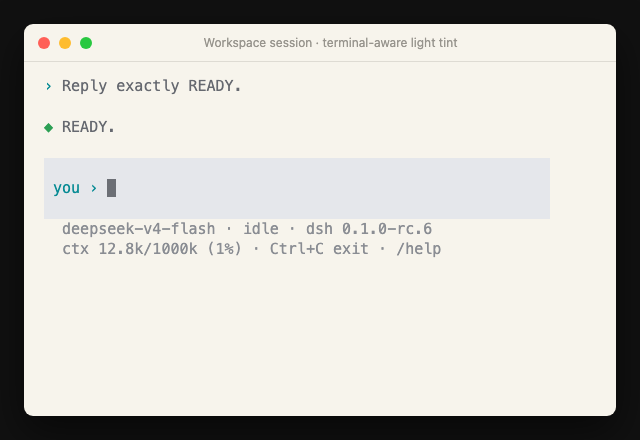
Open a terminal in the project you want DeepSeek to work on:
cd /path/to/your/project
dsh-tui
To continue the newest session for that same project later:
cd /path/to/your/project
dsh-tui -cRequirements: Node.js 22+, pnpm, and the official DeepSeek Harness CLI.
npm install -g @deepseek-ai/dsh
npm install -g github:orriduck/dsh-tui
Then enter any project and run:
cd /path/to/your/project
dsh-tui
The first launch creates the local tui profile and registers this bundle automatically. DSH remains responsible for credentials, model settings, sessions, tools, sandboxing, and approvals.
dsh-tui                         # new session in the current directory
dsh-tui -c                      # continue the newest session for this directory
dsh-tui "fix the failing test"  # start with a prompt
dsh-tui -r <session-id>         # resume an exact session
Inside the UI:
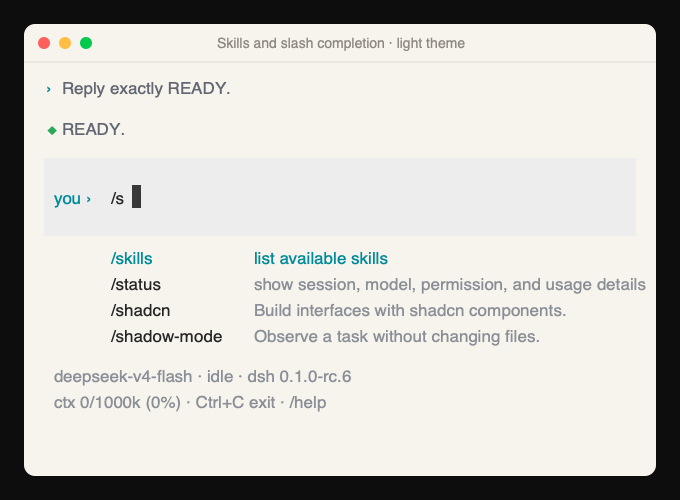
Ctrl+C cancels a running turn. When idle, it saves and exits./sessions lists the 10 most recent sessions saved for the current directory. /resume opens a numbered picker, /resume <session-id> switches directly, and /new starts fresh. Session switches are idle-only and preserve the finished session before restarting the TUI. A corrupt saved log is marked unreadable instead of blocking the rest of the list, and is omitted from the resume picker./status, /permission, /skills, /sessions, /new, /resume, /cancel, /help, /quit, and /exit are available.ask_user_question prompts render in the terminal./permission switches this session through DSH's official command — idle only, with a typed FULL ACCESS confirmation for full access./skills lists user-invocable skills. Type /skill-name to load one directly; slash commands and catalog skills appear in a compact, described menu below the composer and offer Tab completion.Slash completion combines built-in commands with the current DSH skill catalog:
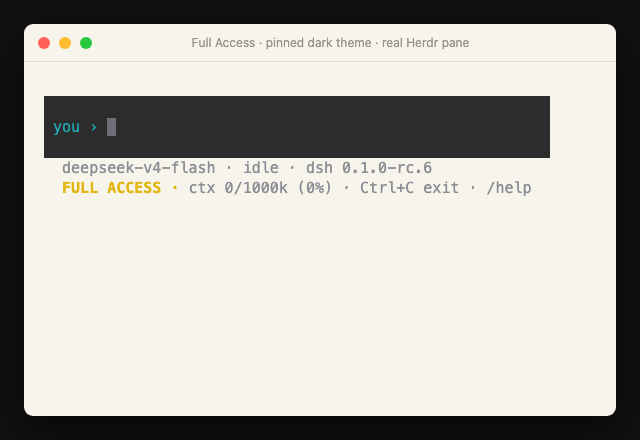
Full access is deliberately conspicuous after its typed confirmation:
When dsh-tui runs inside Herdr, it connects automatically. No separate hook installation is needed.
The bridge reports:
working, blocked, and idle/done lifecycle stateDeepSeek display labelThis makes the DeepSeek tab visible to herdr agent list, get, and wait, including notifications when a background turn finishes or needs an answer. It is inert outside a Herdr-managed pane and never changes DSH credentials or permissions.
Herdr 0.8.0 does not yet include a native dsh agent kind, so herdr agent start --kind dsh and herdr agent prompt are not available yet. Start and type into the TUI normally; native launch/control belongs in a future Herdr integration.
The first launch creates ~/.dsh/tui.json:
{
  "theme": "system"
}
system follows the terminal background automatically. It uses a short OSC 11 color probe first and retains the returned RGB value to derive the Codex-style composer tint. If exact RGB is unavailable, it falls back through COLORFGBG, the macOS appearance setting, and finally dark. Set theme to light or dark to pin it instead.
For a one-off override:
DSH_TUI_THEME=dark dsh-tuiRun /status inside the TUI to see the resolved theme and where it came from.
The status bar reads the installed Harness version from dsh --version. After startup, a non-blocking check against the official npm registry looks for a newer @deepseek-ai/dsh release. If one exists, the status bar shows the exact command to install it, for example:
npm install -g @deepseek-ai/dsh@0.1.0-rc.7The check times out quickly and silently disappears when offline, so it never blocks the TUI. Set DSH_TUI_UPDATE_CHECK=0 to disable the registry request. DeepSeek Harness is still a developer preview; review the changelog and compatibility notes before upgrading across preview releases.
This package never reads or stores a DeepSeek key itself. It uses the normal DSH credential chain, including ~/.dsh/.credentials.yaml and supported environment variables.
The default DSH permission preset is workspace-write with interactive approval. The TUI answers DSH's official approval/request and user-question seams; it does not bypass the sandbox. The current preset remains visible in the composer status, while /status provides the underlying sandbox/approval facts. /permission (bare or with a preset name) switches through the official command — switches are idle-only, affect only the current session, and full access requires typing FULL ACCESS to confirm.
Included:
/permission switching (idle-only, full-access confirmation)Not included yet: split panes, remote persistence, a graphical cross-workspace session browser, image attachments, native Herdr launch/control, or Web-client parity. Herdr/tmux can own terminal persistence around this TUI if needed.
pnpm install --registry=https://registry.npmjs.org
pnpm check
pnpm test
pnpm build

# Use the checkout directly while developing
dsh plugin --profile tui add link:.
dsh --profile tui
The official Harness is currently a developer preview. DeepSeek package versions are pinned to 0.1.0-rc.6 so an upstream breaking change is visible instead of silently changing behavior.
Release history is maintained in CHANGELOG.md. package.json remains the machine-readable source of the current dsh-tui version.
MIT
CLASSIFICATION EVIDENCE
系统优先读取 GitHub Topics,再与站内分类词典和词根规则比对。
asdf17128
Find what your DeepSeek Harness (dsh) patches silently broke — dead patches, config fields dropped by whole-config repla…
asdf17128
Manage DeepSeek Harness profiles — list, create, clone, diff, and share a whole dsh setup as one portable file.
aust24lzy
DeepSeek Harness (DSH) 开源插件导航站 —— 实时同步 dsh-plugin 生态,按 Stars 动态排行