界面增强
完整应用
dsh-desktop
Jedeiah
DeepSeek Harness 桌面端(macOS):双击即用的官方 dsh「壳」应用。内置 Node 与完整依赖闭包,电脑无需安装任何环境;跟随上游自动更新、干净卸载、局域网手机/平板浏览器访问。
ai-agentdeepseekdesktop-appdsh-plugin
PROJECT TOPICS
PROJECT README
一套遵循 Google Material You / Material 3 (M3) 设计规范的 DeepSeek Harness 皮肤。 配色由 Material Color Utilities 的 HCT 算法 从种子色推导成色调色板(tonal palette), 字体采用 Maple Mono NF CN(带 Nerd Font + 中文的等宽字体)。
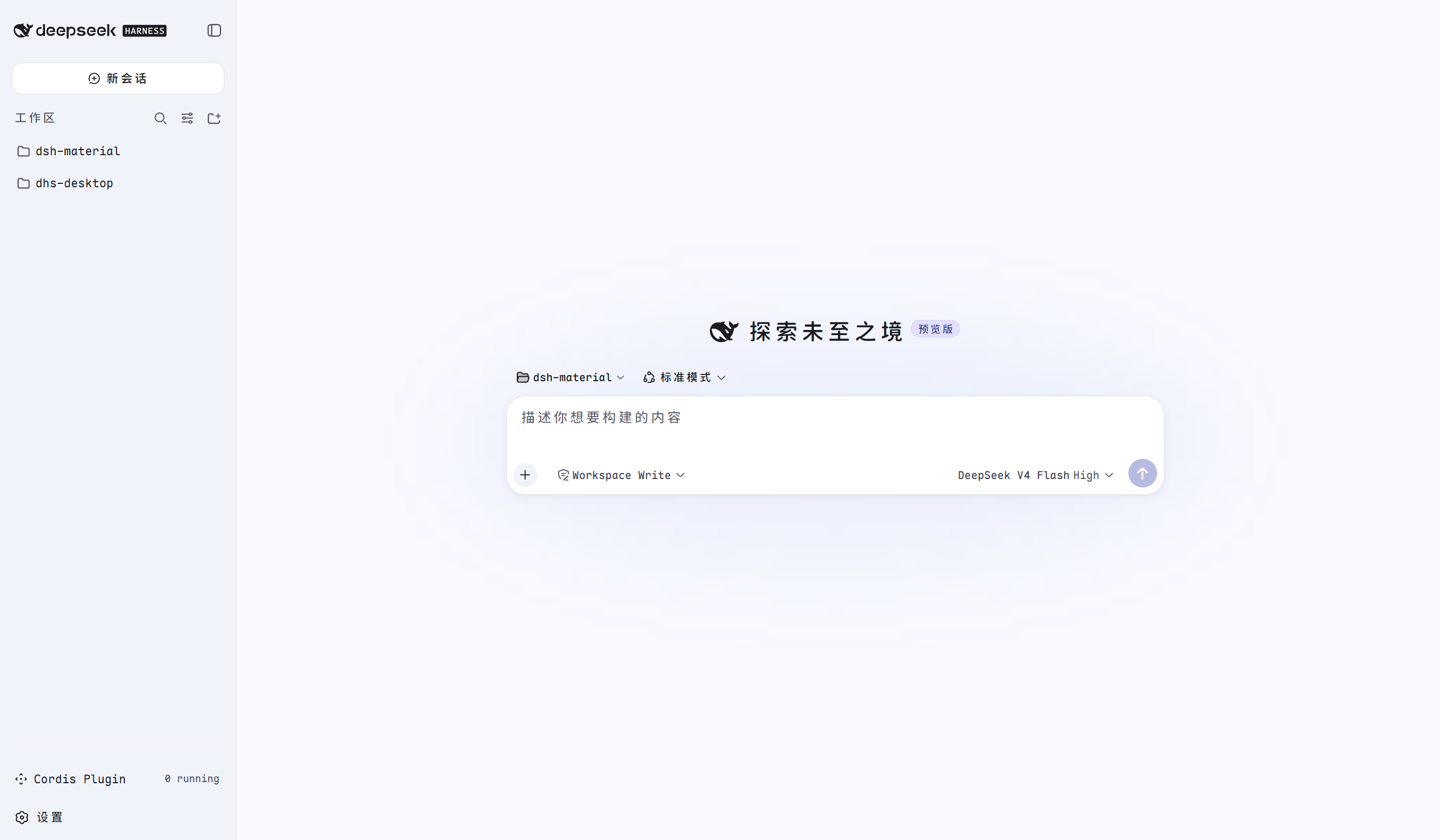
| 维度 | 取值 |
|---|---|
| 种子色 (seed) | #3B82F6(HCT 色相 266.3,tone 55.6 处 chroma 64.2,干净科技蓝) |
| 调色板模型 | HCT(Hue–Chroma–Tone),tone 0–100,非 HSV/HSL |
| 色板数量 | 5 条:primary / secondary / tertiary / neutral / neutral-variant |
| 字体 | Maple Mono NF CN(family name "Maple Mono NF CN",经 System.Drawing 校验) |
| 字重 | 100–800(Thin…ExtraBold)+ 全套斜体 |
| 动效 | M3 emphasized/standard 缓动,支持 prefers-reduced-motion |
| 形状 | M3 圆角体系(4/8/12/16/28/full px) |
Material You 的"动态取色"本质:从种子色提取 色相 (hue) 与 彩度 (chroma),
再沿 *色调 (tone,即明度 L)** 轴生成一条 13 级色板。本皮肤种子 #3B82F6 推导出:
| tone | 10 | 20 | 30 | 40 | 50 | 60 | 70 | 80 | 90 | 95 |
|---|---|---|---|---|---|---|---|---|---|---|
| 值 | #001a42 |
#002e6a |
#004395 |
#015ac2 |
#3474dd |
#538ef9 |
#81aaff |
#adc6ff |
#d8e2ff |
#edf0ff |
| tone | 4 | 6 | 10 | 12 | 17 | 22 | 40 | 80 | 90 | 94 | 98 |
|---|---|---|---|---|---|---|---|---|---|---|---|
| 值 | #0d0e11 |
#121316 |
#1b1b1f |
#1f1f23 |
#292a2d |
#343538 |
#5e5e62 |
#c7c6ca |
#e3e2e6 |
#efedf1 |
#faf8fd |
| tone | 30 | 40 | 50 | 60 | 70 | 80 | 90 |
|---|---|---|---|---|---|---|---|
| 值 | #44474f |
#5c5e66 |
#75777f |
#8e9099 |
#a9abb4 |
#c4c6d0 |
#e1e2ec |
#505e7d(40) / #b8c6ea(80)#77517c(40) / #e6b7e9(80)完整色值见
src/palette.css。生成算法(HCT → sRGB)与 Material Color Utilities 一致:#6750A4用同算法可复现官方 baseline 色板(primary-40 =#6750A4), 验证了实现正确性。
DSH 皮肤通过覆盖 --dsw-alias-* / --dsw-specific-* 语义 token 生效
(详见 docs/dsh-skin-development.md)。下面是核心映射(L=浅色 / D=深色):
| DSH token | M3 角色 | 浅色 (light) | 深色 (dark) |
|---|---|---|---|
--dsw-alias-bg-base |
surface | #ffffff |
#121316 |
--dsw-alias-bg-layer-1 |
surface-container | #faf8fd |
#1f1f23 |
--dsw-alias-bg-layer-2 |
surface-container-high | #f5f3f7 |
#292a2d |
--dsw-alias-bg-layer-3 |
surface-container-highest | #f2f0f4 |
#343538 |
--dsw-alias-bg-overlay |
surface-variant | #eff0fa |
#38393c |
--dsw-alias-brand-primary |
primary | #015ac2 |
#adc6ff |
--dsw-alias-label-primary |
on-surface | #1b1b1f |
#e3e2e6 |
--dsw-alias-label-secondary |
on-surface-variant | #44474f |
#c4c6d0 |
--dsw-alias-label-tertiary |
on-surface-variant | #44474f |
#c4c6d0 |
--dsw-alias-label-caption |
outline | #5c5e66 |
#a9abb4 |
--dsw-alias-border-l2 |
outline-variant | rgba(27,27,31,.12) |
rgba(227,226,230,.14) |
--dsw-alias-interactive-bg-hover |
state layer (8%) | rgba(1,90,194,.08) |
rgba(173,198,255,.08) |
--dsw-alias-button-primary-fill |
primary | #015ac2 |
#adc6ff |
--dsw-alias-state-error-primary |
error | #ba1a1a |
#ffb4ab |
--dsw-specific-sidebar-fill |
surface-dim | #fefbff |
#0d0e11 |
--dsw-specific-sidebar-nav-item-active |
secondary-container | #d8e2ff |
#004395 |
--dsw-specific-sidebar-nav-item-active-accent |
primary-container | #d8e2ff |
#004395 |
⚠️
--dsw-specific-sidebar-nav-item-active-accent与--dsw-alias-button-info-fill必须保持对比:前者是ask_user_question"推荐"徽章的背景,后者是徽章文字色。 本皮肤取值 primary-container(p90/p30)作背景、primary(p40/p80)作文字, 与默认主题"浅/深中性底 + 品牌蓝文字"的关系一致(曾因两者同取 primary 而撞色,已修复)。
完整的 --dsw-alias-* 覆盖清单(约 80 个 token × 双外观)在 src/tokens.mjs。
M3 关键语义:surface 用 neutral 色板,surface-variant/outline 用 neutral-variant, primary/secondary/tertiary 独立;深浅两套由"同 roles、不同 tone"天然对应 (如 primary:light=tone40,dark=tone80)。
M3 官方用 Roboto(无衬线),但本皮肤应需求改用 Maple Mono NF CN(等宽)。保留了 M3 的 字号 / 字重 / 行高 / 字距节奏,字重按 M3 的 400/500/700 映射到 Maple Mono 的 Regular/Medium/Bold:
| M3 角色 | 字号/行高 | 字重 |
|---|---|---|
| Display Large | 57/64 | 400 |
| Headline Large | 32/40 | 400 |
| Title Large | 22/28 | 400 |
| Title Medium | 16/24 | 500 |
| Body Large | 16/24 | 400 |
| Body Medium | 14/20 | 400 |
| Label Large | 14/20 | 500 |
完整 type scale 与 --m3-typescale-* token 见 src/fonts.css。
已随包自带 Regular 字重 woff2(fonts/MapleMono-NF-CN-Regular.woff2,约 6.1MB),
src/fonts.css 里启用 @font-face(font-weight: 100 800 声明覆盖全部字重,
未打包的 Medium/Bold 走浏览器合成加粗或系统已安装字体回退):
@font-face {
  font-family: 'Maple Mono NF CN';
  font-style: normal;
  font-weight: 100 800;
  src: url('../fonts/MapleMono-NF-CN-Regular.woff2') format('woff2');
  font-display: swap;
}
如需更忠实的 Medium/Bold 字重,把对应 TTF 用 fontTools 转 woff2 放入
fonts/并补对应@font-face规则(每份约 6MB)。
dsh-material/                 # 仓库根 = 插件包根(DSH 标准形态)
├── package.json        # dsh.bundle.patch + dsh.client 声明(标准插件形态)
├── cordis.patch.yml    # 自带 patch:insert 皮肤行(bundle 层)
├── build.mjs           # 构建脚本:src/tokens.mjs + fonts.css + palette.css → lib/client.js
├── README.md           # 本文档
├── demo.png            # 主题展示截图
├── LICENSE             # MIT
├── docs/
│   └── dsh-skin-development.md   # DSH 皮肤开发参考文档
├── fonts/              # 自托管 Maple Mono Regular woff2(6.1MB)
├── src/                # 源文件
│   ├── tokens.mjs      # M3 色调色板 → DSH --dsw-* 覆盖(source of truth)
│   ├── fonts.css       # Maple Mono @font-face + M3 type scale / shape / motion token
│   ├── palette.css     # 原始 HCT 色板(参考/文档)
│   ├── client.js       # 源版插件体(apply/overrideTokens/register/注入 CSS)
│   ├── client.d.ts
│   └── index.js / index.d.ts   # 源版 host 入口(重新构建时用)
└── lib/                # 构建产物(DSH 实际加载)
    ├── index.js        # host 侧 no-op 插件入口(exports: name/apply)
    ├── index.d.ts
└── client.js # 浏览器侧 bundle(__ModuleLoader__.load 格式,内联 tokens+CSS)插件形态参考了 Nagi-ovo/dsh-ads 仓库:
dsh.bundle.patch: "./cordis.patch.yml" —— 声明本包是一个 bundle patch 层;
dsh plugin add 后会自动把包名加进 profile 的 dsh.profile.bundles,无需手动编辑 profile。cordis.patch.yml —— 用 insert 把皮肤行挂进加载列表:- insert:
- id: ui-skin-material-you
name: '@deepseek-ai/dsh-skin-material-you'exports["./client"] 为简单字符串,指向 lib/client.js 浏览器 bundle。| 位置 | 内容 | 作用 |
|---|---|---|
package.json 的 dsh.client.inject |
包名数组 | 构建 window.__DSH_BOOT__ 引导图的包级加载顺序 |
lib/client.js 的 exports.inject |
服务名数组 | 浏览器 cordis 服务依赖(fiber 激活前等待) |
⚠️ 二者不能混用:
exports.inject若写成包名,浏览器 cordis 会永远等不到该 "服务",条目卡pending,web boot抛did not activate错误。 本皮肤exports.inject = ['theme'](theme是 ui-theme 提供的服务名)。
DSH 的 dsh plugin 是 pnpm 转发器,支持本地路径、GitHub 等 pnpm 依赖来源:
# 方式一:从 GitHub 安装(仓库根即插件包)
dsh plugin --profile web add github:mtaech/dsh-material-you

# 方式二:从本仓库目录安装(file: 依赖;发布到 npm 后也可直接加包名)
dsh plugin --profile web add "file:E:/Dev/Code/dsh-material"
安装后:
profiles/web/package.json 的 dsh.profile.bundlescordis.patch.yml 把 ui-skin-material-you 行插进加载列表dsh web 生效:system 偏好下两种外观均为 Material You 配色;
设置 → 外观里可选 material-you-light / material-you-dark 固定主题💡 GitHub 安装会走包内
prepare构建流程,pnpm 默认阻止构建脚本——若提示Ignored build scripts,在profiles/web/pnpm-workspace.yaml的allowBuilds里加入包名后重新执行即可(本包无需构建脚本也能直接运行,lib/已随仓库提交)。
卸载:dsh plugin --profile web remove @deepseek-ai/dsh-skin-material-you
验证:dsh --profile web --dump-config 应看到皮肤行,且标记来源为
# == @deepseek-ai/dsh-skin-material-you(bundle 自带 patch 层)。
--dsw-alias-* 与 --dsw-specific-*,但若上游新增 token 需同步补。src/tokens.mjs 里的调色板常量(或重新跑 HCT 生成器),
并同步 src/palette.css,再 node build.mjs 重新构建 lib/client.js。想换主题色,改步骤:
src/palette.css 头部的注释算法)从新种子
生成 primary/secondary/tertiary/neutral/neutral-variant 五条色板。src/tokens.mjs 里 NEUTRAL/VARIANT/PRIMARY/SECONDARY/TERTIARY
常量与 ERROR。src/palette.css 的参考值。node build.mjs(生成 lib/client.js)。CLASSIFICATION EVIDENCE
系统优先读取 GitHub Topics,再与站内分类词典和词根规则比对。
Jedeiah
DeepSeek Harness 桌面端(macOS):双击即用的官方 dsh「壳」应用。内置 Node 与完整依赖闭包,电脑无需安装任何环境;跟随上游自动更新、干净卸载、局域网手机/平板浏览器访问。
awa-123-cw
DeepSeek Harness WebUI 动效美化插件:聊天背景黑客帝国代码雨,雨字内容 = 当前会话 AI 思考链(流式实时),设置页调色盘 + 全套 DIY
baiyun200
DSH 插件看板 · DeepSeek Harness 插件生态可视化(shadcn/ui,每日自动构建部署)