
其他
技能
dsh-web-search-ddg
aooyoo
Zero-token DuckDuckGo search provider for the DeepSeek Harness (DSH) web seam — local headless browser, no API key, no m…
deepseek-harnessdeepseek-harness-plugindsh-bundledsh-ctest
PROJECT TOPICS
PROJECT README
English · 简体中文
A community plugin for DeepSeek Harness — records token usage and cost for every model call, with peak/off-peak billing, balance query, a calendar heatmap, and CSV / JSON / PNG export.


🔔 Important Notice (2026-08-16): npm package renamed
The npm package has been renamed from
@feiyang666/deepseekharnessdesktopto@feiyang666/dsh-usage-plugin(matching the GitHub repofeiyang-dev/dsh-usage-plugin).
- Use the new package name for install / upgrade:
dsh plugin --profile web add @feiyang666/dsh-usage-plugin- The old package
@feiyang666/deepseekharnessdesktopremains published for a while, but it is no longer maintained and will not receive updates — please migrate soon.- The desktop client (
DeepSeek Harness Desktop) supports both package names and will auto-detect old-name installs with a one-click update to the new name.
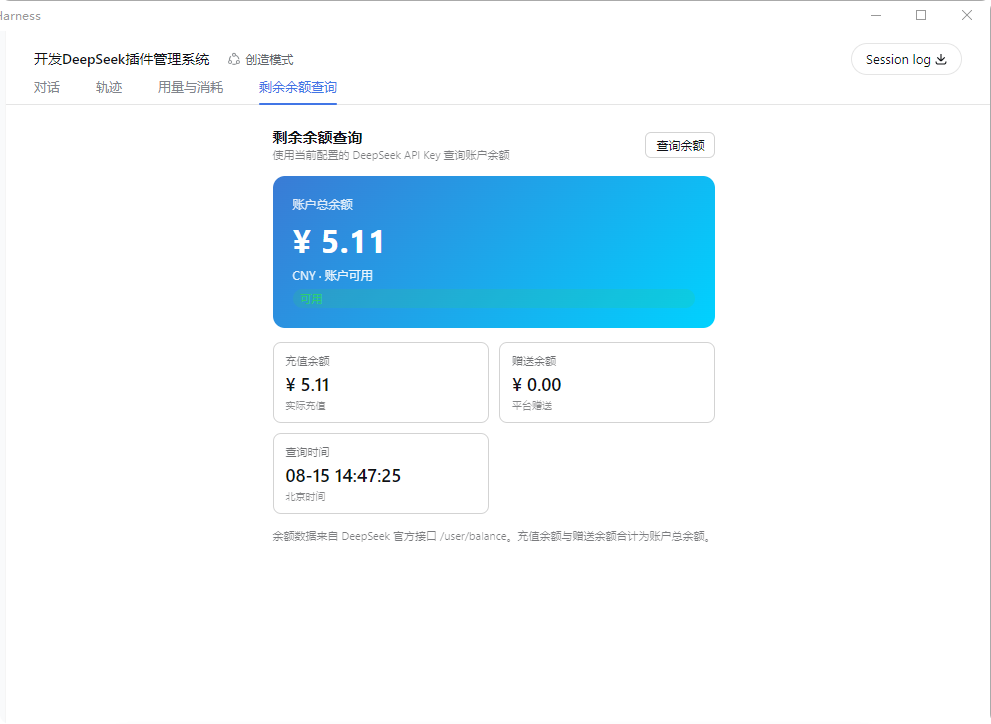
dsh-usage-plugin is a usage & cost tracker plugin in the DeepSeek Harness ecosystem (a DSH plugin shipped as a Host + Client two-in-one package). After installation, "Usage & Cost" and "Balance Query" tabs appear in the Web UI, right after "Conversation" and "Trace":
Supports Windows / macOS / Linux: paths are handled per platform (
node:path), and the folder picker / "reveal in file manager" use each OS's native mechanism (macOS:osascript/open; Linux:zenity/xdg-open). Balance query and export do not depend on Windows-only commands.
pricing.json, with a reset-to-default option.DEEPSEEK_API_KEY.<session workspace>/dsh-usage/usage-records.json and restored on restart (cap 100000 records).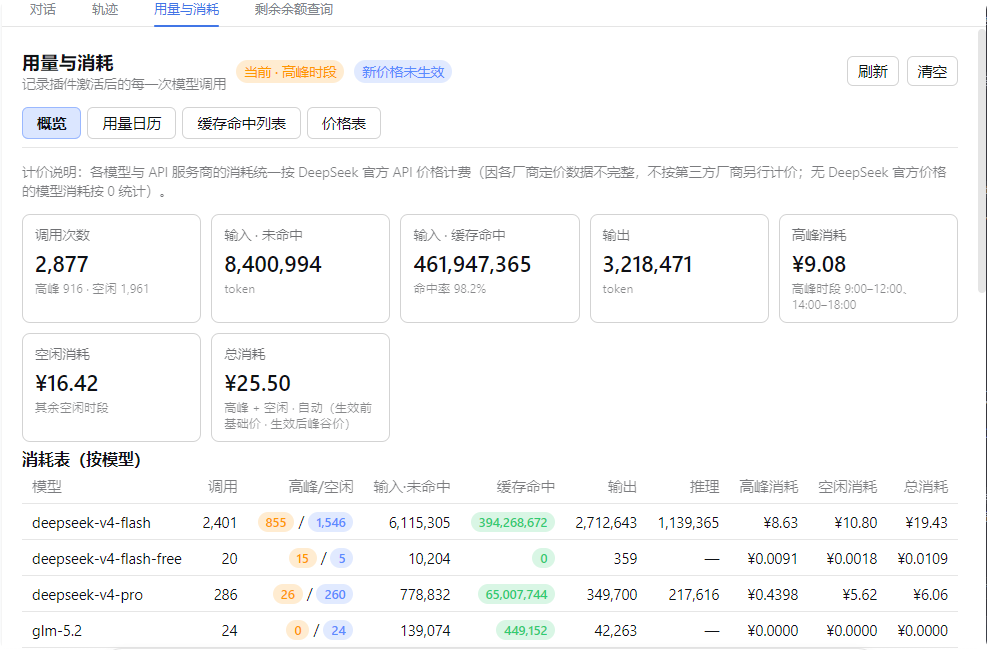
Either method works and is equivalent. We recommend the desktop app — fully graphical, no command line needed.
Install DeepSeek Harness Desktop, open it, then go to "Install Plugins" → Recommended → Usage & Cost Tracker → Install and click "Restart Service Now" to activate.
# Prerequisite: install dsh (npm install -g @deepseek-ai/dsh)
dsh plugin --profile web add @feiyang666/dsh-usage-plugin
Or install to another profile:
dsh plugin --profile web add @feiyang666/dsh-usage-plugin
dsh plugin --profile headless add @feiyang666/dsh-usage-plugin
Restart the dsh web service after installation. Detailed manual install / wiring / uninstall / troubleshooting follows below.
One npm package = a host half (Node-side Cordis plugin: recording, billing, balance query, export — see lib/index.js) + a client half (browser-side panel — see lib/client.js, which talks to the host via /usage/api).
The package integrates with DSH through two declarations:
| Declaration | Purpose |
|---|---|
dsh.bundle.patch (cordis.patch.yml) |
Lets DSH recognize it as a standard bundle plugin package: dsh plugin --profile <name> add <package> installs and wires it in one command, no manual config editing |
dsh.client + exports["./client"] |
Lets the web client auto-load the browser panel at /plugins/<package>/client.js |
So for users, installation is one command — no YAML editing, no manual file copying.
npm install -g @deepseek-ai/dsh, or a desktop app built on it, or npx @deepseek-ai/dsh web).npm install -g pnpm (or corepack enable).dsh is on PATH (for the desktop app, run in its bundled terminal).dsh plugin --profile web add @feiyang666/dsh-usage-pluginThis does three things (all automatic):
~/.dsh/profiles/web (auto-initializes the profile on first use);dsh.bundle declaration and writes the package name into the profile's dsh.profile.bundles layer list;cordis.patch.yml and mounts the plugin row into the app tree — no manual config editing.Same for other profiles (replace web with your profile name, e.g. dsh plugin --profile headless add ...; dsh web equals dsh --profile web).
Test a local tarball:
dsh plugin --profile web add C:\path\to\feiyang666-dsh-usage-plugin-1.9.0.tgz
dsh plugin)Only for when you have no pnpm or want full manual control. Do not npm install directly at ~/.dsh/profiles (that dir has no package.json; npm would treat the whole node_modules as residue and wipe it).
B1. Use pnpm but not dsh plugin:
cd ~/.dsh/profiles/web
pnpm add @feiyang666/dsh-usage-plugin
# then manually append the plugin row to web/cordis.patch.yml (see B3) and restart
B2. Or use npm: add a minimal package.json to the profile first, then install:
cd ~/.dsh/profiles/web
# if no package.json exists there yet (only after `dsh plugin` init):
# echo '{"name":"dsh-profile-web","private":true,"dependencies":{}}' > package.json
npm install @feiyang666/dsh-usage-plugin
B3. Wire it up (once, idempotent): append to ~/.dsh/profiles/web/cordis.patch.yml:
- insert:
    - id: usage-plugin
      name: '@feiyang666/dsh-usage-plugin'
      inject:
        - fs
        - webServer
        - subprocess
        - credentials
        - sandboxPolicy
        - agents
Or just run the package's built-in wiring script (auto-finds the profile and appends, idempotent):
node node_modules/@feiyang666/dsh-usage-plugin/scripts/wire.js⚠️ The
injectlist is required: it makes Cordis wait untilfs/webServer/subprocess/credentials/sandboxPolicy/agentsare ready before activating the plugin. Without it the/usage/apiroute never registers and the panel fails withUnexpected end of JSON input.
The desktop app (e.g. DeepSeek Harness Desktop) uses the same ~/.dsh/profiles underneath. Run Method A's command in any terminal, restart the app, and the plugin activates automatically (the app starts the same dsh web).
Restart the DeepSeek Harness web app (command line: kill the old process and re-run dsh web; desktop: fully quit and reopen). Then:
"Balance Query" uses the configured DEEPSEEK_API_KEY: set the API Key in Settings → Models (same key used for chats), then open the "Balance Query" tab and click "Query Balance".
dsh plugin --profile web remove @feiyang666/dsh-usage-plugin(Equivalent to pnpm remove; dsh plugin auto-removes the package name from the dsh.profile.bundles layer list.) Restart the app afterward.
For manual installs (Method B), do it in reverse: remove the usage-plugin row from cordis.patch.yml, then pnpm remove / npm uninstall the package, and restart.
Upgrading from a 1.0.x manual-wiring install to 1.1.x: first remove the old
usage-pluginrow fromcordis.patch.yml(or follow the uninstall flow), then reinstall via Method A to avoid mounting the plugin twice.
<session workspace>/dsh-usage/usage-records.json<session workspace>/dsh-usage/pricing.json<session workspace>/dsh-usage/{csv,json,images}/dsh-usage-boot.log in the session workspace| Symptom | Cause / Fix |
|---|---|
Panel reports Unexpected end of JSON input |
The plugin row is missing the inject list, so the route isn't registered. Add the inject list per Method B3 and restart |
| Panel blank / no top tab | Plugin not activated. Check dsh-usage-boot.log; confirm the cordis.patch.yml row exists with the correct name |
| Balance query fails with "DEEPSEEK_API_KEY not configured" | Set the API Key in Settings → Models |
| Balance query network error | Ensure api.deepseek.com is reachable (configure a proxy if needed) |
dsh plugin reports pnpm not found |
Install pnpm: npm install -g pnpm |
| Install can't reach the npm registry | Set a mirror: npm config set registry https://registry.npmmirror.com (or pnpm config set registry ...) and retry |
After uninstall, still reports Cannot find package '@feiyang666/...' |
A package reference remains in the profile. Remove the corresponding row from cordis.patch.yml and the package name from dsh.profile.bundles, then restart |
| Project | Description | Installation |
|---|---|---|
| DeepSeek Harness Desktop | Windows desktop console: install/start/stop/restart the dsh web service with one click, built-in plugin management — install this plugin from its Recommended section | Download the desktop app and click a few buttons |
| Data Vault (dsh-vault) | Auto backup / wipe detection / one-click restore — protects chat history and workspace data | One-click from the desktop app, or dsh plugin add @feiyang666/dsh-vault |
| DeepSeek-Harness | Official CLI / Web service | Quick start below |
Quick start (via npm)
Install Node.js, then run:
npx @deepseek-ai/dsh webThis command starts the Web UI at the default address http://127.0.0.1:3080. See the Web UI Guide for details.
Run from source
To run from the repository source:
git clone https://github.com/deepseek-ai/deepseek-harness.git
cd deepseek-harness
pnpm install
pnpm run build
pnpm dsh webMIT © dsh-usage-plugin
CLASSIFICATION EVIDENCE
系统优先读取 GitHub Topics,再与站内分类词典和词根规则比对。
aooyoo
Zero-token DuckDuckGo search provider for the DeepSeek Harness (DSH) web seam — local headless browser, no API key, no m…
awa-123-cw
DSH 图片/音视频托管插件:自动拉起 8899 静态服务 + 3080 /files/ 路由(HTTP Range 流式)+ WebUI 内点击即播(视频静音/音频 20% 音量/互斥懒加载)
awa-123-cw
DSH 设置页「关于」栏位 + 一键检测更新插件(About page with update checking for DeepSeek Harness WebUI)