
生活娱乐
插件
dsh-web-speech-input
leozou320-ai
Voice-to-text for the DeepSeek Harness Web UI — live, editable, never auto-sends. | DeepSeek Harness 网页语音输入
accessibilitydeepseekdeepseek-harnessdsh-plugin
PROJECT TOPICS
PROJECT README




📖 中文文档:README.zh.md
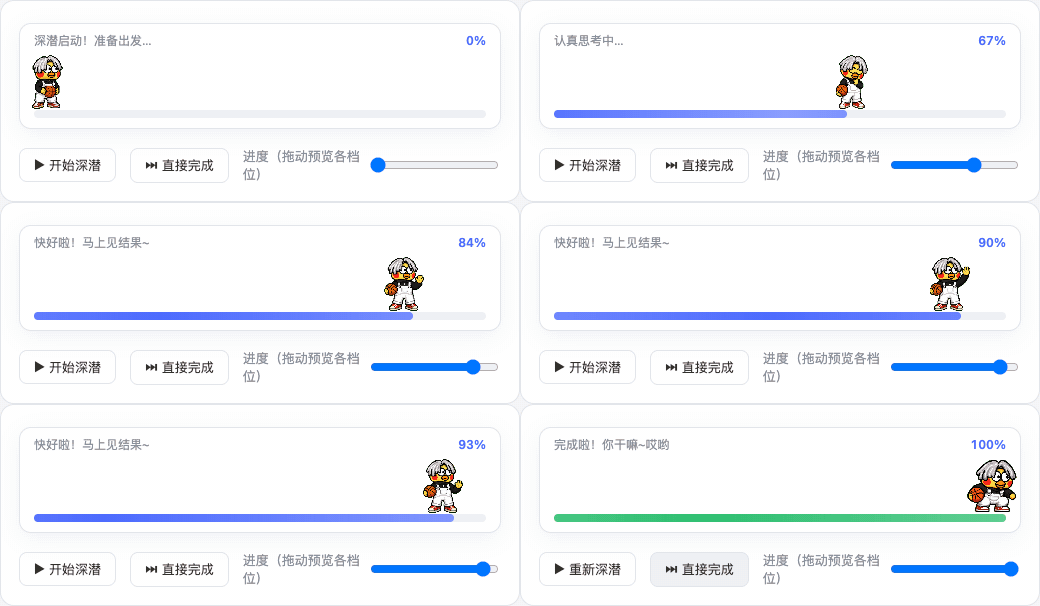
A DeepSeek Harness (DSH) plugin that fills the full row under the "Deep diving..." status line with an ikun pet during every reply: a
0% → 100%progress bar, a new animation and text every 20%, and a jump celebration with a system-level "你干嘛~哎哟" voice cue at completion 🏀
conversation.input.dock — the full row directly below
DSH's "Deep diving..." status line, between the conversation and the composer. Visible only while a
session is running (deep diving); completely invisible the rest of the time.assets/voice.mp3)
with a system command — audible from any window and any session, independent of browser mute
(tested on macOS).cordis.patch.yml) and auto-loaded on
every DSH start — install once, works in every session. Dynamic-plugin sources (src/) are kept as
an alternative for session-level installs.Option A: clone (for tinkerers)
git clone https://github.com/eric-song-dev/dsh-ikun-pet && cd dsh-ikun-pet
dsh plugin add "$PWD" --profile web
Option B: remote one-liner (for users)
dsh plugin add github:eric-song-dev/dsh-ikun-pet --profile web
# or: dsh plugin add https://github.com/eric-song-dev/dsh-ikun-pet.git --profile web
Option C: npm (prebuilt — installs without the allowBuilds build-approval step)
dsh plugin add dsh-ikun-pet --profile web💡 If your profile isn't named
web, swap--profile webfor your own profile name in the commands above.
Then restart dsh web and refresh the browser. Verify:
curl -sI http://127.0.0.1:3080/ikun-pet/spritesheet.webp   # sprite route (should be image/webp)
curl -s http://127.0.0.1:3080/plugins/dsh-ikun-pet/client.js # client bundle (should return JS)| Progress | Animation | Text |
|---|---|---|
| 0% – 20% | waiting | 深潜启动!准备出发… |
| 20% – 40% | runRight | 正在收集线索… |
| 40% – 60% | working | 埋头苦干中… |
| 60% – 80% | review | 认真思考中… |
| 80% – 100% | wave | 快好啦!马上见结果~ |
| 100% (done) | jump | 完成啦!你干嘛~哎哟 🔉 (host plays the voice cue) |
Everything lives in the plugin line's config inside the bundled cordis.patch.yml:
spritePath / voicePath / playVoiceAtDone / playCommand (assets default to the bundled assets/).
# in front of # disabled: true, restart dsh web (put it back to re-enable)config.playVoiceAtDone: false (the animated bar is unaffected)playCommand to PowerShell / ffplay (examples in the comments;
macOS defaults to afplay, tested)dsh plugin remove dsh-ikun-pet --profile web # uninstall (bundles are reconciled automatically), then restart dsh web
# update: cd <repo dir> && git pull && dsh plugin add "$PWD" --profile webnode scripts/build-package.mjs # produces the ikun.package.json install payloadHand the payload to your Agent to install via cordis_define + cordis_run — current session only.
⚠️ Don't run it alongside the permanent plugin (their sprite routes conflict).
| Part | macOS | Windows / Linux |
|---|---|---|
| Animated UI + progress bar (pure Web) | ✅ tested | ⚠️ should work, untested |
| Completion voice (system command) | ✅ tested (afplay) |
⚠️ commands provided, untested |
| Symptom | Fix |
|---|---|
| Plugin line fails on restart | node -e "require('dsh-ikun-pet')" in the profile dir should succeed; reinstall if it doesn't |
| Dock not showing but routes work | hard refresh (Cmd+Shift+R); make sure the dynamic plugin isn't enabled at the same time |
| No voice | check config.playVoiceAtDone; macOS uses afplay, other OSes need a different playCommand |
| Don't want it to load | add disabled: true to the plugin line and restart |
MIT
CLASSIFICATION EVIDENCE
系统优先读取 GitHub Topics,再与站内分类词典和词根规则比对。
leozou320-ai
Voice-to-text for the DeepSeek Harness Web UI — live, editable, never auto-sends. | DeepSeek Harness 网页语音输入
lhenlihai-hub
该仓库暂未提供项目说明。
misterbig5222-oss
DeepSeek Harness highlight annotation plugin: 8-color text highlighting, notes, tags, copy/delete, and context-positione…