开发工具
插件
dsh-doctor
asdf17128
Find what your DeepSeek Harness (dsh) patches silently broke — dead patches, config fields dropped by whole-config repla…
agentclicordisdeepseek
PROJECT TOPICS
PROJECT README
Windows 级提醒,随 DeepSeek Harness 而来。 Windows-grade notifications for DeepSeek Harness — system toasts, custom sounds, and a crisp taskbar bubble badge (no extra tray icon) for pending decisions and unread completions, installed as a native DSH profile plugin (zero patching of built-in packages).
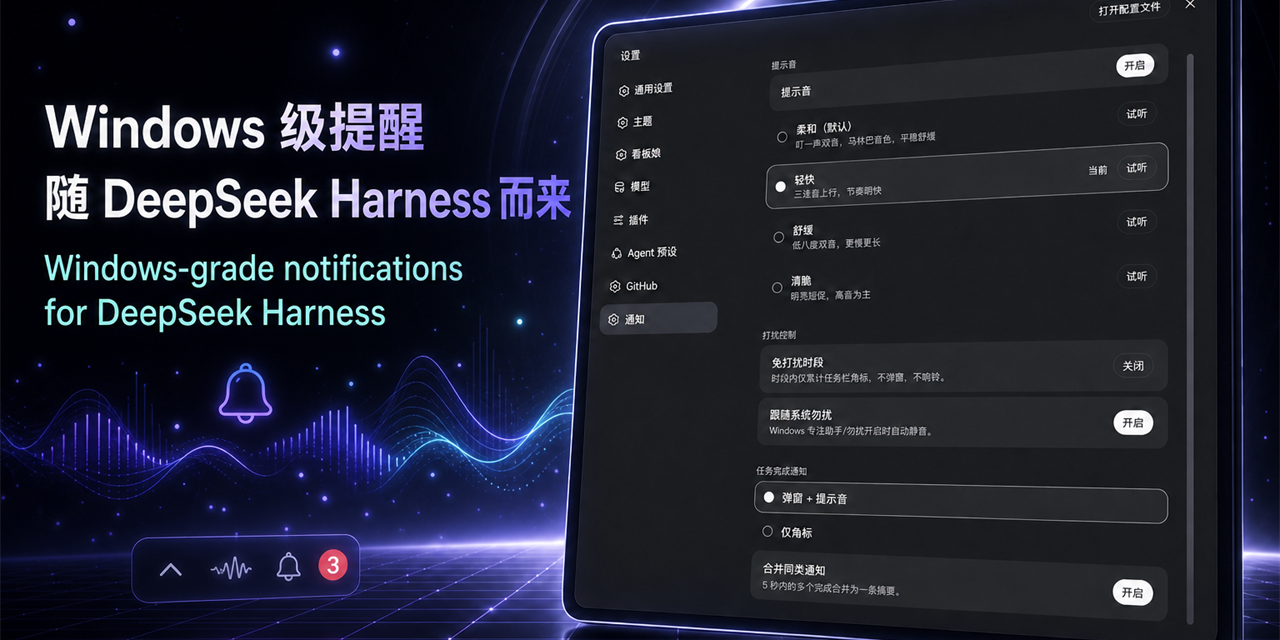
任务完成或需要你决策时:系统 Toast + 提示音 + 任务栏托盘角标(待查看数量)。免打扰时段、跟随系统勿扰、四套自制提示音、完成合并摘要,全部可在设置页调整,保存即生效。
DSH 任务完成 ✅(N))。ask_user_question 提问时弹「DSH 需要你的决定 ❓」,带问题与选项列表;回答/取消后托盘角标自动 -1。# 在仓库根目录
.\install.ps1 # 等价于 node install.mjs脚本(幂等)会:初始化 profile(缺失时按 web/headless 模板生成)→ 在
$DSH_HOME\profiles\<profile>\node_modules\dsh-windows-notify 建 junction →
把 dsh-windows-notify 写入 profile 的 dsh.profile.bundles 与 dependencies
→ 可选迁移旧配置。重启 DSH 生效。
常用参数:--profile <name>(默认 web)、--dsh-home <dir>、
--keep-legacy(从旧版 apply-patch 扩展迁移时跳过还原)、
--legacy-root <dir>(从旧版扩展迁移时指定 DSH 安装的 @deepseek-ai 目录,从 npm registry 拉取同版本官方文件还原旧补丁)。
dsh plugin --profile web add dsh-windows-notify.\uninstall.ps1 # 等价于 node install.mjs --uninstall删除 junction 与 manifest 条目后重启即可;settings 里的 dsh-notify 配置保留,重装后继续有效。
设置页「通知」区段(settings 命名空间 dsh-notify),保存即生效:
| 键 | 默认 | 说明 |
|---|---|---|
sound |
soft |
soft / brisk / calm / crisp |
soundEnabled |
true |
提示音总开关 |
quietHours.enabled / start / end |
false / 22:00 / 08:00 |
免打扰时段(支持跨午夜) |
respectSystemDnd |
true |
跟随 Windows 专注助手/勿扰 |
completeMode |
toast |
toast 弹窗 / badge-only 仅角标 |
completeMerge |
true |
5 秒窗口内合并完成摘要 |
环境变量:DSH_NOTIFY=0 整体禁用;DSH_NOTIFY_SOUND=<wav路径> 覆盖音效;DSH_NOTIFY_MIN_INTERVAL_MS 节流间隔。
cordis.patch.yml — bundle 补丁层,向 profile 组合插入一行 dsh-notify(单包双面 dsh.bundle + dsh.client)。lib/index.js — agent/status 事件(回合结束)→ 完成通知(过滤子代理与 goal 自动续跑);包装 userQuestions.ask() → 决策提醒 + 角标 ±1;ctx.settings.register 注册命名空间 dsh-notify(持久化到 $DSH_HOME/settings.yaml,schema 校验);webServer.register 注册 GET/POST /api/dsh-notify/config(设置页读写)与 /api/dsh-notify/preview(试听);旧 apply-patch 钩子共存守卫。lib/client.js — 手写 __ModuleLoader__ 工厂(零构建步骤),设置页「通知」区段经插件自有 HTTP 路由读写配置(DSH rc.6 的 apiproxy 只暴露白名单 settings 命名空间,第三方命名空间须走自有路由,详见 CHANGELOG 1.1.0)。lib/notify-core.js — Toast/托盘脚本经 Base64 JSON 载荷传递(Windows spawn 不转义参数)、PowerShell 绝对路径、不用 detached/unref、全程 best-effort。toast.ps1(WinRT Toast + SoundPlayer.PlaySync + 免打扰/系统勿扰静音)、tray.ps1(任务栏气泡角标:ITaskbarList3 原生 overlay,4x 超采样抗高 DPI 模糊;端口看门狗 + 按端口独立锁 + 窗口前台自动清未读)。$DSH_HOME/settings.yaml 的 dsh-notify 节);$DSH_HOME/dsh-windows-notify/;install.mjs --legacy-root 在还原旧补丁时从 npm registry 拉取同版本官方包;/api/dsh-notify/config(设置页读/写配置,仅同源可访问)与 /api/dsh-notify/preview(试听);不向外部发送任何数据;npm ci
node test.mjs # 语法/YAML/JSON/资产/BOM/路径泄露校验
node pack.mjs # dist/ 下生成 tgz 与 zip要求:Node ≥ 18;PowerShell 脚本须为 UTF-8 BOM(中文文本),.bat 须纯 ASCII。CI 见 .github/workflows/(push/PR 校验 + tag 自动 Release)。
MIT © 2026 Sutera-Diffusus
CLASSIFICATION EVIDENCE
系统优先读取 GitHub Topics,再与站内分类词典和词根规则比对。
asdf17128
Find what your DeepSeek Harness (dsh) patches silently broke — dead patches, config fields dropped by whole-config repla…
asdf17128
Manage DeepSeek Harness profiles — list, create, clone, diff, and share a whole dsh setup as one portable file.
aust24lzy
DeepSeek Harness (DSH) 开源插件导航站 —— 实时同步 dsh-plugin 生态,按 Stars 动态排行